
Acode
Foxbiz Software Pvt. Ltd.
40 MB
1.13.5
8.0

Full Version
Images
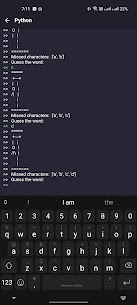
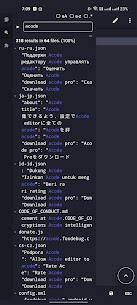
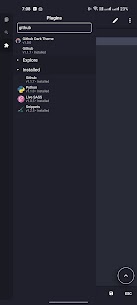

Description
Acode MOD APK is an open-source Android code editor and web IDE with a Linux terminal, AI-assisted coding tools, Git, SSH, plugins, and powerful web development features.
Acode MOD APK — Terminal, AI Coding & Professional Code Editor
Acode MOD APK turns your Android smartphone or tablet into a portable development environment for coding, web development, and project management. Acode works as an open-source code editor and web IDE, giving developers access to professional editing tools without requiring a desktop computer for every task. You can edit projects, manage files, open a Linux terminal, work with Git and SSH, and extend the application through its community-driven plugin ecosystem.
The app provides a flexible environment for developers who want to write, test, preview, and manage code directly from Android. Whether you work with HTML and CSS, JavaScript, Markdown, server-side projects, or other programming languages, Acode provides tools that can make mobile development more practical and productive.
Linux Terminal Without Root
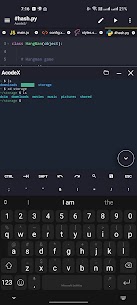
One of Acode’s most useful features is its built-in Alpine Linux terminal powered by proot. You can access a Linux-style command-line environment directly from your Android device without rooting the phone or tablet.
The terminal supports multiple tabs, allowing you to work with different sessions at the same time. You can also customize your shell and back up or restore your terminal configuration. Supported command-line packages can be installed through the apk package manager, giving you additional flexibility when setting up your mobile development environment.
This makes Acode especially useful for developers who frequently need terminal access while working away from their computer.
AI-Assisted Coding
Acode also supports AI-assisted coding workflows through its terminal and plugin ecosystem where compatible tools are available. These tools can help developers generate code, investigate errors, refactor files, and understand unfamiliar sections of a project.
Instead of switching between multiple applications while coding, you can combine your editor, terminal, plugins, and supported AI tools within your Android workflow. This can make it easier to experiment with code and solve development problems directly from a smartphone or tablet.
JavaScript and Web Development
Acode provides several tools for modern web development. You can set up mobile web projects using Node.js and npm, execute package scripts, and work with server-side JavaScript applications. Developers can also create and test front-end projects directly from their Android devices.
The built-in preview capabilities allow you to view HTML and Markdown content without leaving the application. This makes Acode useful for developers who need to make quick changes to websites, test front-end code, or manage web projects while away from their main workstation.
Professional Code Editor
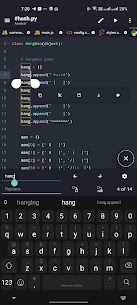
Acode provides a comprehensive collection of features designed to make mobile code editing more efficient. It supports syntax highlighting for more than 100 programming languages, allowing developers to work with different types of source code from a single application.
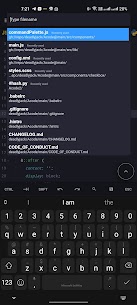
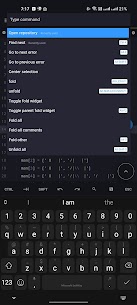
The editor also supports multi-file projects with tabs, making it easier to switch between files. A command palette provides quick access to editor functions, while project-wide file search helps you locate files efficiently.
Code completion and IntelliSense can also be added through compatible Language Server Protocol plugins. Developers can use keyboard shortcuts for common operations, while Emmet support helps speed up HTML and CSS authoring.
Acode also includes an interactive JavaScript console for debugging, live HTML and Markdown previews, customizable themes and fonts, and optimized editing capabilities for large files.
Git, SSH and Remote Development
Acode goes beyond local file editing by providing tools for working with remote projects and development servers. Git workflows allow you to clone repositories, commit changes, push and pull updates, and manage branches directly from Android.
SSH support also allows developers to connect to remote servers when they need to perform server-side tasks. FTP and SFTP capabilities provide additional options for managing files on remote systems.
GitHub integration can help synchronize projects, while the combination of editing, previewing, version control, and remote access makes Acode a practical mobile tool for developers who regularly manage web projects.
Community Plugin Ecosystem
One of Acode’s biggest advantages comes from its community plugin ecosystem. You can extend the editor through plugins available from the in-app Plugin Store, allowing you to customize the application according to your development needs.
Available plugin categories include Language Servers for IntelliSense, themes, icon packs, AI-assisted coding tools, build utilities, formatters, and support for modern web development frameworks. Developers can also create JavaScript and TypeScript plugins to extend Acode with additional functionality.
This modular approach means you do not have to rely only on the application’s default features. You can install the tools you actually need and build a development environment that fits your workflow.
Open-Source Development Environment
Acode is an open-source project released under the MIT license. Its source code is publicly available, allowing developers and contributors to inspect the project and participate in its development.
The open-source nature of Acode also makes it appealing to developers who prefer software with transparent development and community involvement. Documentation and community resources provide additional information for users who want to learn more about the editor or develop their own extensions.
Acode Pro Features
Acode also offers a Pro version with additional benefits such as ad removal and premium themes. Availability and pricing for in-app purchases can vary depending on your region.
For users who spend significant time coding on Android, these additional customization options can provide a cleaner and more comfortable editing experience. However, the core application already provides a substantial set of development tools for writing and managing code.
How to Get Started with Acode
Getting started with Acode is relatively straightforward. After installing the application, open the integrated terminal and complete the initial setup. You can then install the packages and plugins required for your projects.
Once the environment is ready, you can begin editing files, previewing web content, managing repositories, connecting to remote servers, and working with your projects directly from your Android device.
This setup makes Acode suitable for both quick coding tasks and more involved mobile development workflows.
Final Verdict
Acode MOD APK provides a powerful combination of code editing, Linux terminal access, web development tools, Git, SSH, remote file management, plugins, and AI-assisted coding capabilities. Its open-source foundation and flexible plugin system allow users to customize the development environment instead of relying on a fixed collection of tools.
For developers who want to code from an Android smartphone or tablet, Acode offers many of the features normally associated with desktop development environments. With support for more than 100 programming languages, Node.js and npm workflows, Git and GitHub integration, SSH connections, live previews, and an extensible plugin ecosystem, Acode can serve as a capable portable development environment for modern coding projects.
Related apps


Latest Apps
-
 Cards – Mobile Wallet4.2.0 Cards 20.50 MB Premium Unlocked
 -
 AnkiDroid Flashcards2.26.0alpha8 AnkiDroid Open Source Team 39.34 MB Original
 -
 NoteDraft1.4.1 AAS Codeworks 13.58 MB Premium Unlocked
 -
 Device Care12.25.0 Nexech 22.02 MB Premium Unlocked
 -
 Lock Screen OS2.6 HkN Studio 13.69 MB Premium Unlocked
-