
Aqua Mail

Images
Description
Aqua Mail MOD APK is a fast and secure email client for Android with unlimited account management, smart inbox tools, advanced customization, encryption, cloud backup, and premium features.

Aqua Mail MOD APK
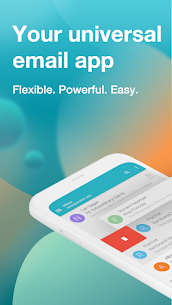
Aqua Mail MOD APK turns your Android smartphone or tablet into a powerful email management center for personal and professional communication. The app supports IMAP and POP3 mailboxes and lets you manage messages from multiple services in one convenient interface. Instead of switching between different applications, you can connect your email accounts and handle your inbox from a single place.
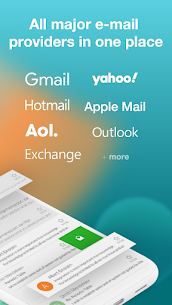
With years of development and millions of users relying on Aqua Mail, the application focuses on speed, security, flexibility, and customization. It supports popular email providers such as Gmail, Yahoo, Fastmail, GMX, AOL, Hotmail, Microsoft Exchange, Office 365, Outlook, iCloud, and other webmail services.
Smart Inbox with Intuitive Interface
Aqua Mail provides a clean and practical inbox designed for fast email management. You can read messages, reply quickly, and move between emails with simple gestures. The interface also makes frequently used tools easy to reach, which can be particularly useful when you manage email from a smartphone with one hand.
The application gives you considerable control over the way your inbox behaves. You can customize swipe actions, quickly select multiple messages, adjust text size using the volume keys, and change other interface settings according to your preferences.
Secure and Private Email Management
Security and privacy remain important parts of the Aqua Mail experience. The application does not rely on storing your passwords, emails, or private message content on its own servers. When you connect supported accounts, Aqua Mail can use OAuth2 authentication to provide a more secure sign-in process.
The email client also supports several security technologies, including SSL hardening, SSL certificate tracking, and DKIM and SPF validation. These features help protect communication and account connections while reducing potential security risks associated with email transmission.
Highly Customizable Email Client
One of Aqua Mail’s biggest advantages is its extensive customization. The application allows you to adapt email management to your personal workflow instead of forcing you to use a fixed interface.
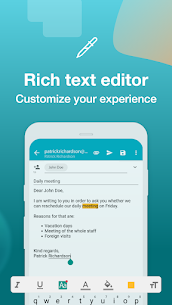
You can customize account and mail-receiving behavior, change swipe functions, adjust the appearance of the inbox, modify text size, and personalize the rich text editor. The editor supports different fonts, colors, attachments, quotations, and formatting options, giving you greater flexibility when composing professional or personal emails.
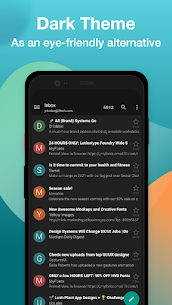
Aqua Mail also includes a Dark Theme that provides a more comfortable interface in low-light environments.
Support for Multiple Email Accounts
Managing several email addresses becomes easier with Aqua Mail. You can connect different personal, work, and other supported accounts and access their messages from the same application. The smart folder system can combine messages from multiple accounts, helping you find important emails without constantly switching between inboxes.
The premium feature set also allows you to manage unlimited email accounts, making Aqua Mail particularly useful for users who maintain multiple addresses for different purposes.
Available in Multiple Languages
Aqua Mail supports 20 languages, allowing users around the world to manage their email in a familiar interface. Multilingual support makes the application more accessible to users who prefer something other than English when reading menus, settings, and other interface elements.
Communication and Productivity Tools
Aqua Mail can work alongside several third-party Android applications to improve communication and productivity. Compatibility with tools such as Tasker and other supported applications allows you to integrate email management with automated tasks and daily routines.
This approach makes Aqua Mail more than a basic inbox application. You can combine email communication with scheduling, automation, and other productivity activities from your Android device.
Smart Folders and Calendar Sync
The Smart Folder feature helps organize messages from different accounts in one location. Instead of checking every mailbox individually, you can use unified views to manage incoming messages more efficiently.
Aqua Mail also supports contacts and calendar synchronization for Exchange and Office 365 accounts. This integration can work with compatible calendar applications and widgets, allowing you to keep important communication and scheduling information connected.
Useful Widgets and Smartwatch Support
Aqua Mail provides home screen widgets that let you check important emails without opening the complete application. These widgets can give you a quick overview of priority messages and help you stay informed throughout the day.
The app also supports Android Wear smartwatch integration on compatible devices. You can check emails directly from your wrist and use voice input to reply, providing a convenient option when you cannot easily access your smartphone.
Advanced Email Features
Aqua Mail includes a broad selection of tools for managing and organizing messages. You can save emails as PDF files, create unique signatures for individual accounts, and back up or restore your settings using local files or supported cloud storage services.
Signature customization supports images, links, text formatting, and HTML signatures. You can therefore create different professional signatures for different accounts instead of using the same signature everywhere.
The application also offers battery-saving options and customizable email notifications, helping you balance timely communication with everyday device usage.
Cloud Backup and Restore
Backing up your email settings becomes easier with Aqua Mail’s backup and restore options. Depending on your preferred workflow, you can save settings directly on your device, use a file, or store backups through supported cloud services such as Dropbox, OneDrive, and Google Drive.
This feature can simplify the process of moving your configuration to another device or restoring your preferred settings after reinstalling the application.
Aqua Mail Premium Features Unlocked
Aqua Mail MOD APK provides access to premium-oriented features designed for users who want a more complete email management experience. These features expand the application’s account management, security, organization, and backup capabilities.
Premium features include unlimited email account management, end-to-end encryption using S/MIME certificates, Push for Exchange, Outlook filter management, unlimited email identities, folder management, email backups, EML file support, priority notifications, and additional customization options.
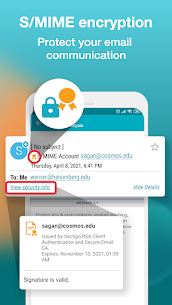
End-to-end encryption support can allow users to send and receive signed or encrypted messages when compatible S/MIME certificates are configured. This provides an additional layer of protection for sensitive email communication and can help reduce the risks associated with phishing attempts and data exposure.
Remove Ads and Enjoy More Features
The premium experience also removes advertisements and unlocks additional tools that can make everyday email management more convenient. Users who frequently work with multiple accounts can benefit from features such as moving messages between folders, deleting folders, opening and saving EML files, and creating multiple email identities.
These additions make Aqua Mail a more comprehensive alternative to basic email applications, particularly for users who need advanced account and message management on Android.
Final Verdict
Aqua Mail MOD APK is a feature-rich email client designed for Android users who want speed, security, and extensive customization in one application. Its support for IMAP and POP3 accounts makes it compatible with a wide range of email providers, while tools such as Smart Folders, calendar synchronization, widgets, cloud backups, custom signatures, and advanced notifications improve everyday productivity.
The application also places strong emphasis on privacy and security through OAuth2 authentication, SSL-related protections, DKIM and SPF validation, and S/MIME encryption support. With premium features such as unlimited accounts, Push for Exchange, advanced Outlook filters, EML support, and ad removal, Aqua Mail offers a comprehensive email management solution for both personal and professional use.
Related apps




Latest Apps
-
 VRTV VR Video Player4.1.0 Chai Software 85.79 MB Full Version
 -
 Cards – Mobile Wallet4.2.0 Cards 20.50 MB Premium Unlocked
 -
 AnkiDroid Flashcards2.26.0alpha8 AnkiDroid Open Source Team 39.34 MB Original
 -
 NoteDraft1.4.1 AAS Codeworks 13.58 MB Premium Unlocked
 -
 Device Care12.25.0 Nexech 22.02 MB Premium Unlocked
-