
AtomicClock

Images


Description
AtomicClock MOD APK provides precise NTP reference time, UTC and local clock modes, customizable analog and digital displays, widgets, and Pro features for accurate manual time checks.

AtomicClock MOD APK – Exact NTP Time, UTC Clock & Pro Features
AtomicClock MOD APK turns your smartphone into a reliable reference clock for checking precise network time whenever every second matters. Whether you need to set a wristwatch, synchronize a wall clock, compare local time with UTC, or prepare for an event, the app provides a clear and easy-to-read clock based on NTP reference time. Instead of relying only on your device’s ordinary clock display, AtomicClock connects to Network Time Protocol servers and uses their reference time to help you perform accurate manual time checks.
The application offers both analog and digital clock interfaces, along with several customization options for users who want a practical precision clock that also looks good on screen. You can select a predefined NTP server or enter a custom server, then view either your local time or a UTC clock in a 12-hour or 24-hour format.
Accurate NTP Reference Time
AtomicClock uses NTP servers to obtain network time referenced to highly accurate time sources, including atomic clocks. This makes the app useful when you need a dependable reference instead of simply checking the time on another ordinary clock.
You can select from available time servers or configure your own preferred server. The app also provides technical information such as the selected server, round-trip time, and stratum, allowing users who understand NTP to inspect the connection and reference details.
Keep in mind that actual accuracy can vary depending on the selected server, network latency, connection quality, and how your device handles the received time information.
Check Local Time or UTC
AtomicClock supports both local time and UTC, making it useful for different situations. You can compare your current local time with Coordinated Universal Time or use the UTC display as a reference when dealing with international schedules, online events, servers, broadcasts, or other activities that rely on a standardized time zone.
The app also supports both 12-hour and 24-hour clock formats, so you can choose the display that best matches your preference.
Analog and Digital Clock Display
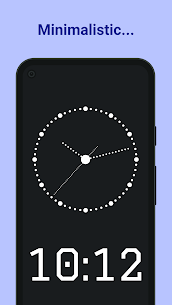
AtomicClock gives you a choice between traditional analog and modern digital clock interfaces. The analog display can provide a familiar clock-reading experience, while the digital option makes it easy to read the exact current time at a glance.
The second hand can move smoothly instead of appearing to jump from one second to the next, creating a fluid and realistic clock animation. This can be particularly useful when you are watching the clock closely and need to observe the passage of seconds.
Customize Your Clock
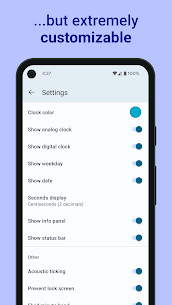
The application provides several options for customizing the appearance of your reference clock. Depending on the available features, you can change clock faces, hands, fonts, and time formats to create a display that fits your preferences.
You can also enable acoustic ticking sounds if you prefer a traditional clock experience. The app includes the Greenwich Time Signal as another useful option for users who want an audible reference associated with precise timekeeping.
AtomicClock Widget
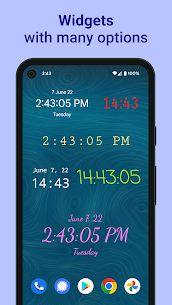
AtomicClock also provides a home screen clock widget that can display the time and date without requiring you to open the application. This makes it convenient to keep a clock visible while using other applications or working on your device.
However, the widget uses your smartphone’s system time for technical and battery-related reasons. It should therefore not be confused with the NTP reference clock inside the main AtomicClock application.
Picture-in-Picture Mode
With AtomicClock Pro, you can keep the clock visible while working in another application by using picture-in-picture mode. This feature can be useful when you need to monitor a precise time reference while performing another task on your smartphone.
For example, you can keep the clock visible while preparing for an online event, monitoring a scheduled activity, working with timing-sensitive software, or waiting for a specific moment.
Useful Manual Time Synchronization
AtomicClock is designed primarily for manual clock synchronization. You can use the displayed NTP reference time to adjust another clock, watch, camera, recording device, or other equipment manually.
This approach is useful when another device does not provide a reliable automatic synchronization feature. Instead of guessing whether your clock is several seconds ahead or behind, you can compare it against the reference time displayed by AtomicClock.
Tap Actions and Convenience Features
The app also includes practical tap actions that make the clock easier to use in different situations. Depending on your configuration, you can tap the display to hide additional information, freeze the clock display, or mute ticking sounds.
These controls help keep the interface clean when you only want to see the time. They can also make the application more convenient when you use it as a dedicated reference clock for longer periods.
AtomicClock Pro Features
AtomicClock is available as a free application, while AtomicClock Pro unlocks additional customization and convenience features. Pro users can access preferred clock styles and fonts, expanded widget customization, all available tap actions, picture-in-picture mode, and ad removal.
Unlike applications that require recurring payments, AtomicClock Pro uses a one-time purchase through the user’s Google Play account. This makes the Pro upgrade suitable for users who want the additional features without committing to a monthly or yearly subscription.
Does AtomicClock Change System Time?
AtomicClock does not automatically modify your smartphone’s system clock. The application functions as a reference-time tool and allows you to compare its NTP-based time with another clock or device.
This distinction is important because using an NTP reference clock does not mean that the application has permission to change Android’s system time. If you want to synchronize another physical clock or device, you must make that adjustment manually.
Who Should Use AtomicClock?
AtomicClock can benefit anyone who occasionally needs a more reliable time reference. It is useful for setting watches and wall clocks, checking UTC before scheduled events, comparing different clocks, monitoring exact seconds, and keeping a visible reference clock while working.
The app can also appeal to technical users who want additional NTP information such as server selection, round-trip time, and stratum. At the same time, its simple analog and digital interfaces make it accessible to users who do not need to understand the technical details behind NTP.
Final Verdict
AtomicClock MOD APK provides a practical way to turn your smartphone into a precise reference clock based on NTP time servers. With local and UTC time displays, analog and digital modes, smooth second-hand movement, customizable clock designs, NTP technical information, widgets, and Pro features such as picture-in-picture, the application offers considerably more than a standard clock.
It is especially useful when accurate manual time checking matters. Whether you want to set a watch, compare UTC, prepare for a time-sensitive event, or simply keep a precise reference clock visible, AtomicClock provides a straightforward solution without automatically changing your device’s system time.
Developer's apps

Related apps


Latest Apps
-
 M3U IPTV3.1.0 Herber Entertainment 19.50 MB Premium Unlocked
 -
 Alarmy26.42.1 Sleep Tracker & Alarm Clock by Delightroom 144.23 MB Premium Unlocked
 -
 Calls Blacklist – Call Blocker4.17.0 Enchan Li 13.94 MB Pro Unlocked
 -
 Radarbot9.35.26 Radarbot Company 150.67 MB Premium Unlocked
 -
 Nebula Icon Pack8.5.9 Stark Designs 110.26 MB Full Version
-