
Bluetooth Volume Manager MOD APK (Premium Unlocked)

Images
Mod Info
- Premium Unlocked
Description
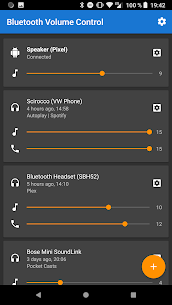
Bluetooth Volume Manager is a powerful Android utility that automatically manages volume levels and actions based on connected Bluetooth devices, ensuring a consistent and personalized audio experience.

Introduction
Bluetooth accessories have become an integral part of daily smartphone usage, ranging from wireless headphones and car stereos to smart speakers and hands-free kits. One common frustration for Android users is inconsistent volume behavior when switching between different Bluetooth devices. Volume levels may suddenly become too loud or too quiet, calls may sound different from media playback, and notifications can interrupt unexpectedly. Bluetooth Volume Manager is designed to solve these issues by giving users granular control over how their device reacts when Bluetooth devices connect or disconnect.
Rather than relying on Android’s default behavior, this application allows the system to remember and restore specific volume settings for each Bluetooth device. The result is a smoother, more predictable audio experience that adapts automatically to the user’s environment.
What Is Bluetooth Volume Manager?
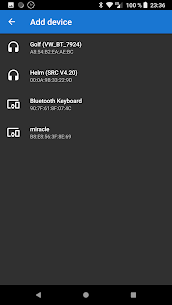
Bluetooth Volume Manager is a utility application for Android that responds to Bluetooth connection events. When a Bluetooth device connects or disconnects, the app can automatically apply predefined actions such as adjusting volume levels, launching apps, or sending media commands. Its primary purpose is not to increase volume beyond hardware limits, but to manage existing volume levels intelligently and consistently.
The application works within Android’s system permissions and respects device limitations. If a volume level cannot be changed using the physical volume buttons, the app will not override that restriction. This design ensures stability, compatibility, and compliance with Android system behavior.
Automatic Volume Control per Bluetooth Device
One of the core strengths of Bluetooth Volume Manager is its ability to remember different volume profiles for different Bluetooth devices. For example, a user may prefer higher media volume when using a car stereo but lower notification volume when connected to wireless earbuds. The app allows separate control over music, call, ringtone, and notification volumes, applying the correct levels automatically each time a device connects.
This per-device memory eliminates the need for manual adjustments every time Bluetooth accessories are switched. Over time, this significantly improves usability, especially for users who frequently move between multiple audio devices throughout the day.
Intelligent Actions on Connect and Disconnect
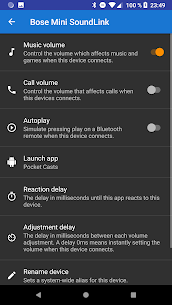
Beyond volume management, Bluetooth Volume Manager can trigger additional actions when a Bluetooth device connects or disconnects. These actions are particularly useful for automation and productivity. The app can send media commands such as play or next, which is ideal for car use where users want music to start automatically upon connection.
It can also open a specific application when a Bluetooth device connects. For instance, a navigation app can launch automatically when connecting to a car’s Bluetooth system, or a music streaming app can open when headphones are detected. This level of automation reduces friction and enhances the overall user experience.
Call, Ringtone, and Notification Handling
Audio behavior during calls and notifications often differs from media playback, and Bluetooth Volume Manager accounts for this complexity. Users can define separate volume levels for calls, ringtones, and notifications, ensuring clarity without being disruptive. This is particularly useful in professional or driving contexts, where call volume must be clear but notification sounds should remain subtle.
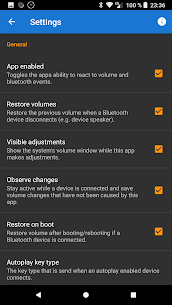
By restoring previous volume levels after a Bluetooth device disconnects, the app prevents sudden loud sounds from playing through the phone’s speaker. This feature protects both user comfort and privacy, especially in public settings.
Screen and Volume Lock Capabilities
Bluetooth Volume Manager also includes options to keep the screen awake while a specific Bluetooth device is connected. This is beneficial in scenarios such as navigation or media control in a vehicle, where constant screen visibility is required.
Another advanced feature is the ability to prevent volume changes. Once a preferred volume level is set for a Bluetooth device, the app can lock that level, avoiding accidental changes caused by hardware buttons or system behavior. This is particularly useful for shared devices or situations where consistent volume is essential.
Practical Use Cases
The app is well-suited for drivers who rely on Bluetooth car stereos and want predictable audio behavior every time they enter their vehicle. It is equally valuable for users with multiple headphones, each requiring different volume preferences. Professionals who attend frequent calls using Bluetooth headsets can benefit from consistent call volume, while casual users will appreciate the reduction in manual adjustments.
Because the app works within Android’s native volume controls, it remains stable and does not introduce artificial amplification or distortion. This makes it suitable for long-term use without compromising audio quality or device safety.
Performance and Compatibility
Bluetooth Volume Manager is designed to be lightweight and efficient. It runs in the background and reacts only to Bluetooth events, minimizing battery impact. Compatibility depends on Android’s standard Bluetooth and audio APIs, meaning most modern Android devices can use the app without issues.
The application does not attempt to bypass system restrictions, which ensures reliable performance across different manufacturers and Android versions. Users should note that certain device-specific limitations may apply, depending on how the manufacturer implements audio controls.
Conclusion
Bluetooth Volume Manager is a practical and well-designed solution for managing audio behavior on Android devices. By remembering volume levels for individual Bluetooth devices and automating actions on connection and disconnection, it removes one of the most common annoyances of Bluetooth usage. Its focus on reliability, system compatibility, and user control makes it a valuable utility for anyone who frequently uses Bluetooth accessories.
For users seeking consistency, automation, and smarter volume handling without unnecessary complexity, Bluetooth Volume Manager delivers exactly what its name promises.
Frequently Asked Questions
What does Bluetooth Volume Manager actually do?
Bluetooth Volume Manager automatically adjusts and restores volume levels when Bluetooth devices connect or disconnect. It can also trigger actions such as launching apps or sending media commands.
Can this app increase volume beyond normal limits?
No, the app cannot boost volume beyond what is allowed by the device hardware and Android system. It only manages existing volume settings.
Does it work with all Bluetooth devices?
It works with most standard Bluetooth audio devices, including headphones, car stereos, and speakers. Compatibility may vary slightly depending on the device manufacturer.
Will it drain battery life?
The app is lightweight and only responds to Bluetooth events, so battery impact is minimal under normal usage.
Can I use different settings for different Bluetooth devices?
Yes, the app is designed to store and apply unique volume profiles and actions for each Bluetooth device.
Developer's apps


Related apps


Latest Apps


