
Clipboard Manager – Copy History Support
Jetpof Apps
11.95 MB
5.9
Varies with device

Premium Unlocked
Images
Description
Copy History Support MOD APK saves copied text automatically, lets you paste content with one tap, copy unselectable text, organize favorites, and manage clipboard history on Android 10 and newer.

Copy History Support MOD APK – Clipboard Manager & One-Touch Paste
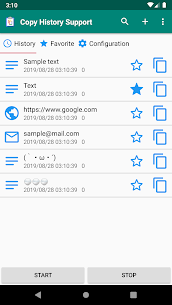
Copy History Support MOD APK is a practical clipboard management application designed to make copying and pasting text much easier on Android devices. Compatible with Android 10 and newer, the app automatically saves the text you copy so you can access previous clipboard entries whenever you need them. Instead of losing copied information after replacing it with new content, you can browse your saved history and paste the required text again with minimal effort.
The application also provides useful tools for users who frequently work with repeated phrases, notes, contact information, passwords, addresses, or other text. Its straightforward interface keeps your copied content organized while providing quick access to frequently used items.
Save Your Clipboard History
Copy History Support automatically stores copied text in your clipboard history. The application also prevents duplicate entries, helping keep your history cleaner and easier to browse. When you copy different pieces of information throughout the day, you can return to previously copied content without having to copy it again.
This feature can save considerable time when you regularly switch between applications or need to reuse the same information multiple times.
Organize Favorite Text
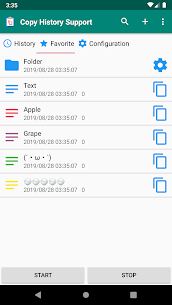
The Favorites tab lets you save frequently used words, sentences, or phrases for quick access. You can use this section as a personal memo or store fixed phrases that you repeatedly enter.
For example, you can keep commonly used responses, addresses, contact details, frequently entered text, or other information that you do not want to type repeatedly. The app also allows you to organize favorites using additional tabs and folders.
One-Touch Text Pasting
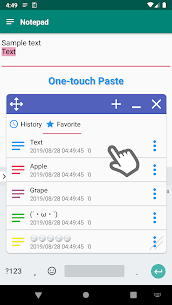
Copy History Support makes pasting text more convenient with its one-touch paste feature. Instead of pressing and holding a text field to bring up the standard paste option, you can use the application’s tools to insert saved content more quickly.
This feature is particularly useful when you frequently copy information from one application and paste it into another. It reduces unnecessary steps and makes repetitive text entry more efficient.
Copy Unselectable Text from the Screen
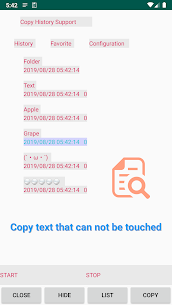
Some applications display text that you cannot normally select or copy. Copy History Support provides a feature that can help you copy text displayed on the screen even when the standard selection function is unavailable.
This can be useful when you need to reuse information from applications that do not provide conventional text selection. The exact functionality may depend on the application, screen, and Android device.
Copy and Paste with Convenient Buttons
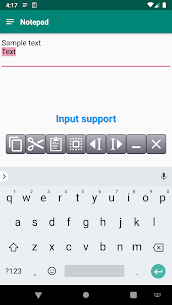
The app also provides buttons that assist with copying and pasting text. These controls give you another way to interact with your clipboard without relying entirely on Android’s standard text-selection interface.
By placing commonly used clipboard actions within easy reach, Copy History Support can simplify repetitive input tasks and make everyday text management more convenient.
Additional Clipboard Features
Beyond basic clipboard history, the application includes several additional tools designed to improve text management. You can create extra favorite tabs and folders to organize saved content, while import and export functions provide another way to manage your stored information.
Other available features include contact text quoting, text keyword search, text sharing, application shortcuts, and file shortcuts. Together, these tools make the application more than a simple clipboard history viewer.
Search Saved Text Quickly
The built-in keyword search allows you to find specific content within your saved text. This becomes especially useful when your clipboard history contains many entries.
Rather than scrolling through every copied item, you can search for a relevant keyword and locate the information you need more quickly. This makes the app practical for users who frequently save large amounts of copied text.
App and File Shortcuts
Copy History Support also includes shortcuts for applications and files. You can register application shortcuts through the Favorites tab and launch them when needed.
To add an application shortcut, open the Favorites tab, tap the plus icon in the upper-right corner, and choose Add App. After registering an application, you can launch it from the shortcut and copy relevant text information more conveniently.
AccessibilityService API
Copy History Support uses the Android AccessibilityService API to provide some of its clipboard and text-related functionality. According to the application’s information, the API is used to save copied text and display tools that assist with copying and pasting text.
The developer also states that the application does not collect or share data through this AccessibilityService API. Users should still review the application’s permissions and Android privacy settings before enabling accessibility access.
Control Clipboard Checking
The application gives you an option to register apps that you do not want it to check for clipboard content. This can provide additional control over how the clipboard manager interacts with other applications.
You can configure these exclusions from the Settings tab, giving you more flexibility when using Copy History Support alongside other apps.
Import and Export Your Clipboard Data
The import and export functions provide a convenient way to manage saved clipboard information. These tools can be useful when moving your saved content between supported environments or creating a backup of important text entries.
Combined with folders, favorite tabs, and keyword search, these functions help turn your clipboard history into a more organized personal text library.
Simple Tool for Everyday Text Management
Copy History Support focuses on a specific but useful problem: managing copied text efficiently. Instead of treating every clipboard entry as temporary information, the app lets you save, search, organize, reuse, and share copied content whenever necessary.
Whether you frequently copy information between apps, reuse standard phrases, collect notes, or need access to previous clipboard entries, the application can reduce repetitive typing and make everyday Android usage more efficient.
Compatibility
Copy History Support is compatible with Android 10 and newer. However, certain functions may behave differently depending on the Android version, device manufacturer, application restrictions, and accessibility settings.
Some features may also require AccessibilityService permission to function correctly. Users should enable the required permissions only after reviewing what the application needs and understanding how those permissions are used.
Final Verdict
Copy History Support MOD APK provides a useful collection of clipboard management tools for Android users who want more control over copied text. Automatic clipboard history, duplicate prevention, favorite phrases, one-touch pasting, selectable-text assistance, keyword search, folders, import and export, sharing, and application shortcuts make it a versatile solution for repetitive text tasks.
Its support for copying otherwise unselectable screen text and its integration with Android’s AccessibilityService API further expand its capabilities. For users who frequently copy and paste information between applications, Copy History Support offers a convenient way to keep important text accessible, organized, and ready to reuse.
Developer's apps


Related apps


Latest Apps
-
 Text Repeater3.8.6.1 TarrySoft 14.75 MB Pro Unlocked
 -
 Desh Bangla Keyboard17.7.1 Desh Keyboard 34.46 MB Premium Unlocked
 -
 Desh Tamil Keyboard17.7.1 Desh Keyboard 44.03 MB Premium Unlocked
 -
 Desh Telugu Keyboard17.7.1 Desh Keyboard 46.02 MB Premium Unlocked
 -
 Desh Marathi Keyboard17.7.1 Desh Keyboard 45.76 MB Premium Unlocked
-