
Express Cleaner MOD APK (Pro Unlocked)

Images


Mod Info
- Pro Unlocked
Description
Express Cleaner: Phone Cleaner is a lightweight Android storage cleaner that clears cache, removes junk files, deletes duplicate photos, manages apps, and keeps your device fast and organized — all while protecting your privacy.
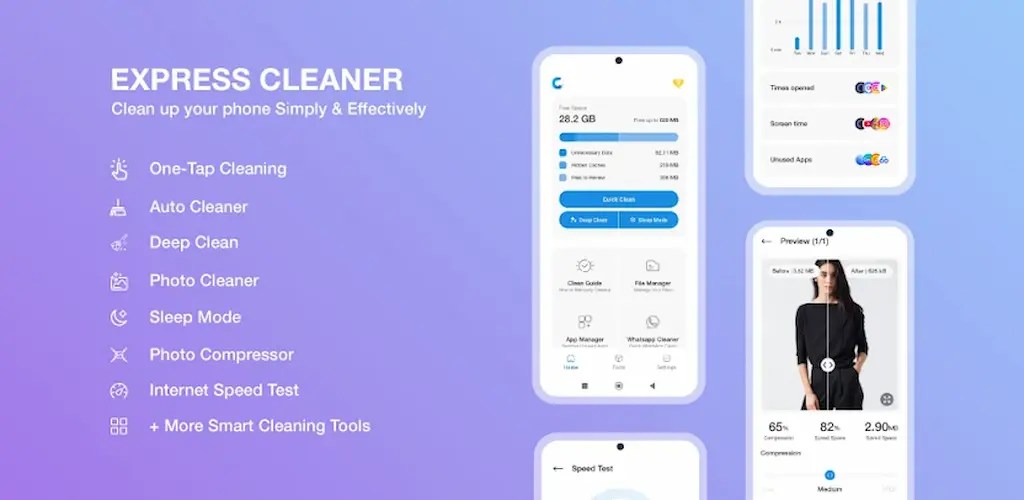
A Lightweight Cleaner That Keeps Your Phone Running Smoothly
Express Cleaner: Phone Cleaner gives you a fast, reliable way to clear cache, remove junk, delete unwanted photos and files, and manage your storage without any hassle. The app strips away unnecessary bloat and focuses on doing one job exceptionally well: keeping your device clutter-free and running at full speed.
You don’t need any technical knowledge to use Express Cleaner effectively. The app handles the complicated parts of storage management behind the scenes, so you simply tap a button and let the cleaner do the heavy lifting. Whether your phone has slowed down from years of accumulated junk or you simply want to stay organized, Express Cleaner gives you the tools to take back control of your storage in seconds.
Clean Your Entire Phone Instantly With One Tap
The One Tap Cleaner feature lets you wipe out junk files, app cache, temporary data, and residual files the moment you open the app. You press a single button, and Express Cleaner scans your device, identifies everything that’s slowing you down, and clears it out instantly. This feature alone can free up significant storage space and make your phone feel noticeably lighter and faster.
Because the process runs so quickly, you can clean your phone whenever you have a spare moment — while waiting for a coffee, between meetings, or right before installing a new app that needs extra space.
Dig Deeper With Advanced Deep Clean Scanning
Basic cleaners often miss hidden junk buried deep in your system. Express Cleaner solves this problem with its new Deep Clean feature, which runs an advanced scan to uncover system cache and leftover files from apps you’ve already uninstalled. These forgotten files quietly eat away at your storage over time, and Deep Clean roots them out so you can reclaim space that other cleaning tools simply overlook.
Running a deep clean periodically ensures that your phone stays genuinely clutter-free, not just superficially tidy. You get a more thorough clean without needing to manually hunt through folders or guess where leftover data might be hiding.
Let Auto Cleaner Handle Maintenance for You
Manually cleaning your phone every day takes effort most people don’t have time for. The new Auto Cleaner feature solves this by automatically scanning for and removing junk, cache, and temporary files on a regular basis. You enable it once, and Express Cleaner takes care of the rest without requiring any further setup or attention from you.
This hands-free approach means your phone stays clean continuously in the background, so you never have to remember to run a manual scan again.
Extend Your Battery Life With Sleep Mode
The new Sleep Mode feature pauses inactive apps running in the background, cutting down on unnecessary battery drain throughout the day. Many apps continue consuming resources even when you’re not actively using them, and Sleep Mode puts a stop to that quietly and efficiently.
By minimizing background activity, your phone runs more efficiently and your battery lasts longer between charges. You get smoother day-to-day performance without having to manually close every app yourself.
Take Control of Storage With Smart Storage and Cache Tools
Express Cleaner scans your entire phone to locate large files, unused apps, leftover APKs, and duplicate media that take up unnecessary space. The built-in cache cleaner then lets you clear out this clutter in just a few taps, giving you a fast and effective way to reclaim valuable storage.
Instead of digging through menus and folders trying to figure out what’s safe to delete, you get a clear overview of everything consuming your space, along with simple tools to remove it. This puts you in full control of your phone’s storage without any guesswork.
Clean Up Your Gallery With the Photo Cleaner
Your photo gallery often fills up faster than any other part of your phone. The Photo Cleaner feature scans your images and identifies duplicates, blurry shots, and low-quality photos within seconds. You can then remove these unwanted images in bulk, freeing up gallery space while keeping only your best shots.
This feature saves you the tedious task of manually scrolling through hundreds of photos trying to decide what to delete, letting you reclaim storage quickly and effortlessly.
Organize Everything With the Built-In File Manager
The File Manager gives you an intuitive way to browse, search, and organize all your files, including documents, videos, downloads, and more. You get full visibility into what’s stored on your device, along with the tools to move, sort, or delete files as needed.
Rather than juggling multiple apps to manage different file types, you can handle everything from one clean, centralized interface.
Identify Storage-Hungry Apps With the App Manager
The App Manager tracks which apps consume the most storage space and flags the ones you rarely open. This makes it easy to spot bloated or forgotten apps that are quietly taking up room on your device. Once identified, you can remove them in just a couple of taps, keeping your phone lean and organized.
Shrink Your Photos Without Sacrificing Quality
The Photo Compressor lets you compress images in bulk, with customizable quality settings ranging from low to high. You choose the balance between file size and image sharpness that works best for you, then apply it across multiple photos at once. This dramatically reduces the storage your photo library takes up while keeping your images looking sharp and presentable.
Check Your Connection With the Internet Speed Test
Express Cleaner also includes a built-in Internet Speed Test that measures your Wi-Fi and mobile data performance instantly. You get accurate readings on download speed, upload speed, and ping, all without leaving the app. This makes it easy to monitor your connection quality whenever you suspect something feels slower than usual.
Take Back Your Notification Panel
The Notification Cleaner helps you silence annoying apps and clear out spammy or irrelevant alerts cluttering your notification panel. You stay focused on what actually matters by filtering out the noise, giving you a calmer, more organized notification experience throughout the day.
Clear Out WhatsApp Media Without Losing What Matters
WhatsApp chats accumulate huge amounts of media over time, including images, videos, voice notes, documents, and forwarded files. The WhatsApp Cleanup feature lets you quickly identify and remove this unwanted media, freeing up significant space while keeping your important conversations and files intact.
Make the App Your Own With Personalization Options
Express Cleaner lets you choose from a variety of colorful themes and layout styles, so the app looks and feels exactly the way you want it to. You can customize the interface to match your mood or personal aesthetic, turning a purely functional tool into something you actually enjoy opening.
Why Express Cleaner Stands Out From Other Phone Cleaners
Express Cleaner has earned a reputation as a trusted Android cleaner for freeing up space and managing storage effectively. The app stays simple and beginner-friendly, so you never need technical skills to use it well. Regular updates continue to add powerful new features, while the app itself remains lightweight and fast, with zero unnecessary bloat slowing it down.
You also have the option to upgrade to a premium ad-free experience if you prefer uninterrupted use. Throughout everything, Express Cleaner builds its foundation on privacy, security, and transparency, so you can clean your phone with complete confidence.
Download Express Cleaner Today and Keep Your Phone Running Like New
Download Express Cleaner: Phone Cleaner now to remove junk files, clear cache, and free up space easily and safely. Keep your Android device clean, light, and organized with a tool built to handle everything from quick one-tap cleans to deep system scans, all while putting your privacy first.
Related apps


Latest Apps
-
 Gardenscapes10.0.1 Playrix 160.52 MB Unlimited Coins
 -
 Good Pizza, Great Pizza5.59.3 TapBlaze 365.03 MB Unlimited Money
 -
 Car Parking Multiplayer4.9.12.1 olzhass 2298.81 MB Unlimited Money
 -
 Sniper 3D7.14.0 Wildlife Studios 234.35 MB Unlimited Coins
 -
 Indian Bikes Driving 3D91 Rohit Gaming Studio 170.56 MB Mod Menu
-