
Fake Chat ChatsMock MOD APK (Premium Unlocked)

Images



Mod Info
- Premium Unlocked
Description
ChatsMock Fake Chat Conversation Maker lets you create realistic fake chat conversations, prank calls, fake profiles, and phony status updates. It helps you fool your friends and family in the most hilarious way possible.

Turn Ordinary Moments Into Hilarious Pranks
Everyone loves a good laugh. The best pranks are the ones that look completely real. ChatsMock Fake Chat Conversation Maker gives you everything you need to craft convincing fake conversations and fool the people closest to you. Whether you want to trick your best friend into thinking a celebrity slid into your DMs, or convince your family that you received some outrageous news, ChatsMock makes it happen with just a few taps.
The app puts a full suite of prank tools right in your hands. You create the fake contacts, you write the messages, you control both sides of the conversation — and then you sit back and watch the reactions roll in. No technical skills required, no complicated setup. Just open the app, build your prank, and let the fun begin.
Create Fake Profiles That Look Completely Convincing
A great prank starts with a believable contact. ChatsMock lets you build fake profiles from scratch, giving you full control over the name, profile picture, and status of any fictional person you want to invent. Want to pretend you got a message from your boss? Done. How about a fake conversation with a famous athlete or a long-lost friend? You can make it look completely real in seconds.
The profile creation tool gives your prank a solid foundation. When your friend picks up your phone and sees a convincing contact name paired with a realistic chat thread, their brain immediately accepts it as genuine — and that is exactly where the magic happens.
Build Realistic Fake Chat Conversations with Full Media Support
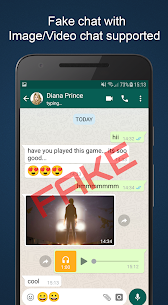
ChatsMock does not stop at plain text messages. The app supports a full range of media types so your fake conversations look as rich and authentic as the real thing. You can add emojis, GIFs, and stickers to give each message personality and flair. You can attach fake images, videos, and audio clips to make the conversation feel dynamic and multi-layered.
You also control both sides of the chat. You write the incoming messages and the outgoing replies, giving you complete creative freedom over how the conversation unfolds. Build a dramatic story, a shocking revelation, or a side-splitting joke — the script is entirely yours to write. The realistic chat interface mirrors the look of popular messaging apps. As a result, anyone who glances at the screen will struggle to tell the difference.
Add Fake Status Updates to Sell the Story
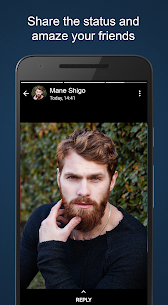
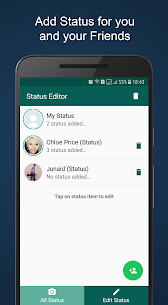
Sometimes a great prank needs a little extra detail to sell it. ChatsMock lets you add fake status updates to your prank contacts, adding another layer of authenticity to the overall illusion. A well-placed status message reinforces the story you are telling and makes the whole setup feel even more believable.
Now you can also send status videos, taking the fake profile experience to a whole new level. A short video status from your fictional contact wraps the prank in a layer of realism that plain text simply cannot match.
Pull Off Fake Calls — Voice and Video
ChatsMock goes beyond text-based pranks by giving you the ability to stage fake voice calls and fake video calls. You can make it look like someone is calling you right now. The app gives you a convincing incoming call screen that will make your friends do a double take. You can also display a list of fake call logs, adding a history of interactions that makes your fictional contact seem like a regular part of your life.
The newly added prank video call feature takes things even further. Stage a live-looking video call from anyone you choose and let your friends’ jaws hit the floor. Whether you use it for a quick laugh or build an elaborate multi-step prank around it, the fake call feature is one of the most entertaining tools in the app.
Dark Mode and the Latest New Features
ChatsMock keeps getting better with every update. The app now includes Dark Mode, giving you a sleek, eye-friendly interface that looks great whether you are pranking in broad daylight or scheming late at night. The latest update also brings video support to fake conversations. Now, you can send videos inside your chat threads for an even more convincing result.
The development team continues to add new features regularly, so the app grows more powerful over time. Stay tuned for upcoming updates that will bring even more creative prank tools to your fingertips.
Share Your Pranks and Capture the Reactions
Once you build the perfect fake conversation, ChatsMock makes it easy to share the fun. The app includes a screenshot sharing feature that lets you capture your fake chat and send it directly to friends, post it on social media, or save it for later. You can share the prank itself or share the reaction. Either way, the laughs are guaranteed.
Download ChatsMock and Start Pranking Today
Life is too short to skip the laughs. ChatsMock Fake Chat Conversation Maker hands you a powerful, easy-to-use prank toolkit that works on any occasion — birthdays, get-togethers, slow afternoons, or any moment that needs a little mischief. Download ChatsMock today, unleash your inner prankster, and give your friends and family a story they will talk about for years.
Developer's apps

Related apps


Latest Apps
-
 Rosetta Stone9.2.3 Rosetta Stone Ltd 283.09 MB Premium Unlocked
 -
 Adobe Scan26.09.25 Adobe 168.40 MB Premium Unlocked
 -
 Bookvo7.3.0 MetroMobiTech 25.62 MB Premium Unlocked
 -
 Ling8.9.1 Ling Learn Languages 167.47 MB Premium Unlocked
 -
 Lingokids26.40.0 Lingokids - Games Shows & Songs for Kids 159.80 MB Premium unlocked
-