
FtpCafe FTP Client MOD APK (Pro Unlocked)

Images



Mod Info
- Pro Unlocked
Description
FtpCafe FTP Client is a powerful and easy-to-use file transfer app that supports FTP, FTPS, and SFTP protocols, offering secure connections, multiple transfer options, resume support, and a clean interface for seamless file management.
What Is FtpCafe and Why Do You Need It?
Managing files across servers and remote systems does not have to be complicated. FtpCafe FTP Client gives you a powerful yet straightforward tool to handle all your file transfer needs from one clean, easy-to-navigate app. Whether you run a website, manage a remote server, or simply need to move files between systems on a regular basis, FtpCafe puts everything you need right at your fingertips.
The app strips away unnecessary complexity and focuses on what matters most — fast, reliable, and secure file transfers. You get a robust set of features packed into an interface that does not overwhelm you with clutter. From the moment you open the app, you can connect to your server and start transferring files without wasting time digging through confusing menus or settings.
Connect Securely With Multiple Transfer Protocols
FtpCafe supports three major file transfer protocols, giving you the flexibility to connect to virtually any server configuration you encounter. You are not locked into a single method — instead, you choose the protocol that best fits your server setup and security requirements.
FTP (File Transfer Protocol) serves as the foundation and works reliably for standard server connections. It gets the job done quickly and efficiently for environments where a basic connection is all you need.
For situations that demand stronger security, FtpCafe supports FTPS — which stands for FTP over SSL. The app handles both Implicit and Explicit FTPS modes, so you can match the exact configuration your server requires without any compatibility headaches. FTPS wraps your file transfers in SSL encryption, protecting your data as it moves between your device and the server.
SFTP (FTP over SSH) takes security even further by routing your transfers through a secure SSH tunnel. FtpCafe gives you multiple ways to authenticate your SFTP connection. You can log in using a standard password, or you can use a private key for stronger, certificate-based authentication. The app supports RSA and DSA OpenSSL keys in the Traditional SSLeay PEM format, as well as ConnectBot-compatible keys in the PKCS8 PEM format. This level of flexibility ensures that FtpCafe works smoothly with a wide range of server configurations and security policies.
Transfer Multiple Files and Folders With Ease
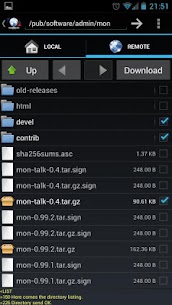
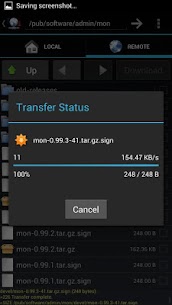
FtpCafe does not limit you to moving one file at a time. The app supports multiple file and directory transfers simultaneously, so you can send or receive entire folders full of content in a single operation. This saves you a significant amount of time when you need to upload a batch of images, deploy website files, or back up large collections of data.
You can select as many files and folders as you need, queue them up, and let FtpCafe handle the rest. The app manages the transfer process efficiently, keeping things organized and making sure every item in your queue reaches its destination.
Resume Interrupted Transfers Without Starting Over
Network interruptions happen — and when they do, losing progress on a large file transfer can be incredibly frustrating. FtpCafe solves this problem with built-in resume transfer support. If your connection drops mid-transfer, the app picks up exactly where it left off once you reconnect. You do not have to restart the entire upload or download from scratch, which saves you both time and bandwidth.
This feature proves especially valuable when you work with large files or operate in areas with unstable internet connections. FtpCafe keeps your workflow moving forward no matter what the network throws at you.
A Clean and Simple Interface That Gets Out of Your Way
FtpCafe prioritizes usability without sacrificing functionality. The interface stays clean, uncluttered, and intuitive, so you can focus entirely on your work rather than figuring out how the app works. Everything you need appears exactly where you expect it, making the learning curve minimal even for first-time users.
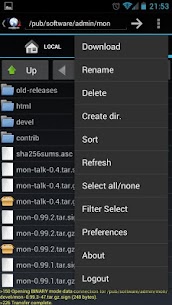
When you need access to additional options, the system menu puts them within easy reach. You can also long-press on any file to bring up a context menu packed with file-specific actions. This approach keeps the main interface tidy while still giving you full control over every file and folder you manage.
Start Transferring Files With FtpCafe Today
FtpCafe FTP Client combines powerful protocol support, strong security options, and a smooth user experience into one compact and capable app. Whether you need a quick FTP connection or a fully encrypted SFTP session with private key authentication, FtpCafe handles it all without breaking a sweat.
Download FtpCafe today and take control of your file transfers with a tool built for speed, security, and simplicity.
Developer's apps

Related apps





Latest Apps
-
 English Dictionary6.0 EagleInc Thesaurus 47.58 MB Premium Unlocked
 -
 JEFIT17.5.0 Jefit Inc. 133.60 MB Elite Unlocked
 -
 Kids Place3.10.12 Kiddoware - Parental Controls App Provider 21.77 MB Premium Unlocked
 -
 Kilonotes3.35.1 合肥栈顶信息科技有限公司 188.58 MB Premium Unlocked
 -
 LazyBoard2.7.15 Elsayed Hussein Abdallah 4.24 MB Premium Unlocked
-