
Lemur Browser
104.95 MB
2.7.5.011
8.0

Ad-Free, Optimized
Images



Mod Info
– Language: Russian, English, Spanish.
– Translation has been updated and corrected.
– Analytics and trackers have been disabled.
– Debug information has been removed.
– Arm64 only.
Description
Download Lemur Browser Mod APK Premium Unlocked to enjoy a powerful Chromium-based browser with support for extensions, customization, privacy mode, and ad-free browsing.

Introduction
In today’s fast-paced digital world, a reliable and customizable browser is essential for everyone who spends time online. While most browsers provide the basics, very few offer the freedom and flexibility of desktop-level browsing on mobile devices. This is where Lemur Browser Mod APK Premium Unlocked comes in.
Powered by a new Chromium high-speed kernel, Lemur Browser combines speed, customization, and advanced features into one seamless package. With support for popular extensions like Tampermonkey, Adguard, and Dark Reader, this browser lets you take full control of your online experience. The Mod APK version gives you all premium features unlocked for free, ensuring a smooth and ad-free environment on your Android device.
About Lemur Browser
Lemur Browser is built on the Blink rendering engine and V8 engine from Google Chrome, inheriting the same solid foundation that millions of users worldwide already trust. What makes it unique is the integration of extensions, advanced customization, and a clean interface designed for both casual and power users.
Unlike traditional mobile browsers, Lemur Browser supports Chrome and Edge extensions, extension management, custom wallpapers, homepage icons, and multiple search engines. It is essentially a desktop-class browser brought to your mobile device, without compromises.
Now, let’s explore the standout features of Lemur Browser in detail.
Features of Lemur Browser
Extension Support
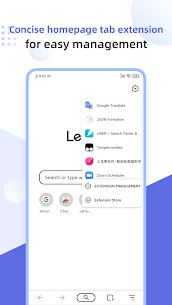
One of the main highlights of Lemur Browser is its support for Chrome Web Store and Microsoft Edge extensions. Whether it’s Tampermonkey, Adblock, Dark Reader, Bitwarden, or Google Translate, you can install and use them directly on your mobile browser. This feature alone sets Lemur apart from most mobile browsers available today.
Extension Management
Managing extensions is simple and efficient. Lemur Browser provides an extension manager where you can easily uninstall, disable, or update any installed extension. This ensures your browser stays optimized and runs smoothly at all times.
Local Extension Import
Beyond online stores, Lemur Browser allows you to import local extensions in CRX format. This is perfect for users who prefer custom-built tools or want to try out third-party extensions not available in the store.
Multiple Search Engine Options
While Baidu is the default search engine, Lemur Browser gives you the flexibility to switch quickly between Google, Bing, Yandex, DuckDuckGo, Sougou, Shenma, and more. You can even add your own custom search engine for a truly personalized browsing experience.
Customizable Wallpapers
Personalization is a strong point of Lemur Browser. It allows you to customize your homepage with high-definition wallpapers sourced from Unsplash. Whether you prefer landscapes, anime, sports, or abstract art, there’s a theme for every mood. You can also upload your own wallpapers to make the browser truly yours.
Homepage Management
The browser lets you manage homepage shortcuts with ease. You can add pre-designed icons from the built-in library or create custom icons for quick access to your favorite websites. The clear layout makes navigation smooth and efficient.
QR Code Functionality
Lemur Browser includes a QR code scanner that allows you to import and recognize local QR codes. You can also generate QR codes for any webpage and share them instantly with others, making sharing links easier than ever.
Tag and Group Management
With its tiled homepage layout, Lemur Browser offers convenient tab and group management. Icons can be grouped and organized, helping you keep everything tidy and accessible at a glance.
Dark Mode
The browser provides a nearly perfect dark mode for users who prefer a darker interface. This reduces eye strain during nighttime browsing and creates a sleek, modern look throughout the app.
Privacy Mode
For those who value security, Lemur Browser includes a one-click privacy mode. Once activated, your browsing activity remains private, ensuring your personal information and online behavior are kept secure.
Conclusion
Lemur Browser is a complete solution for Android users who want more than just a standard browser. Its combination of speed, extensions, customization, and privacy features makes it one of the most powerful alternatives to mainstream browsers.
With the Lemur Browser Mod APK Premium Unlocked, you can enjoy all these premium features without limitations. From installing Chrome extensions to customizing your homepage and ensuring private browsing, this app provides everything you need for a seamless experience.
If you want to try another powerful browser alternative, you might also enjoy the UC Browser Turbo Mod APK available on apkmb.com.


