
NOVA Video Player
Courville Software
32 MB
6.4.62-20260907.2036
6.0

Premium, Ad-Free
Images

Description
NOVA Video Player is an open-source and feature-rich media player for Android phones, tablets, and TV devices, offering hardware-accelerated playback, extensive format support, network streaming, and a TV-friendly interface for a smooth multimedia experience.

Introduction
NOVA Video Player stands out as one of the most versatile and reliable video players available for the Android ecosystem. Built as an open-source project, it provides a transparent and community-driven approach to media playback while delivering performance on par with many premium solutions. Designed for phones, tablets, and Android TV devices, the application focuses on creating a unified multimedia library that brings videos from different sources into a single, well-organized collection.
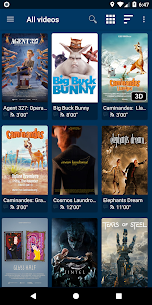
One of the most notable strengths of NOVA Video Player is its ability to seamlessly integrate local and network-based content. Whether your media files are stored on a phone, a computer, a NAS, or a server, the player automatically indexes them and presents them in a visually appealing interface enriched with artwork, descriptions, and metadata. This makes the overall experience feel polished and engaging, especially for users who enjoy managing large movie libraries or TV show collections. With hardware-accelerated decoding, broad format compatibility, and intuitive navigation, NOVA Video Player provides smooth playback and consistent performance on a wide range of devices.
A True Universal Media Player
NOVA Video Player’s universal nature is one of its defining qualities. The app supports an extensive range of sources, ensuring that users can access their video content regardless of where it is stored. Local files on a device are displayed instantly, while videos stored on external USB drives or SD cards are detected and integrated seamlessly. The application’s real power becomes evident when accessing network-based sources, as it supports protocols like FTP, SFTP, WebDAV, SMB, and UPnP. This level of compatibility means users can browse and stream videos directly from their home server, NAS system, or shared folders without needing additional apps.
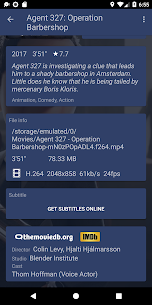
The player is designed to automatically collect metadata from online databases, enriching video libraries with posters, backdrops, cast information, and episode summaries. This transforms a simple video folder into a fully indexed multimedia collection that resembles a high-end digital movie library. With integrated subtitle downloads and the ability to manage multiple audio and subtitle tracks, the player ensures that every video is presented with professional-level detail and convenience.
High-Performance Playback With Hardware Acceleration
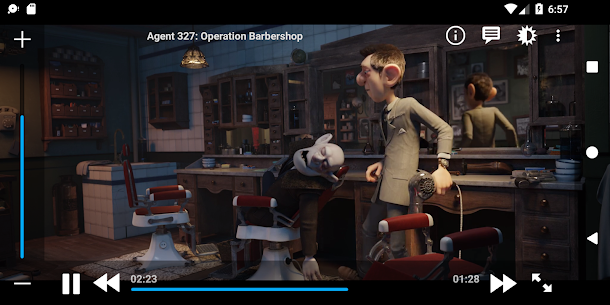
Smooth playback is essential for an enjoyable viewing experience, and NOVA Video Player delivers this through hardware-accelerated video decoding. This technology allows the application to offload heavy processing tasks to the device’s hardware components, ensuring videos run efficiently even at high resolutions or with demanding codecs. As a result, the app supports an extensive variety of file formats, including MKV, MP4, AVI, WMV, and FLV, making it extremely flexible across different content libraries.
Subtitle compatibility is equally robust, with support for SRT, SUB, ASS, SMI, and other commonly used subtitle formats. Users can switch between multiple subtitle tracks, adjust synchronization manually, and fine-tune the display settings to achieve the perfect viewing experience. The inclusion of manual audio and video sync adjustments allows users to correct poorly encoded files or streaming delays, which is particularly helpful when accessing content from diverse sources.
Optimized for Android TV and Home Entertainment Systems
While the application works well on smartphones and tablets, its Android TV experience is one of its strongest features. The dedicated leanback interface is crafted specifically for remote-based navigation, offering a clean and intuitive layout that preserves comfort while browsing large media libraries. This TV-friendly design makes NOVA Video Player a compelling option for home theater setups, media boxes, and smart TVs running Android TV.
For users with advanced audio hardware, the player supports passthrough for formats such as AC3 and DTS, allowing sound systems to process audio signals directly for maximum fidelity. In addition to standard playback capabilities, the app includes support for side-by-side and top-bottom 3D formats, accommodating users who still enjoy watching 3D content. Features like Audio Boost and Night Mode provide further customization, allowing viewers to adjust the sound dynamically based on their environment or preference.
Flexible Browsing and Smart Library Management
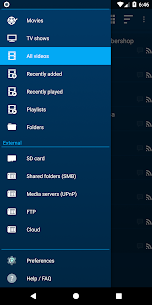
NOVA Video Player is designed for users who value efficient browsing and well-organized collections. The app makes it easy to access recently added or recently viewed videos, ensuring that frequently watched content remains within reach. Users can explore their movie library by name, genre, year, duration, or rating, offering an experience similar to high-end media center software. TV show fans benefit from season grouping and episode browsing, making long-running series easy to manage.
Folder-based browsing is available for those who prefer a more traditional approach, offering full visibility and control over directory structures. The application also includes support for processing NFO metadata files, allowing advanced users to curate their own artwork, descriptions, and additional details. Scheduled library rescans keep the collection updated automatically, especially when using the Android TV interface, ensuring that newly added network videos appear without manual intervention.
Additional Tools and Smart Playback Features
Beyond standard playback, NOVA Video Player contains several thoughtful features that enrich the user experience. Multi-device resume functionality allows users to continue watching videos across different devices on the same network. Private Mode provides a way to temporarily disable playback history, offering discretion for shared devices. Advanced synchronization tools for both subtitles and audio ensure that content plays correctly even when external factors cause delays. For users who track their viewing history, the app integrates with Trakt, allowing synchronization of watched statuses across platforms.
Conclusion
NOVA Video Player successfully blends powerful performance, open-source transparency, and user-friendly design into a single, highly capable media player. Its ability to index videos from local devices, external storage, and network sources sets it apart as a versatile tool for managing multimedia libraries of any size. With hardware-accelerated playback, extensive file format support, rich metadata integration, and a dedicated Android TV interface, the application offers an outstanding experience for both casual viewers and home theater enthusiasts. Whether you’re watching movies on your phone or managing a full living room entertainment system, NOVA Video Player delivers a polished, feature-rich solution that adapts to your needs.
FAQ
Does NOVA Video Player support network streaming?
Yes, the player supports streaming from various network sources, including FTP, SFTP, WebDAV, SMB, and UPnP.
Can the app download subtitles automatically?
Yes, it includes an integrated subtitle download feature that retrieves subtitles directly from online databases.
Is NOVA Video Player optimized for Android TV?
Yes, the app includes a dedicated leanback interface designed specifically for Android TV devices.
Does the player support hardware-accelerated playback?
Yes, NOVA Video Player uses hardware-accelerated decoding on supported devices to ensure smooth and efficient playback.
Can I adjust audio or subtitle synchronization manually?
Yes, the app lets users manually fine-tune audio and subtitle timing for better playback accuracy.




Latest Apps
-
 All Translate: Photo, PDF, DOC1.1.5 Daily Tool Labs 75.57 MB Premium Unlocked
 -
 AppMint – Web2Apk1.11.46 Smartrix Labs 138.97 MB Premium Unlocked
 -
 Bobbie Goods: Coloring Book1.7.1 Pixel Logic Apps 24.15 MB Premium Unlocked
 -
 Bangladesh VPN63.26 BanglaTach 29.71 MB Premium Unlocked
 -
 HSK2 Learn Chinese Chinesimple12.11.0 Khanji School 244.39 MB Premium Unlocked
-