
PilotWeather MOD APK (Full Version)

Images



Mod Info
- Full Version
Description
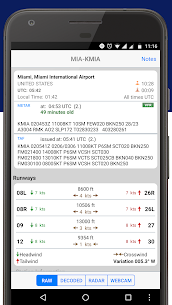
PilotWeather empowers pilots with real-time access to essential METAR weather reports and TAF forecasts, streamlining flight preparation worldwide. Discover PilotWeather, the ultimate mobile app for pilots seeking accurate METAR and TAF data from global airports—select by name, ICAO, or IATA code for decoded insights, customizable units, and vital flight planning tools like sunrise/sunset times.
Mastering Flight Weather with PilotWeather
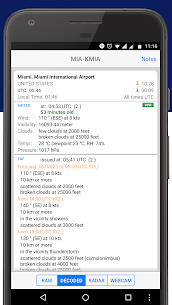
Pilots rely on precise weather intelligence to ensure safe and efficient flights, and PilotWeather delivers exactly that. This innovative app pulls current METAR observations and TAF forecasts directly from trusted sources, presenting them in formats that suit every user’s needs. Whether you prepare for a short hop or a transoceanic journey, the app equips you with data from thousands of airports around the globe. You simply select your desired station using its name, ICAO code, or IATA identifier from the comprehensive built-in database. The interface responds instantly, displaying raw data in its authentic format or decoding it into plain, actionable English that anyone can grasp without specialized jargon.
Imagine planning a dawn departure from a remote airstrip: PilotWeather fetches the latest METAR, breaking down wind speeds, visibility, cloud layers, and temperature into straightforward summaries. This eliminates guesswork and saves precious pre-flight time. Developers designed the app with aviation professionals in mind, ensuring reliability even in areas with spotty connectivity by caching recent updates efficiently.
Essential Features for Every Pilot
PilotWeather packs a suite of features that go beyond basic reports, enhancing your situational awareness. It reveals critical extras like sunrise and sunset times, helping you anticipate lighting changes during critical phases of flight. The app also pinpoints each station’s exact location and elevation, which proves invaluable for high-altitude operations or terrain-challenged approaches. Timezone details and daylight saving adjustments appear automatically, preventing errors in scheduling across international routes.
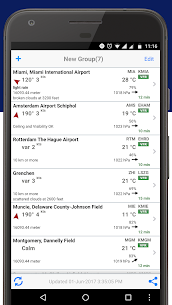
Users gain flexibility with time displays: toggle between GMT for universal consistency or the station’s local time for intuitive reference. Unit preferences cater to diverse preferences—switch seamlessly between US customary measurements (like feet and knots) and metric systems (meters and kilometers). A standout capability lets you view or add nearby stations, expanding your weather picture to cover alternates or en-route airports. For instance, if primary weather turns marginal, pilots quickly scan adjacent fields for better conditions.
To view temperatures in Fahrenheit—a staple for many American pilots—simply deactivate the “Show original units” option. This customization ensures the app aligns perfectly with your workflow, whether you fly under FAA, EASA, or other regulations.
Navigating the App with Ease
Getting started feels effortless. Launch PilotWeather, tap the search bar, and enter your airport details. Results populate rapidly, with options to pin favorites for one-tap access on repeat flights. The decoded view transforms cryptic METAR strings—like “KORD 121745Z 27010KT 10SM FEW030 BKN050 15/10 A2992″—into readable prose: “Winds from 270 degrees at 10 knots, visibility 10 statute miles, few clouds at 3,000 feet, broken clouds at 5,000 feet, temperature 15°C, dew point 10°C, altimeter 29.92 inches.” This clarity empowers quick decisions without cross-referencing charts.
The app’s database spans major hubs like Heathrow (EGLL) and bush strips in Alaska, covering over 10,000 stations. Pilots praise its offline mode, which retains the last 24 hours of data for remote ops. Regular updates from aviation authorities keep information fresh, often within minutes of issuance.
Why Pilots Choose PilotWeather Daily
In the high-stakes world of aviation, outdated or unclear weather data can cascade into delays or risks. PilotWeather mitigates this by prioritizing accuracy and user-friendliness. General aviation pilots use it for VFR cross-countries, while jet crews integrate it into iPad checklists alongside EFB apps. Its lightweight design conserves battery life during long briefings, and intuitive menus minimize training time—even student pilots master it in under five minutes.
Feedback from users highlights reliability during events like hurricanes or winter storms, where rapid updates prove lifesaving. The app fosters confidence by blending raw data with interpreted insights, letting pilots focus on flying rather than decoding.
Exciting New Recommendation: Sky MET
PilotWeather enthusiasts will love the latest addition to the family: Sky MET. This visually captivating app takes weather visualization to new heights, crafted by pilots for pilots. It renders METAR and TAF data through interactive maps, 3D cloud simulations, and trend graphs that forecast turbulence or icing risks. Sky MET complements PilotWeather perfectly—use one for textual precision, the other for graphical overviews. Download it now to elevate your pre-flight routine with stunning, feature-packed tools that make complex weather intuitive.


