
Pixolor
Hanping
2 MB
1.7.3
Varies with device

Premium Unlocked
Images

Description
Pixolor MOD APK turns your Android screen into a powerful live color picker with pixel zoom, RGB color codes, screen coordinates, color palettes, and useful design tools.

Pixolor MOD APK – Live Color Picker, Pixel Zoom & Color Code
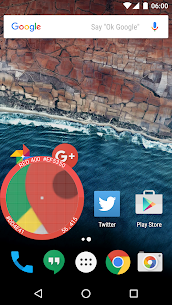
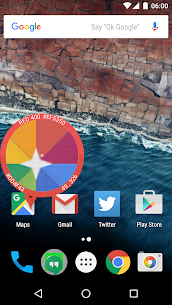
Pixolor MOD APK is a practical screen color picker and magnifier designed for Android users who need detailed information about individual pixels. The app places a floating circular overlay above other applications and displays a magnified view of the area underneath it. At the center of the circle, you can instantly see information about the selected pixel, including its color and screen coordinates.
Pixolor can be especially useful for graphic designers, UI/UX designers, developers, and anyone who needs to identify exact colors from a screen. It can also help users with limited eyesight by enlarging small text and other difficult-to-see elements without requiring them to zoom the entire screen.
Live Pixel Color Picker
The main feature of Pixolor is its floating live color picker. Once the overlay appears, you can move the circle over any part of your Android screen to inspect the underlying pixels. The app provides the RGB color code of the pixel at the center, making it easy to identify a specific color from an application, website, image, or interface.
This feature eliminates the need to take screenshots and open them in a separate image editor just to determine a color. You can inspect the screen directly while another application remains open.
Pixel Zoom and Magnification
Pixolor also works as a convenient screen magnifier. The floating circle provides a zoomed view of the selected area, allowing you to examine small details that may otherwise be difficult to see.
Users with less-than-perfect eyesight can take advantage of this feature to enlarge hard-to-read text and other screen elements. Designers can also use the magnified view to study individual pixels and understand how colors and graphical elements are arranged on the display.
Get RGB Color Codes and Coordinates
With Pixolor, you can identify the RGB color value of virtually any pixel displayed on your screen. The app also provides the coordinates of the selected pixel, giving designers and developers useful technical information about screen layouts and interface elements.
You can copy the detected RGB value to your clipboard by tapping outside the floating circle in the supported areas. Alternatively, you can use the Share option from the notification to send the color information to another application.
Measure Screen Areas
Pixolor does more than identify individual pixels. You can also use the overlay to determine the approximate dimensions of a selected area in DIPs. When you drag the circle across the screen, the application displays the X and Y distance before you release it.
This can be useful when analyzing Android interfaces, checking spacing between UI elements, or estimating the dimensions of an object directly from the screen.
Find Similar Material Design Colors
Another useful feature allows Pixolor to identify the nearest Material Design color to the color currently selected by the picker. This can help Android developers and interface designers find a suitable standardized color when analyzing an existing application or creating a new design.
Instead of manually comparing shades, you can use the live picker to inspect the target color and find a corresponding Material Design option.
Generate Color Palettes
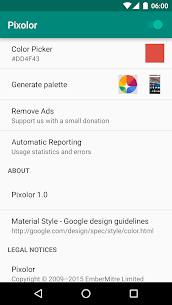
Pixolor can generate a color palette from your latest screenshot or the most recently captured circular zoomed section. This feature gives designers a convenient way to collect multiple colors from an existing interface or image and use them as references for future design work.
The palette functionality can be particularly useful when you want to reproduce a visual style or create a new interface based on colors already present on the screen.
Capture and Share Screen Areas
The application also provides tools for sharing screenshots and cropped sections of your screen. You can focus the floating overlay on one corner and drag it toward the opposite corner to select a specific region.
After selecting the area, Pixolor displays a thumbnail of the captured region. You can then long-press the thumbnail to share the cropped image with another application, such as an email client, messaging app, cloud storage service, or image editor.
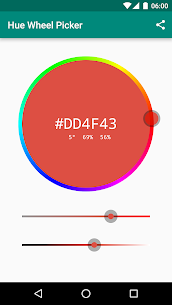
Hue Wheel Color Picker
For users who need more advanced color selection, Pixolor includes a Hue Wheel color picker. This gives you another way to explore and identify colors while working with the application.
Combined with the live pixel picker and RGB information, the Hue Wheel makes Pixolor a useful utility for people who regularly work with digital colors, interfaces, graphics, and visual content.
Pinch-to-Zoom and Fine Panning
Pixolor supports pinch-to-zoom, allowing you to change the magnification level according to the amount of detail you need to inspect. You can also use two fingers for more precise panning.
These controls make it easier to examine individual pixels or small areas without constantly repositioning the entire overlay. After performing a fine adjustment, you can release one finger and continue using the overlay normally.
Quick Settings and Notification Controls
The app provides a Quick Settings Tile that lets you quickly turn the Pixolor overlay on or off. This means you do not always have to open the application manually whenever you want to inspect something on your screen.
Pixolor also provides a notification with several useful controls. From the notification, you can hide or show the overlay, quit the application, and share the latest detected color information with other apps.
Easy Color Sharing
Pixolor makes it simple to transfer detected color information to other applications. You can use the Share function to send the latest color code wherever you need it, which can be helpful when communicating design specifications or transferring color information between different tools.
The notification-based sharing option also provides a convenient solution when you want to copy a detected color without interfering with the application currently displayed underneath the overlay.
Android Compatibility
Pixolor requires Android 5.0 Lollipop or higher. Some features may behave differently depending on your smartphone, Android version, and system interface.
Xiaomi devices using MIUI may require additional configuration. If the floating overlay does not work correctly, you may need to manually enable the overlay permission through the application’s system settings.
Known Device Limitations
Some devices may automatically dim the rest of the screen while the Pixolor circle overlay is active. When this happens, the detected colors can appear darker than their actual values because the underlying display has been dimmed.
This behavior depends on the device and system implementation, and the original developer notes that there may not be a way to completely correct the issue on affected devices.
Why Use Pixolor?
Pixolor is a compact utility that combines several useful functions into one floating tool. Designers can inspect pixel colors and coordinates, developers can analyze interface dimensions, and everyday users can magnify difficult-to-read parts of their screens.
Its ability to work above other applications makes it particularly convenient. You can inspect a website, image, application interface, or other screen content without repeatedly switching between different applications.
Final Verdict
Pixolor MOD APK is a useful Android utility for anyone who needs accurate color information, pixel-level magnification, and quick screen analysis. Its live color picker can identify RGB values and coordinates, while additional tools let you measure screen areas, generate color palettes, find nearby Material Design colors, and share screenshots or cropped regions.
The combination of live pixel zoom, RGB color detection, Hue Wheel, palette generation, screen measurement, and floating overlay controls makes Pixolor more than a basic color picker. It is a practical tool for designers, developers, accessibility-focused users, and anyone who wants greater control when analyzing content displayed on an Android screen.




Latest Apps
-
 Car Parking – Driving School9.21.0 Racing Games Android - Appsoleut Games 1334.84 MB Unlimited Money
 -
 Red Dustlands Online1.3 Virtual Studio Team 509.04 MB Unlimited Money
 -
 TDZ Pro2.1.16000 Leke Games 1165.45 MB Unlimited Money
 -
 RiPlay0.8.0 RiPlay 57.70 MB No Ads
 -
 Dev Tools Pro10.2.0-gp Trinea 16.31 MB Full Version
-