
Smart Tools

Images




Description
Smart Tools is an all-in-one utility app featuring 15 tools in 6 different sets, designed to assist with measurement, navigation, sound analysis, lighting, and unit conversion. A must-have toolkit for every smartphone user.
Introduction
In today’s fast-paced world, having a reliable and versatile toolkit right in your pocket is more important than ever. Smart Tools is a complete utility app that brings together six essential tool sets—each designed to help you measure, analyze, and navigate effortlessly. Whether you need to measure a distance, check a sound level, or use a compass, this app has everything covered. Smart Tools transforms your device into a professional-grade measuring and utility assistant for daily use, making it indispensable for students, engineers, travelers, and DIY enthusiasts alike.
The Complete Toolkit in One App
Smart Tools stands out because it combines 15 essential tools into one simple interface. Each of the six toolsets focuses on a unique aspect of everyday practicality, allowing you to perform a wide variety of tasks with precision and ease.
The first set, Smart Ruler Pro, provides essential measurement tools for length, angle, slope, level, and thread. It’s perfect for quick adjustments, home projects, or educational use when accuracy is key.
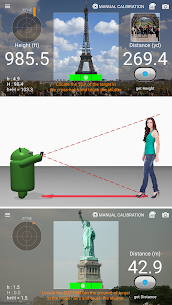
The second set, Smart Measure Pro, goes beyond the basics by enabling users to measure distance, height, width, and area through the camera. This makes it incredibly useful for fieldwork, outdoor projects, or whenever physical measurement tools aren’t available.
Next, Smart Compass Pro ensures you never lose your way. It includes a compass, metal detector, and GPS functions—all working offline. These features are especially handy for hikers, travelers, and anyone who loves exploring new territories.
Sound Meter Pro brings in a sound level meter and vibrometer. Whether you’re checking noise levels in your environment or measuring vibrations in machinery, this toolset helps maintain safety and precision in real-world conditions.
The fifth set, Smart Light Pro, combines a flashlight, magnifier, and mirror—all in one. It’s perfect for those unexpected moments when you need extra visibility or to inspect small details.
Finally, Unit Converter is a versatile addition that simplifies conversions across a wide range of categories—length, weight, area, temperature, and more. It’s ideal for students, professionals, and travelers who constantly deal with different measurement systems.
Precision and Convenience in Every Tool
Smart Tools was built with practicality and user convenience in mind. Each tool within the app is designed to function both online and offline, ensuring accessibility in any environment. Once installed, you only need to open the app a few times with an internet connection to activate full offline functionality.
Moreover, Smart Tools is a one-time purchase, meaning there are no subscriptions or hidden fees. Once you’ve downloaded the app, all features are permanently unlocked. It’s a cost-effective solution that gives you the power of multiple tools without the need for extra apps cluttering your device.
Another highlight of Smart Tools is its offline capability. Unlike many modern apps, Smart Tools doesn’t rely on internet access for its core functionalities. While it excludes internet-based features like maps or exchange rate conversion, this limitation actually enhances privacy and ensures that all measurements and readings are done directly on your device, keeping your data secure.
A Tool for Professionals and Everyday Users
Smart Tools isn’t just for technical experts—it’s designed for everyone. Builders can use it for quick measurements on-site, hikers can use the compass and GPS, musicians can use the sound meter to check acoustics, and homeowners can benefit from the flashlight and ruler tools.
The app’s intuitive design ensures that anyone can access powerful functionality with minimal effort. Even without prior experience using digital measurement tools, users can navigate easily through each section thanks to the clean, organized interface.
Compatibility and Technical Notes
Smart Tools requires a device equipped with certain sensors to work optimally. For example, the compass and metal detector functions depend on a magnetic sensor. Devices lacking this feature, such as the Moto G4, Galaxy J, or Galaxy Tab A, may have limited functionality.
Despite these hardware requirements, Smart Tools maintains a lightweight footprint and works efficiently on most modern Android devices. Its smooth performance and optimized coding ensure low battery consumption and high accuracy in readings.
Conclusion
Smart Tools delivers an exceptional all-in-one experience by combining precision instruments into a single, efficient package. It’s an app designed for practicality, saving time and effort while providing professional-grade accuracy for daily use. Whether you’re an engineer, student, outdoor enthusiast, or simply someone who loves having the right tools at hand, Smart Tools stands out as a must-have application for your smartphone.
With continuous updates and offline functionality, it remains one of the most dependable toolkits on Android. Smart Tools isn’t just an app—it’s a complete toolbox in your pocket, ready to assist you anywhere, anytime.
FAQ
Q1: Is Smart Tools a subscription-based app?
No, Smart Tools is a one-time purchase. Once you buy it, you have lifetime access to all its features without any additional charges.
Q2: Can I use Smart Tools offline?
Yes, the app supports offline functionality. After opening it a few times while connected to Wi-Fi or mobile data, you can use most tools without an internet connection.
Q3: What devices are not compatible with Smart Tools?
Devices without a magnetic compass sensor, such as Moto G4 or Galaxy Tab A, will have limited functionality, especially for compass-related tools.
Q4: Does Smart Tools include map or exchange rate features?
No, due to its offline nature, Smart Tools doesn’t include maps or exchange rate conversion. However, all core measurement and analysis tools work fully offline.
Q5: How many tools are included in Smart Tools?
Smart Tools includes 15 individual tools divided into 6 main sets: Smart Ruler Pro, Smart Measure Pro, Smart Compass Pro, Sound Meter Pro, Smart Light Pro, and Unit Converter.
Developer's apps


Related apps


Latest Apps
-
 iphone 15 Keyboard Fonts Emoji45.0 Goldy IT Solutions Widget 53.06 MB Premium Unlocked
 -
 Mugen Anime15.4.2 NOON ANIME 16.85 MB Premium Unlocked
 -
 PDF AI Reader4.23.2 NEXT AI Lab 47.45 MB Premium Unlocked
 -
 PDF Reader – PDF Editor (Hi Read)1.7.5 Simple Design Ltd. 39.69 MB Premium Unlocked
 -
 ProCut: Video Editor1.0.25 Trung-Hieu Tran 22.31 MB Premium Unlocked
-