
Split Screen Launcher

Images



Description
Split Screen Launcher MOD APK lets you save app pairs, launch split-screen combinations with one tap, and access apps instantly through the SideEdge sidebar on Android.
Split Screen Launcher MOD APK
Split Screen Launcher MOD APK makes Android multitasking faster and more convenient by allowing you to save frequently used applications as pairs and launch them together in split-screen mode. Instead of opening each application separately and manually arranging them every time, you can create a pair once and launch both apps with a single tap.
The app provides a lightweight and straightforward solution for users who frequently work with two applications at the same time. Whether you want to browse the web while taking notes, watch videos while checking social media, or keep navigation and music available together, Split Screen Launcher helps you create a more efficient multitasking workflow.
Launch App Pairs with One Tap
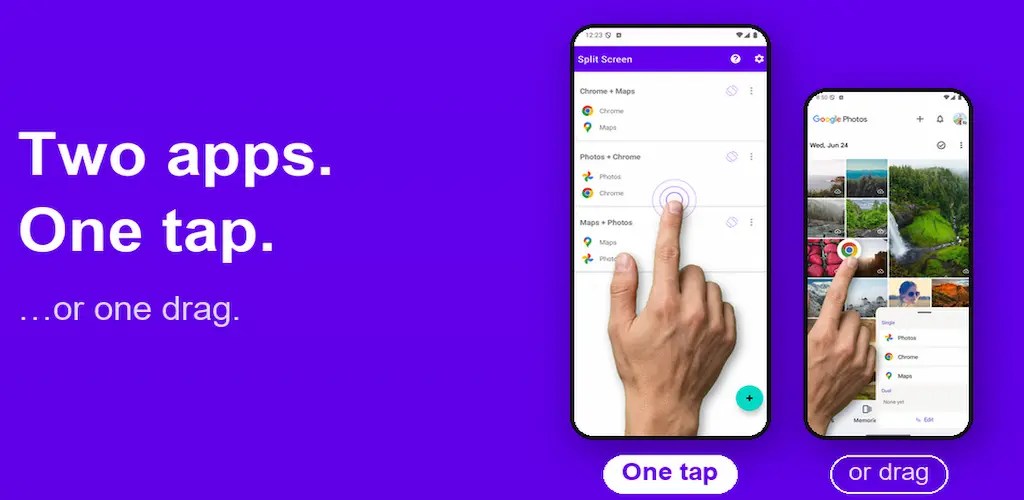
One of the main features of Split Screen Launcher is its ability to create and save app pairs. You simply choose two applications that you regularly use together and save them as a pair. After that, you can launch both applications in split-screen mode without repeating the setup process.
This feature is particularly useful for repetitive tasks. Instead of opening Chrome, finding your notes application, and arranging both windows manually, you can simply tap your saved pair and let the app handle the setup.
SideEdge Sidebar
Split Screen Launcher introduces SideEdge, a convenient pull-out sidebar that gives you quick access to your saved pairs and individual applications from almost any screen. You can swipe inward from the edge of your display to open the sidebar without returning to the home screen.
SideEdge works on Android phones and tablets and provides an ad-free way to access your favorite applications. You can also customize the sidebar handle by changing its position, size, color, and transparency to match your preferences.
If you previously used a smartphone with a built-in sidebar that could launch split-screen application combinations, SideEdge recreates a similar experience on compatible Android devices.
Drag-to-Split Multitasking
Split Screen Launcher also includes Drag-to-Split, which makes creating a split-screen setup even faster. You can open SideEdge and drag an application onto the app currently displayed on your screen. The launcher then attempts to place both applications into split-screen mode.
This approach is useful when you do not want to create a permanent pair but still need to combine two applications temporarily. It gives you a quick way to switch from single-app usage to multitasking without going through several menus.
Useful App Combinations
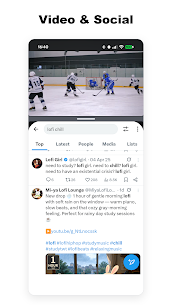
You can use Split Screen Launcher with almost any combination of compatible applications. For example, you can browse your photo gallery while listening to music, watch YouTube while checking Instagram, or search for information in Chrome while writing notes.
The launcher can also improve productivity by keeping Gmail and Slack side by side during work. You can compare information by opening a browser next to a calculator, check directions in Google Maps while chatting with someone, or combine other applications according to your daily workflow.
Automation Support
Split Screen Launcher can also work with automation applications such as MacroDroid, Tasker, and Automate. Android Shortcuts support allows saved pairs or individual applications to become part of automated routines.
For example, you can configure an automation to launch Maps and your music application when you get into your car. You could also create a routine that opens Spotify and a notes application when you connect your earphones.
This makes saved app pairs more useful because you can trigger frequently used combinations based on conditions such as time, location, or Bluetooth connections.
Per-Entry Screen Orientation
Another useful feature is the ability to configure screen orientation for individual applications or saved pairs. You can allow automatic rotation or lock an entry to portrait or landscape mode depending on your needs.
This can be particularly useful for video playback and landscape-oriented games. When you save a pair with a specific orientation, Split Screen Launcher can open the split-screen setup using the orientation you selected instead of requiring you to adjust the display manually each time.
Home Screen Shortcuts
You can also pin your favorite app pairs directly to the Android home screen. Once you create a shortcut, you can launch the saved combination with a single tap without opening Split Screen Launcher first.
This provides an efficient way to access frequently used workflows. For example, you could create separate shortcuts for a video-and-social combination, work applications, navigation-and-music, or any other pair that you use regularly.
Organize Your App Pairs
As you create more combinations, Split Screen Launcher provides organizational tools to keep everything manageable. You can place saved pairs into folders, reorder them using drag and drop, and use custom colors to distinguish different entries.
These customization options make it easier to find the right pair quickly, especially if you have several saved combinations for work, entertainment, communication, or productivity.
Backup and Restore
Split Screen Launcher includes backup and restore functionality, allowing you to preserve your saved configurations. This can be useful when switching to another device or after resetting your Android phone.
Instead of rebuilding all your app pairs and custom settings from scratch, you can restore your previous configuration when supported by your backup setup.
Dark Mode and Multiple Languages
The app includes a dark mode for users who prefer a darker interface, particularly when using the launcher at night or in low-light environments.
Split Screen Launcher also supports 15 languages through its in-app language switcher. Available languages include English, Japanese, Korean, Simplified Chinese, Traditional Chinese, Spanish, Brazilian Portuguese, French, German, Italian, Russian, Arabic, Hindi, Thai, and Vietnamese.
Lightweight and Simple Design
Despite offering several multitasking and customization features, Split Screen Launcher maintains a lightweight and straightforward approach. Its main purpose is to make split-screen multitasking easier without adding unnecessary complexity.
The combination of saved app pairs, SideEdge, home-screen shortcuts, orientation controls, folders, and automation support gives Android users multiple ways to access their favorite workflows quickly.
Final Verdict
Split Screen Launcher MOD APK is a useful multitasking tool for Android users who frequently run two applications together. Its saved app pairs eliminate the need to manually arrange the same applications repeatedly, while the new SideEdge sidebar provides instant access from almost any screen.
Features such as Drag-to-Split, Android Shortcuts, automation support, per-entry orientation controls, home-screen shortcuts, folders, backup and restore, and dark mode make the launcher more flexible than a basic split-screen shortcut. For users who want faster multitasking and a convenient way to recreate the app-pair sidebar experience found on some older devices, Split Screen Launcher offers a lightweight and practical solution.
Related apps


Latest Apps
-
 Proxy Browser (Midnight Browser)3.0 m24apps 21.41 MB Premium Unlocked
 -
 xNotes1.42 Sajid. 13.12 MB Premium Unlocked
 -
 Block-Spam19.9.4 Block-Spam 10.29 MB Premium Unlocked
 -
 Bottom notifications2.8 Pleiades7Apps 14.05 MB Premium Unlocked
 -
 PodsLink – AirPods Battery1.4.6 PodsLink 21.92 MB Premium Unlocked
-