
Applore Assistant PRO

Images


Description
Applore Assistant PRO MOD APK provides premium device management, app locking, file privacy, junk cleaning, anti-theft protection, backup tools, and advanced file management features.

Applore Assistant PRO MOD APK – Premium Device Manager & Privacy Tools
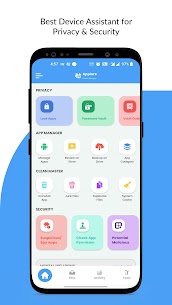
Applore Assistant PRO is a comprehensive device management and privacy application designed to give you greater control over your Android phone. The app combines security, file management, app management, privacy protection, anti-theft tools, and device optimization in one convenient package. Instead of installing separate applications for different tasks, you can use Applore to manage many aspects of your device from a single interface.
The PRO version provides a full-featured experience with tools designed to help keep your smartphone organized, secure, and easier to manage. You can lock sensitive applications, hide private media, remove unnecessary files, find duplicate content, manage installed apps, back up important data, and monitor information about your device.
Privacy & Security Protection
Applore Assistant PRO includes several tools that help you identify potentially suspicious applications on your device. You can inspect installed apps and look for hidden or unsafe applications that may require further attention.
The app also provides additional protection through App Lock and privacy-focused features. You can secure individual applications or groups of apps using a passcode, pattern, or supported biometric authentication. This helps prevent other people from opening sensitive applications without your permission.
Private Media Vault
The Private Media Vault provides a secure location for personal pictures, videos, audio files, and documents. You can move selected files from your regular storage into the vault, where Applore encrypts and stores them locally.
Access to these private files requires the appropriate passcode or pattern. This feature gives you an additional layer of privacy when you need to keep personal media away from the standard gallery or file system.
Advanced App Lock
Applore’s App Lock feature allows you to protect individual applications or multiple apps at once. You can secure applications with a PIN, pattern, or supported fingerprint authentication while also protecting private notifications and certain system settings.
The app also supports additional locking options involving Wi-Fi, Bluetooth, and mobile data. Its optimization is designed to keep the security features running while using as little battery power as possible.
Powerful App Manager
The App Manager helps you understand and control the applications installed on your Android device. You can inspect installed and system applications, identify apps that consume significant storage, and check applications with large cache sizes.
Applore also lets you manage multiple applications at once. You can bulk uninstall unnecessary apps, back up applications, restore them, share APK files, inspect permissions, and hide or disable supported system applications. These tools can make it easier to keep your app collection organized without managing every application individually.
File Manager
Applore includes a full-featured file manager that provides many of the basic file operations you would expect from a desktop file explorer. You can search, copy, cut, paste, move, rename, delete, share, and inspect file properties directly from your phone.
The file manager also supports file compression and decompression, allowing you to work with supported archive formats without relying on another application. You can browse files by category, size, or file type and preview pictures and videos using thumbnails.
A daily file report can also help you understand new media and other files appearing on your device, making it easier to keep track of your storage.
Duplicate File Finder
Duplicate files can consume valuable storage space without providing any benefit. Applore includes a duplicate finder that can scan your device for repeated files, including duplicate images.
After identifying unnecessary copies, you can review the results and remove unwanted duplicates to reclaim storage. This can be especially useful on devices that accumulate large numbers of photos, downloaded files, and other media over time.
Junk File Cleaner
Applore also helps identify unnecessary files that may occupy storage space. Its junk file finder can detect unwanted files and thumbnails that you may no longer need.
Removing this type of unnecessary data can help keep your storage organized and make more room for applications, photos, videos, and other important content. The cleanup tools give you a convenient way to review unwanted files before removing them.
Backup and Uninstallation Tools
Managing multiple applications becomes easier with Applore’s bulk management features. You can uninstall several unwanted applications rather than removing them individually.
The app also provides backup and restore functionality for supported applications. Backups can be stored through supported Google Drive cloud workflows, giving you an additional option for preserving application data or APK files before making major changes to your device.
Share Apps and Files
Applore makes it easier to share applications and files with other people. You can send APK files or application links to friends and share supported files directly from the file management interface.
This functionality provides a convenient way to transfer applications and other content without switching between multiple management tools.
App Update Notifications
Keeping applications updated can become difficult when you have many apps installed. Applore includes an app update finder that can notify you when updates are available for supported applications.
This gives you a central place to check for application updates instead of manually opening each app or checking every application separately.
Mental Wellbeing and Focus Mode
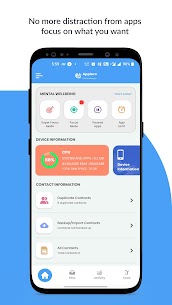
Applore Assistant PRO also includes tools designed to help users reduce excessive smartphone use. The Mental Wellbeing features allow you to set daily limits for selected applications.
Once an application reaches its configured usage limit, Applore can restrict access to that app for the remainder of the day. The Super Focus mode provides an even more immediate way to block distracting applications for a selected period, helping you stay focused when you need uninterrupted time.
Anti-Theft Protection
Applore includes several anti-theft tools designed to warn you when someone handles or disconnects your phone unexpectedly. Its pickpocketing protection can trigger an alarm when the device detects that it has been removed from your pocket.
The charger protection feature can also trigger an alarm when someone disconnects the phone from its charger. You must enter the correct passcode or pattern to stop the alarm, adding another layer of protection when you leave your device unattended.
Device Information and Health Insights
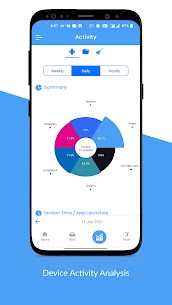
Applore can provide useful information about your smartphone’s hardware and overall device condition. These insights help you understand what components and resources your device uses and can make it easier to identify potential storage or performance issues.
By combining hardware information with application and storage management tools, Applore gives you a broader overview of your Android device from one application.
Password Manager
Applore also includes a password management tool that can generate random passwords and assist with autofill through its passlock system. This can help you create stronger credentials instead of repeatedly using simple or predictable passwords.
The password-related features provide an additional convenience for users who want to manage login information while keeping access protected behind an authentication mechanism.
Contact Backup and Sharing
Managing contacts becomes easier with Applore’s contact tools. You can back up supported contact information and share contact data when necessary.
This can be useful before changing devices, performing maintenance, or making other changes that could affect locally stored contact information.
Social App Management
Applore provides dedicated tools for managing media associated with popular social applications such as WhatsApp and Facebook. You can organize and manage status-related files and other supported media through its file management system.
This can help prevent social media files from becoming scattered throughout your storage and makes it easier to find content that applications create or download.
Device Administrator Permission
Applore uses the Android Device Administrator permission for its Advanced Protection functionality. When enabled, this permission helps prevent unauthorized users from uninstalling or disabling AppLock accidentally or intentionally.
The permission specifically supports the application’s security workflow and is intended to provide additional protection against unauthorized removal of its protection features.
Accessibility Service
Applore can also use Android’s Accessibility service to support its Power Saving Mode and improve certain aspects of its unlocking and operational stability.
According to the app’s stated functionality, the service helps reduce battery usage, improve unlocking efficiency, and keep Applore operating reliably. Users should review Android’s permission information carefully and only enable services they understand and trust.
Package Installation Support
Applore allows users to send or install supported application packages that are available locally on their device. This provides another way to manage locally stored APK packages directly through the application.
The feature can be useful when working with APK files that you have already saved on your device and need to install or share.
Final Verdict
Applore Assistant PRO MOD APK combines many useful Android management tools into a single application. Its feature set covers app management, file browsing, private media protection, App Lock, duplicate detection, junk cleaning, backup and restore, anti-theft protection, focus controls, password management, and device information.
For users who want a centralized tool for managing privacy, applications, storage, and device security, Applore Assistant PRO offers a broad collection of features without requiring multiple separate utility apps. The exact functionality available can depend on the Android version, device hardware, and permissions granted to the application.


