
Brevent MOD APK (Premium Unlocked)

Images



Mod Info
- Premium Unlocked
Description
Brevent is a no-root Android app that uses app-standby and force-stop to prevent background apps from draining your battery and resources, supporting Android 6 through Android 16 with simple USB or wireless debugging setup.

What Is Brevent and What Does It Do?
If you have ever noticed your Android phone slowing down or burning through battery faster than it should, background apps are likely the culprit. Brevent tackles this problem head-on by giving you a powerful way to control which apps run in the background — and it does all of this without requiring root access.
Brevent uses two core Android features to keep unwanted background activity in check: app-standby and force-stop. App-standby, available since Android 6.0, puts idle apps into a restricted state where they cannot freely consume system resources. Force-stop goes a step further by completely shutting down an app’s processes. Together, these two tools give Brevent the ability to aggressively manage your app activity and keep your device running smoothly.
It is worth noting that not all devices support the app-standby feature, so behavior may vary depending on your hardware and Android version.
How Brevent Manages Your Apps
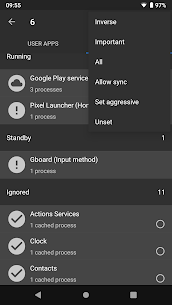
Brevent operates using a straightforward and transparent set of rules that put you firmly in control. The app only acts on apps that you explicitly add to the Brevent list — it will never touch any app you have not included. This means you decide exactly which apps Brevent monitors and manages, giving you precise control without any unwanted surprises.
Here is how Brevent handles each situation it encounters. When you open an app and then exit it by tapping the Back button or navigating away, Brevent places that app into app-standby mode. If the app sits in standby long enough to time out, or if you swipe it away from the recents screen, Brevent escalates its action and force-stops the app entirely. Additionally, whenever Brevent detects that an app is running in the background with no active screen or interface visible to the user, it steps in and force-stops it immediately.
This layered approach ensures that apps on your Brevent list cannot silently drain your battery or slow down your device by lingering in the background undetected.
Allow Sync: Staying Connected When It Matters
Brevent understands that completely cutting off every app is not always what you want. Some apps need to stay active in the background to deliver notifications, sync your data, or complete important tasks. For these cases, Brevent gives you the option to mark individual apps as “allow sync.”
When you enable allow sync for an app, Brevent adjusts its behavior accordingly. It will not place that app into standby, and it will not force-stop it as long as the app has active notifications or is performing a legitimate background task. This gives you the best of both worlds — tight control over apps that have no business running in the background, while keeping your essential apps connected and functional at all times.
Device Compatibility and Android Version Support
Brevent supports a wide range of Android versions, from Android 6 all the way through Android 16. This broad compatibility makes it a reliable choice whether you are running an older device or the latest Android release.
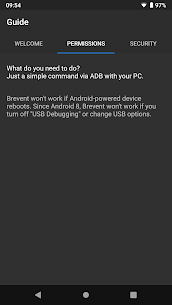
To get Brevent up and running, you need to enable USB debugging or Wireless debugging on your device. You can find both options inside Developer Options in your Android settings. Wireless debugging is available starting from Android 11, which means newer devices can set up Brevent without needing a physical cable at all.
Important Notes for Android 8 to Android 10 Users
If your device runs Android 8, 9, or 10, there is one important thing to keep in mind. Brevent requires debugging to remain active in order to function. If debugging turns off at any point — for example, when you unplug your USB cable — Brevent will stop working until you re-enable it.
If you notice that debugging switches off automatically when you disconnect the cable, you need to adjust your USB connection option in settings to prevent this from happening. In most cases, leaving the USB option at its default setting works perfectly fine and you will not run into this issue at all.
Download Brevent and Take Back Control of Your Android Device
Stop letting background apps silently eat away at your battery life and system performance. Brevent hands you a simple, effective, and root-free solution to keep your device fast, efficient, and in your full control. Download Brevent today and start managing your apps the smart way.
Related apps


Latest Apps
-
 ImproveType AI Typing Keyboard1.7 Envobyte Ltd. Premium Unlocked
 -
 Orion Launcher2.0.4 GxDevs 8.76 MB Premium Unlocked
 -
 TurboFPS Pro3.1 Xn1 Studio 15.78 MB Premium Unlocked
 -
 VPN servers in Russia1.259 Local networks 21.73 MB Premium Unlocked
 -
 IZPH VPN PRO5.9 Sixty Nine Devs 53.98 MB Premium Unlocked
-