
Bugjaeger Premium

Images



Description
Bugjaeger® Premium MOD APK brings advanced ADB tools, interactive shell commands, device monitoring, backups, file management, screenshots, and Android debugging features directly to your smartphone.

Bugjaeger® Premium MOD APK – ADB Tools, Device Control & Debugging
Bugjaeger® Premium MOD APK turns an Android smartphone into a powerful toolkit for developers, advanced users, and Android enthusiasts who want deeper access to their device. The app brings many tools commonly associated with Android Debug Bridge (ADB) and Android Device Monitor directly to your phone, so you can perform various debugging and device-management tasks without relying entirely on a computer.
With Bugjaeger® Premium, you can connect to a target Android device through USB OTG or Wi-Fi and interact with its system using a range of professional tools. The application provides access to shell commands, device logs, application packages, processes, backups, files, and other internal information. This makes it particularly useful for Android developers and power users who want greater control over connected devices.
Use ADB Tools Directly from Android
Bugjaeger® focuses on bringing ADB-style functionality to your Android phone. Instead of connecting your target device to a traditional development computer, you can use another Android smartphone as the control device.
You can execute custom shell commands, open an interactive remote shell, manage applications, inspect system information, and perform different device-control operations. This setup can be useful when you need access to Android debugging tools while away from your computer.
How to Connect a Target Device
Before connecting another Android device, you need to enable Developer options and USB debugging on the target phone. After enabling these settings, connect the Android device running Bugjaeger® to the target device using a compatible USB OTG cable.
Android will request permission to access the connected USB device, while the target phone will ask you to authorize USB debugging. You need to approve the required permissions before Bugjaeger® can communicate with the target device.
If you have both the free and Premium versions installed, it is recommended to remove the free version. Keeping both versions may cause conflicts when the application handles connected ADB devices.
Execute Custom Shell Commands
One of Bugjaeger® Premium’s most useful capabilities is its support for custom shell commands. Advanced Android users can use the interactive shell to communicate with the connected device and perform supported system operations.
The Premium version removes certain limitations found in the free edition, including restrictions on the number of custom commands and interactive shell commands that you can execute during a session. This makes the application more practical for users who regularly work with ADB commands or perform repeated debugging tasks.
Manage Android Applications and Packages
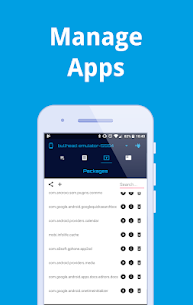
Bugjaeger® also provides tools for managing installed Android applications and packages. You can install and uninstall packages, inspect information about installed applications, and access additional package details.
These features can help developers test applications and investigate package behavior directly from another Android device. Advanced users can also use the package-management tools when maintaining or troubleshooting a connected device.
Monitor Processes and Device Activity
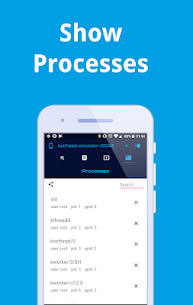
The application includes process-monitoring capabilities that allow you to inspect running processes and view additional information associated with them. You can also terminate processes when necessary.
This functionality gives Android power users a closer look at what the connected device is doing in the background. Developers can use these tools while troubleshooting applications or examining system behavior during testing.
Read and Export Android Logs
Bugjaeger® Premium includes tools for viewing Android device logs. You can read, filter, and export log information from the connected device, making it easier to investigate errors and unexpected behavior.
Developers can use these logs during application testing and debugging to identify potential problems. Filtering the available information can also make it easier to locate relevant events without manually searching through large amounts of system output.
Create and Inspect Backups
The app provides functionality for creating and restoring backups while also allowing you to inspect and extract content from backup files. This gives users additional options for examining stored backup data and managing information during Android development or troubleshooting workflows.
The backup tools can become especially useful when you need to investigate the contents of a backup without relying solely on a desktop development environment.
Capture Screenshots and Record the Screen
Bugjaeger® Premium supports screenshot capture, allowing you to take images of the connected device’s screen directly from the application. The Premium edition removes the screenshot limitations found in the free version, with the practical limit depending on the amount of available storage on your device.
Premium users can also record the live screencast into a video file. This feature can help developers document application behavior, demonstrate problems, or capture activity from a connected Android device.
Control the Connected Android Device
Bugjaeger® provides several commands for controlling the target device. Depending on the device and available permissions, you can perform operations such as rebooting the phone, entering the bootloader, rotating the screen, and terminating running applications.
These controls give advanced users a convenient way to perform common device-management tasks without physically interacting with the target phone for every operation.
Connect Through Wi-Fi
Bugjaeger® can connect to compatible ADB devices over Wi-Fi, providing an alternative to a physical USB connection. The Premium version also allows users to specify a different port when establishing an ADB connection instead of being restricted to the default 5555 port.
Wireless connectivity can make debugging more convenient when you do not want to keep the target device physically connected through an OTG cable.
Inspect Android Hardware and System Information
The application can display various details about the connected device, including its Android version, CPU information, ABI, and display characteristics. You can also inspect battery-related information such as temperature, health, technology, and voltage.
These details can help developers and Android enthusiasts better understand the hardware and software environment of a device before performing debugging or testing tasks.
Manage Files on the Connected Device
Bugjaeger® includes file-management functionality for working with files on a connected Android device. You can browse the file system and transfer files between devices by pushing or pulling supported files.
This feature adds another layer of convenience to the application because you can combine file transfers with debugging, package management, shell commands, and device inspection from the same interface.
Bugjaeger® Premium Features
The Premium edition adds several features that are not included in the free version. These enhancements make the application more suitable for users who regularly perform Android debugging and device-management tasks.
Key Premium features include:
- No advertisements
- Unlimited custom commands
- Unlimited interactive shell commands per session
- Custom ADB Wi-Fi port selection
- Unlimited screenshots, limited only by available storage
- Live screencast recording to video files
- Ability to change file permissions
These additions provide more flexibility for advanced users who need to perform repeated operations without the restrictions found in the free version.
Requirements and Compatibility
Bugjaeger® requires specific hardware and software capabilities when connecting to another Android device. If you want to use a USB connection, the Android phone running Bugjaeger® must support USB host functionality.
The target Android device must also have USB debugging enabled through Developer options. You must authorize the device running Bugjaeger® when Android displays the USB debugging authorization prompt.
Compatibility can vary depending on the Android version, device hardware, USB implementation, and available permissions. Some operations may also behave differently depending on the manufacturer and configuration of the target device.
Who Should Use Bugjaeger® Premium?
Bugjaeger® Premium is primarily designed for Android developers, power users, enthusiasts, and technically experienced users who want deeper access to Android debugging tools. Its extensive ADB-style functionality makes it useful for testing applications, examining device behavior, managing packages, monitoring processes, transferring files, and performing various administrative operations.
For users who rarely interact with Android debugging tools, many of its advanced functions may not be necessary. However, developers and Android enthusiasts who frequently work with ADB can benefit from having many of these capabilities available directly on an Android smartphone.
Final Verdict
Bugjaeger® Premium MOD APK provides a comprehensive collection of Android debugging and device-management tools in a mobile-friendly package. It brings ADB-style functionality, interactive shell access, application management, process monitoring, log inspection, backups, screenshots, screen recording, Wi-Fi connectivity, and file management directly to Android.
The Premium version also removes advertisements and several usage restrictions, making it more convenient for frequent users. With support for both USB OTG and Wi-Fi connections, Bugjaeger® can serve as a practical companion for Android developers and power users who want greater control over connected devices without always relying on a desktop computer.
Related apps


Latest Apps
-
 X-Plane Flight Simulator12.4.0 Laminar Research 1276.67 MB All Unlocked
 -
 Just Cause 21.0.5-beta Avalanche Studios 44.28 MB Full Game
 -
 Ninja Gaiden Black0.9.53 Team Ninja 16.72 MB Full Game
 -
 WWE 2K14android-v0.2.1 Yuke’s 56.35 MB Full Game
 -
 Subway Surfers3.71.0 SYBO Games 258.87 MB Unlimited Coins/Keys
-