
ComicScreen

Images
Description
ComicScreen is a powerful and lightweight comic reader that supports PDF, CBZ, CBR, ZIP, RAR, and numerous image formats. With smooth scrolling, network access, OTG support, and intuitive viewing modes, it offers one of the best reading experiences for comics, manga, and image-based documents on mobile.

Introduction
ComicScreen – PDF, ComicReader is a high-performance mobile application designed to provide a seamless and enjoyable reading experience for comics, manga, image collections, and PDF documents. Built with a focus on speed, compatibility, and user control, the app supports a wide variety of compressed file formats such as ZIP, RAR, CBZ, and CBR, making it incredibly convenient for users who store their comics or documents in bundled archives.
Unlike basic PDF or comic readers, ComicScreen goes the extra mile by delivering an advanced set of tools that make browsing, organizing, and viewing large collections significantly easier. It features comprehensive file management options, smooth image rendering, multiple viewing modes, and support for external storage such as USB-OTG. The app’s intuitive interface ensures that users can quickly access their library, adjust display preferences, and enjoy uninterrupted reading whether they are at home or on the go.
ComicScreen is especially appealing to comic lovers and manga readers because of its ability to automatically detect chapters, support margin cropping, preview pages, and display content in both vertical and horizontal modes. Its high compatibility with image formats including JPG, PNG, GIF, BMP, TIFF, WEBP, and even AVIF ensures that readers can enjoy crisp visuals without worrying about format limitations. With these capabilities, ComicScreen stands out as a complete and reliable solution for anyone who enjoys reading visually rich content on their device.
Versatile File Format Support
One of the strongest features of ComicScreen is its support for an extensive range of file formats. For comic readers, this is particularly useful because comics and manga are often distributed in different compressed formats depending on the source. ComicScreen handles ZIP, RAR, CBZ, and CBR with ease, allowing users to open large archive files instantly without the need for extraction. This not only saves time but also conserves storage space, enabling a more efficient reading experience.
PDF compatibility further expands the app’s use cases, making it suitable for reading documents, image-based books, scanned materials, and digital manuals. Regardless of the file’s size or structure, ComicScreen keeps the viewing experience stable and responsive. Its flexibility transforms your device into a universal reader capable of handling nearly any graphic content.
Comprehensive Image Format Compatibility
In addition to archives, ComicScreen supports numerous image formats including JPG, PNG, GIF, BMP, TIFF, WEBP, and AVIF. This broad compatibility ensures that users can easily view image collections, art galleries, or long sequences of pictures even if they come in various file types.
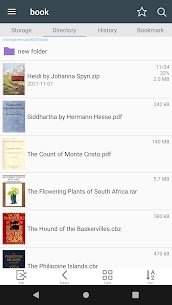
The app automatically detects images inside folders or archives, presenting them in a clean, organized layout. This is especially convenient for users who maintain large visual libraries. Whether you are reading comics, browsing photographs, or reviewing scanned materials, ComicScreen delivers sharp rendering and fluid navigation.
Powerful File Management Tools
ComicScreen is more than a reader—it is also a capable file explorer. The app integrates file management features such as search, rename, delete, and folder creation, allowing users to keep their libraries neatly organized. With support for USB-OTG, users can directly access files stored on external drives without copying them to local storage.
Network support is another key strength. ComicScreen can connect to SMB and FTP servers, making it easy to open files stored on home networks, NAS devices, or remote servers. This functionality is invaluable for users with extensive comic collections stored externally, as it allows seamless access without the need for constant transfers or device storage management.
Drag-and-drop functionality further enhances convenience, enabling smooth movement of files and folders across storage locations. Whether you manage your collection locally or remotely, ComicScreen offers all the essential tools for efficient file organization.
Smooth and Flexible Reading Experience
The reading experience is where ComicScreen truly shines. The app offers extremely smooth image scrolling, ensuring that transitions between pages feel natural and uninterrupted. This is especially important for manga and comic readers, where pacing and panel flow contribute heavily to the overall reading experience.
Users can choose between vertical (single-page) viewing and horizontal (two-page spread) modes. The two-page mode is particularly immersive for comics originally designed for double-page layouts, enhancing readability and preserving artistic intent. Vertical mode is ideal for fast scrolling and continuous reading, especially with long-form content such as webtoons or image sequences.
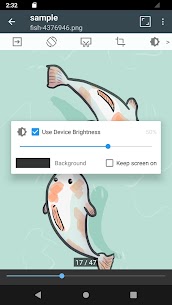
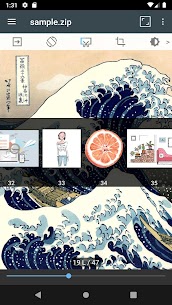
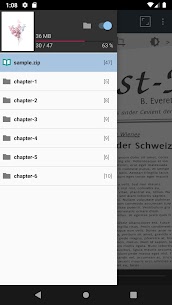
The app provides margin-cutting tools to remove unnecessary white spaces around pages, maximizing the visible area and improving readability. Additionally, page previews, chapter drawers for zip-based folders, and quick navigation tools help users efficiently move between pages or chapters with ease.
Intuitive Navigation and Reading Controls
ComicScreen incorporates several controls that give users full command over their reading experience. Page movement can even be mapped to hardware keys, offering a tactile way to flip through pages without touching the screen. This feature is extremely convenient during long reading sessions or when using the device with one hand.
Preview functions allow readers to quickly scan through page thumbnails before jumping to a specific section. This ensures smooth navigation especially when exploring large volumes. The app’s automatic page sorting intelligently organizes pages within archives, eliminating issues caused by incorrect file naming or mixed image sequences.
These thoughtful design features make ComicScreen suitable not only for casual readers but also for users dealing with large, complex comic collections.
Conclusion
ComicScreen – PDF, ComicReader stands out as a highly versatile and user-friendly app designed for anyone who enjoys reading comics, manga, image-based documents, or PDF files on mobile devices. Its powerful support for compressed archives, wide-ranging compatibility with image formats, and advanced file management capabilities make it an all-in-one solution for digital reading.
Whether you want to explore large comic archives, access files from external storage or network drives, or simply enjoy smooth page transitions and clean visuals, ComicScreen delivers a premium experience. Its thoughtful reading tools, flexible viewing modes, and robust performance ensure that every page feels natural, immersive, and effortless. For readers who value convenience, speed, and control, ComicScreen remains one of the top choices in the mobile comic reader category.
FAQ
Does ComicScreen support comic archive formats like CBZ and CBR?
Yes, the app fully supports ZIP, RAR, CBZ, and CBR formats, allowing direct reading without extraction.
Can ComicScreen open PDF files?
Absolutely. ComicScreen works smoothly with PDF documents of all sizes.
Does the app support network access?
Yes, ComicScreen can connect to SMB and FTP servers for reading files stored on network devices.
Is USB-OTG supported?
Yes, users can access external storage devices directly via USB-OTG.
Are multiple reading modes available?
ComicScreen offers both vertical (single-page) and horizontal (two-page) viewing modes to suit different reading preferences.
Related apps


Latest Apps
-
 Forgotten Memories: Remastered1.9.145 Psychose Interactive Inc. 3861.78 MB Full Game
 -
 Grok1.1.49-release.00 SpaceX Super Intelligence 48.31 MB Premium Unlocked
 -
 XNXX1.63.1 XNXX 17.38 MB Premium Unlocked
 -
 Spotify9.1.94.1929 Spotify AB 87.68 MB Premium Unlocked
 -
 CapCut19.10.0 Bytedance Pte. Ltd. 310.97 MB Pro Unlocked
-