
Device Info
Yasiru Nayanajith
7.67 MB
3.4.4.0
7.0

Premium Unlocked
Images
Description
Device Info MOD APK provides detailed CPU, GPU, RAM, battery, storage, sensors, network, display, and system monitoring tools with real-time device diagnostics.

Device Info MOD APK
Device Info MOD APK turns your Android phone into a comprehensive hardware and system monitoring tool. The app provides detailed information about your smartphone’s internal components, Android system, performance, battery condition, storage, sensors, cameras, display, and network connections. With more than 1 million users and a 4.75-star rating, Device Info has become a useful choice for people who want to understand exactly what is happening inside their Android devices.
You can use the app as a CPU monitor, RAM monitor, battery monitor, performance analyzer, and device diagnostic tool. It displays important hardware statistics in real time and also lets you benchmark your device and export detailed reports. The application also emphasizes privacy because it does not require an account, tracking, or data collection.
Device Dashboard
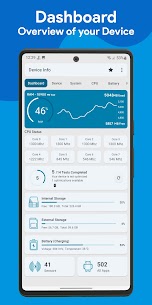
The main dashboard provides a convenient overview of your phone’s most important hardware and system components. You can quickly check CPU activity, RAM usage, battery condition, internal and external storage, available sensors, and installed applications from one place.
This overview makes it easier to identify performance changes or storage problems without opening several different system menus. Instead of searching through Android settings, you can access essential device information through a centralized interface.
Detailed Device Information
Device Info provides extensive specifications about your smartphone. You can view the device model, manufacturer, brand, hardware information, board, build fingerprint, device age, manufacturing date, USB host support, SIM information, and network details.
These details can be particularly useful when checking the specifications of a used phone or verifying whether a device meets the requirements of a particular application. Developers and technicians can also use this information when testing Android compatibility and diagnosing device-specific problems.
Android System Information
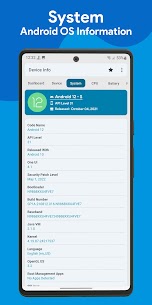
The system information section provides a detailed overview of the Android software environment. You can check the Android version, API level, One UI version, security patch level, kernel information, Google Play services, Vulkan, OpenGL ES, system uptime, language, and other system details.
The app can also display information related to root applications, helping advanced Android users understand more about the software configuration of their devices.
CPU & GPU Monitor
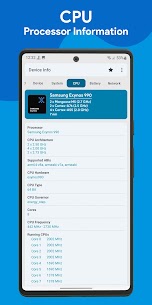
Device Info works as a real-time CPU and GPU monitor by providing detailed information about your device’s system-on-chip. You can view the CPU architecture, supported ABIs, CPU governor, number of processor cores, and real-time CPU frequencies.
For graphics hardware, the application shows information such as the GPU renderer, vendor, version, and supported graphics capabilities. This information can help users understand the performance hardware inside their smartphones and determine whether a device is suitable for demanding games or applications.
Battery Health & Battery Monitor
The built-in battery monitor provides detailed information about your phone’s battery status. You can monitor battery health, current battery level, charging status, temperature, voltage, current in mA, power consumption in watts, battery technology, and estimated capacity.
Real-time battery information can help you identify unusual temperature increases, charging behavior, or changes in battery performance. It can also provide useful technical information when troubleshooting charging or battery-related issues.
Network & Connectivity Information
Device Info includes a network and connectivity analyzer that covers several wireless and wired technologies. You can inspect Wi-Fi, Bluetooth, NFC, Ultra-Wideband (UWB), USB, and mobile network information.
For Wi-Fi connections, the app can display information such as IP address, gateway, DNS, frequency, Wi-Fi standard, security protocol, and connection speed. These details can help advanced users troubleshoot connectivity problems or understand the configuration of their current network connection.
Display & Camera Specifications
The display section provides technical information about your phone’s screen, including resolution, pixel density, refresh rate, HDR support, brightness, and physical display size.
Device Info also provides detailed camera specifications. Depending on the device, you can check aperture, focal length, ISO range, RAW support, focus modes, flash modes, and supported image formats. This makes the app useful for photographers, developers, and users who want to know the actual capabilities of their smartphone cameras.
RAM & Storage Monitor
The RAM and storage monitoring tools show how your device uses its available memory and storage space. You can check real-time RAM usage, RAM type, RAM frequency, total storage capacity, and information about internal and external storage.
Monitoring these resources can help you identify what may be contributing to slow performance. It also makes it easier to determine whether your phone has sufficient free storage for applications, games, photos, videos, and other files.
Sensor Information
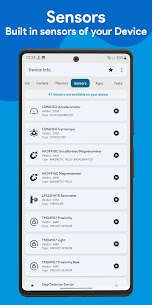
Device Info can detect and display information about the sensors available on your smartphone. You can view the sensor vendor, sensor type, power consumption, wake-up support, dynamic sensor support, and maximum range.
This feature is useful when testing whether specific hardware sensors are available on a device. Developers can also use the information when checking compatibility for applications that depend on accelerometers, proximity sensors, light sensors, gyroscopes, or other hardware components.
App Analyzer
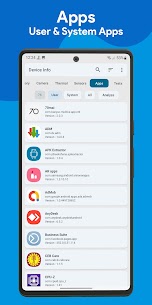
The built-in App Analyzer provides a deeper look at applications installed on your Android device. You can inspect permissions, activities, services, providers, receivers, signatures, minimum Android version, and target Android version.
The application can also extract APK files and provide advanced graphs for analyzing installed apps. This makes the feature particularly useful for developers, Android enthusiasts, and users who want more technical information about the applications installed on their phones.
Wi-Fi Analyzer
Device Info includes a Wi-Fi analyzer that scans nearby wireless networks and provides information about their signal strength, channels, Wi-Fi standards, security protocols, and estimated distance.
This can help you identify nearby networks and understand how wireless connections are distributed around you. The information can also be useful when troubleshooting weak Wi-Fi signals or checking which channels are being used in your surroundings.
Hardware Tests & Device Diagnostics
The hardware diagnostic tools allow you to test many components of your smartphone from within the application. Supported tests can include the display, multi-touch functionality, flashlight, loudspeaker, earpiece, microphone, proximity sensor, light sensor, accelerometer, charging system, headset, vibration motor, Bluetooth, fingerprint sensor, and volume buttons.
These tests can be especially useful when purchasing or selling a used smartphone. Repair technicians can also use them to identify potential hardware problems before performing further diagnostics.
CPU Temperature & Thermal Monitor
The thermal monitoring feature tracks temperature information from supported Android thermal sensors. You can monitor CPU, GPU, battery, and overall system temperatures in real time.
Keeping an eye on thermal performance can help you understand how your device behaves during demanding tasks such as gaming, video recording, charging, or intensive application usage. Available temperature readings depend on the hardware and thermal sensors provided by your device.
Floating Monitor & Material You Widgets
Device Info can display important statistics through floating overlays, allowing you to keep track of RAM usage, battery status, CPU temperature, and other device information while using other applications.
The app also supports customizable Material You widgets that you can place on your Android home screen. These widgets provide quick access to important device statistics without requiring you to open the main application.
Material You Themes
The application supports modern Material You styling with light and dark themes. Dynamic colors allow the interface to better match the visual appearance of compatible Android versions and device themes.
This gives users a cleaner interface while maintaining access to the large amount of technical information provided by the application.
Export Device Reports
Device Info can generate complete reports containing your device and system information. You can export these reports as text or PDF files for troubleshooting, diagnostics, technical support, or documentation.
This feature can save time when you need to share detailed hardware and software specifications with a technician, developer, support team, or another user.
Additional Tools
Beyond its primary monitoring features, Device Info includes several additional utilities. These include a permission analyzer, data usage monitor, and compass.
The permission analyzer can help you review application permissions, while the data usage monitor provides additional insight into network consumption. The built-in compass adds another practical utility for users who want several diagnostic and device-related tools in one application.
Who Should Use Device Info?
Device Info is suitable for a wide range of Android users. Technology enthusiasts can use it to explore almost every technical detail of their phones, while developers can check hardware and software compatibility during application testing.
Repair technicians can use the diagnostic functions to test smartphone components, and buyers can use the application when inspecting a used device. Sellers can also use detailed system and hardware reports to provide potential buyers with accurate technical specifications.
Privacy-Focused Device Monitoring
Privacy is another important aspect of Device Info. The application does not require users to create an account and is designed without tracking or data collection. This means users can access detailed device monitoring tools while keeping their information on the device.
For users who prefer diagnostic applications that do not rely on unnecessary online accounts or tracking services, this privacy-focused approach can make Device Info a convenient option.
Device Info MOD APK Features
Device Info MOD APK combines hardware monitoring, system diagnostics, application analysis, network tools, sensor information, battery monitoring, and hardware testing in a single application. Instead of installing separate utilities for each task, you can use one app to inspect many aspects of your Android smartphone.
Its real-time monitoring capabilities also make it useful for observing device behavior during everyday use or demanding workloads. However, certain features and measurements depend on the hardware and Android version of the device, so not every smartphone will provide identical information.
Final Verdict
Device Info MOD APK is a comprehensive solution for Android users who want deeper access to their smartphone’s hardware and system information. From CPU and GPU monitoring to battery health, RAM, storage, sensors, cameras, display specifications, network connectivity, and thermal performance, the app brings a wide range of diagnostic tools together in one interface.
Its hardware testing tools, App Analyzer, Wi-Fi Analyzer, floating monitors, Material You widgets, and report export functions make it useful beyond simple specification checking. Whether you are a technology enthusiast, Android developer, repair technician, or someone checking a used phone, Device Info provides detailed information that can help you understand and diagnose your device more effectively.

Related apps


Latest Apps
-
 Bendy and the Dark Revival2.1.0 Joey Drew Studios Full, Premium
 -
 Parallax 3D Live Wallpapers3.7.17 TarrySoft 18.69 MB Premium Unlocked
 -
 Nebula Icon Pack8.5.7 Stark Designs 109.97 MB Full Version
 -
 Vera Outline Icon Pack6.6.8 One4Studio 68.91 MB Full Version
 -
 Vera Icon Pack6.6.8 One4Studio 72.45 MB Full Version
-