
Draw on Screen
LE THANH DAT
8 MB
1.7.5
Varies with device

Premium Unlocked
Images



Description
Draw on Screen is a powerful on-screen drawing tool that lets you annotate, highlight, and sketch over any app or game in real time with flexible controls and easy access.

Real-Time Drawing on Any Screen
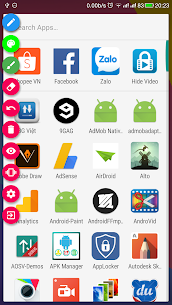
Draw on Screen enables users to sketch directly over any application or game while it is running. Instead of switching between apps or relying on static screenshots, you can interact with your screen dynamically. The tool allows you to activate or deactivate drawing mode instantly through a notification toggle, ensuring a smooth and uninterrupted workflow. Whether you are browsing, gaming, or presenting, you maintain full control over when and how you draw.
A Smarter Way to Capture and Share
Unlike traditional methods that require taking a screenshot first and editing it afterward, this app simplifies the process. You draw directly on the target screen, capture the exact moment, and share it immediately. This streamlined workflow improves efficiency and ensures that your annotations appear exactly where you want them without extra editing steps.
Perfect for Tutorials and Screen Recording
Draw on Screen is especially useful for content creators and educators who rely on screen recording. You can highlight key areas, circle important elements, or add visual guidance while recording videos. This real-time annotation capability enhances clarity and helps viewers understand complex instructions more easily, making your tutorials more engaging and professional.
Flexible Drawing Tools and Customization
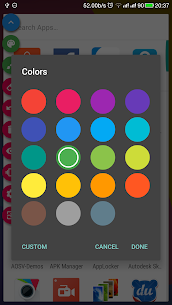
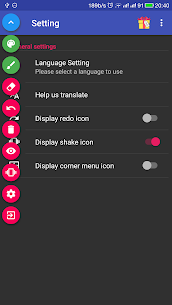
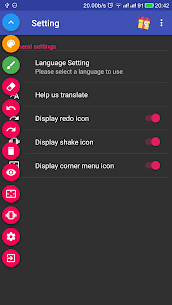
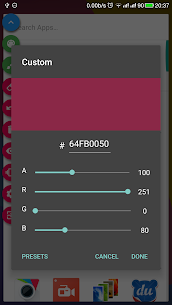
The application offers a variety of drawing options to match your needs. You can choose from multiple colors using the ARGB color space, adjust brush sizes for precision or emphasis, and switch between tools effortlessly. The undo and redo features allow you to correct mistakes instantly, while the eraser tool lets you remove any unwanted markings without disrupting your workflow.
Practical Use Cases
Users can apply this tool in many scenarios, such as creating annotated tutorial screenshots, producing instructional videos with live highlights, or simply marking important information on the screen. Its versatility makes it suitable for both casual users and professionals who need quick and effective visual communication tools.
Related apps


Latest Apps
-
 My Talking Tom Friends26.5.10.25510 Outfit7 Limited 182.33 MB Unlimited Money
 -
 Going Balls3.44 Supersonic Studios LTD 207.44 MB Unlimited Coins
 -
 Dominoes2.7.0 Loop Games 221.73 MB Unlimited Coins
 -
 MadOut2 BigCityOnline21.20 MadOut Games LLC FZ 1413.63 MB Unlimited Ammo
 -
 RFS – Real Flight Simulator4.0.0 RORTOS 441.33 MB Full Game
-