
Dual Camera & PiP – DualView
ssolstice
15 MB
1.0.13
Varies with device

Premium Unlocked
Images


Description
Dual Camera & PiP – DualView MOD APK lets you record with front and rear cameras, create PiP videos, use multiple layouts, and access professional manual camera controls.
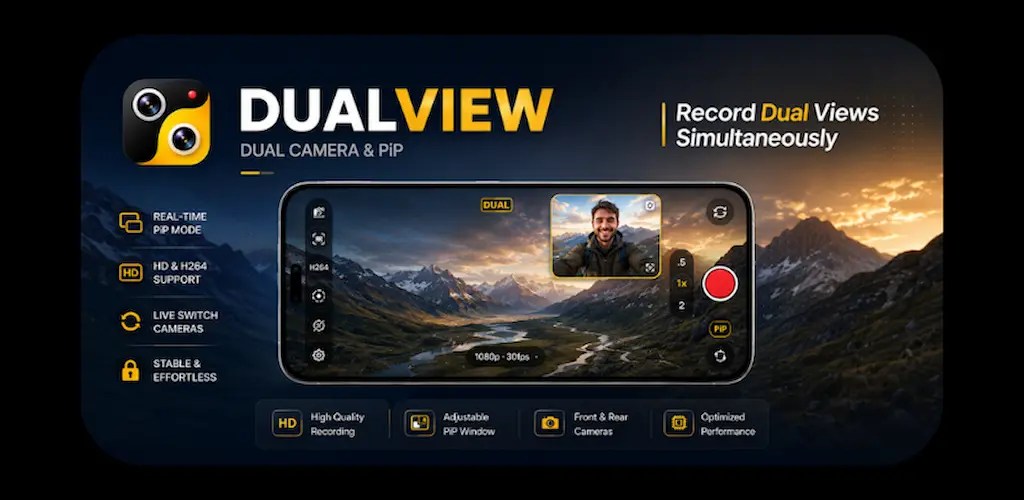
Dual Camera & PiP – DualView MOD APK – Dual Camera, PiP & Manual Controls
Dual Camera & PiP – DualView MOD APK turns your Android smartphone into a flexible camera tool that can capture content from both the front and rear cameras. On supported devices, the app can use both cameras simultaneously, allowing you to record multiple perspectives in a single video. This makes DualView particularly useful for vloggers, reaction creators, interviewers, travelers, and anyone who wants to create more engaging mobile content.
The app combines dual-camera recording, Picture-in-Picture (PiP), multiple camera layouts, manual camera settings, and helpful shooting guides in one interface. Whether you create videos for social media or simply want a better way to capture everyday moments, DualView gives you more control over how you frame and record your content.
Dual Camera Capture
DualView makes it possible to capture footage using your smartphone’s front and rear cameras. On compatible devices, you can record from both cameras at the same time and show different perspectives within the same recording.
The dual-camera feature works especially well for situations where you want viewers to see both the person recording and the environment in front of the camera. Vloggers can show their reactions while recording a destination, while travelers can capture themselves alongside their surroundings without switching between separate recordings.
You can also capture photos using the front and rear cameras and save your results directly to the device gallery. Real-time camera previews and quick controls help make the recording process straightforward.
Picture-in-Picture Camera Mode
Picture-in-Picture, or PiP, gives your video a floating camera window that appears over another camera view. This layout works particularly well for reaction videos, tutorials, interviews, product demonstrations, and travel content.
DualView lets you adjust the PiP window to suit your composition. You can drag the window to a different position, resize it with pinch gestures, and choose from several available PiP styles. Depending on your device and selected layout, you can also use rounded or circular camera windows for a more distinctive appearance.
The live preview allows you to see how both camera perspectives will appear before and during recording, making it easier to create polished content.
Multiple Camera Layouts
DualView provides several layouts so you can choose a presentation that fits your recording scenario. Available options include Picture-in-Picture, Vertical Split, Horizontal Split, Side-by-Side, and Full Screen Preview.
Each layout creates a different visual composition. A vertical split can work well for mobile-oriented content, while a side-by-side arrangement can display two perspectives equally. PiP provides a more traditional reaction-video presentation, while full-screen preview keeps the focus on a single camera.
You can switch between available layouts before recording and choose the configuration that best matches your content.
Professional Manual Camera Controls
Dual Camera & PiP – DualView also provides a range of manual camera controls on supported devices. These settings give experienced creators greater control over exposure, focus, image quality, and video recording parameters.
Depending on your smartphone, available controls may include resolution selection, ISO adjustment, shutter speed, white balance, exposure compensation, frame rate, video bitrate, and video codec selection. The app may also provide focus control, AF lock, AE lock, zoom, flash, timer, aspect ratio, grid lines, and an option to mirror the front camera.
These controls allow creators to fine-tune their shots instead of depending entirely on automatic camera settings. However, the exact controls available depend on the device hardware, Android version, Camera2 API support, and manufacturer implementation.
Compass and Level Indicator
DualView includes additional tools that can help you frame your shots more accurately. The built-in compass provides a live heading display, while the level indicator helps you keep the horizon straight.
These tools can be particularly useful when recording landscapes, architecture, travel footage, or outdoor content. Keeping the camera level can make compositions look cleaner and more professional, especially when the scene contains prominent horizontal or vertical lines.
The accuracy of the compass and level indicator depends on the sensors available on your smartphone. Different devices may therefore produce slightly different results.
High-Quality Photo Capture
DualView is not limited to video recording. The app also supports photo capture with compatible front and rear cameras, giving you another way to use its flexible camera layouts.
You can capture high-quality images, preview them immediately, and save them directly to your gallery. The combination of front and rear camera support makes the app useful when you want to capture yourself and your surroundings without repeatedly switching between different camera modes.
Great for Vlogs and Reaction Videos
Dual Camera & PiP – DualView is designed for a wide range of content creation scenarios. Vloggers can use the dual-camera system to show themselves and their surroundings at the same time, while reaction creators can use PiP to keep their reactions visible alongside the main footage.
The app can also work well for interviews, tutorials, product reviews, travel videos, educational content, behind-the-scenes footage, family moments, and outdoor adventures. Its multiple layouts allow creators to adapt the camera presentation to different types of content.
Simple and Modern Interface
Despite offering numerous camera features, DualView focuses on keeping the shooting experience simple. Its interface provides quick access to important camera controls and supports convenient one-handed operation.
The application also targets modern Android devices and includes a dark interface designed to work comfortably in camera-focused environments. A straightforward layout can help you concentrate on composition and recording rather than navigating through complicated menus.
Premium Features
Dual Camera & PiP – DualView also offers Premium features that provide access to additional capabilities. The available Premium functionality can vary depending on the application version and supported device.
Users who regularly create mobile videos can benefit from having advanced camera controls and flexible layouts available within one application instead of switching between multiple camera tools.
Device Compatibility
DualView does not provide identical functionality on every Android smartphone. Some features depend heavily on the device’s camera hardware, Android version, Camera2 support, and manufacturer-specific implementation.
For example, simultaneous front and rear camera recording may only work on devices that provide the necessary hardware and software support. Certain manual controls, resolutions, frame rates, codecs, and other functions may also be unavailable on specific models.
Because the developer cannot test the application on every Android device, you should verify compatibility before relying on DualView for important recordings such as weddings or other once-in-a-lifetime events.
Why Choose Dual Camera & PiP – DualView?
Dual Camera & PiP – DualView combines several useful mobile filmmaking tools in a single camera application. Instead of offering only a basic dual-camera mode, it brings together simultaneous camera capture, Picture-in-Picture, split-screen layouts, manual camera controls, compass guidance, and a level indicator.
This combination gives creators more flexibility when producing videos directly from an Android smartphone. You can show multiple perspectives, customize the camera layout, adjust manual settings, and use visual guides to improve your composition.
Final Verdict
Dual Camera & PiP – DualView MOD APK provides a versatile camera experience for Android users who want more creative control over mobile photography and video recording. Its dual-camera functionality makes it possible to capture front and rear perspectives simultaneously on supported devices, while PiP and split-screen layouts provide additional options for presenting both views.
With manual settings such as ISO, shutter speed, white balance, exposure compensation, focus controls, frame rate, bitrate, and codec selection, the app can also appeal to creators who want more control than a standard smartphone camera provides. Combined with compass and level tools, high-quality photo capture, and a modern interface, DualView offers a practical all-in-one solution for vlogs, reactions, interviews, travel videos, tutorials, reviews, and everyday memories.
Developer's apps


Related apps


Latest Apps
-
 M3U IPTV3.1.0 Herber Entertainment 19.50 MB Premium Unlocked
 -
 Alarmy26.42.1 Sleep Tracker & Alarm Clock by Delightroom 144.23 MB Premium Unlocked
 -
 Calls Blacklist – Call Blocker4.17.0 Enchan Li 13.94 MB Pro Unlocked
 -
 Radarbot9.35.26 Radarbot Company 150.67 MB Premium Unlocked
 -
 Nebula Icon Pack8.5.9 Stark Designs 110.26 MB Full Version
-