
TrackView Viewer

Images


Description
TrackView Viewer MOD APK lets you monitor connected devices with GPS tracking, remote camera access, alerts, audio and video recording, route history, and cloud backup features.
TrackView Viewer MOD APK
TrackView Viewer MOD APK provides a convenient way to monitor devices connected to the TrackView ecosystem. The application works as a viewer that can access TrackView-enabled devices on different platforms, including smartphones, tablets, iOS devices, Windows PCs, and Mac computers. It focuses on family safety and remote monitoring by combining GPS location tracking, camera access, event detection, alerts, and recording features in one connected system.
TrackView transforms compatible devices into connected IP cameras and GPS-enabled monitoring tools. With the viewer application, you can check connected devices remotely and receive important updates when the system detects movement, sound, or other events. The service also supports cloud and route recording, giving you additional options for reviewing activity and location history.
Family Locator and GPS Tracking
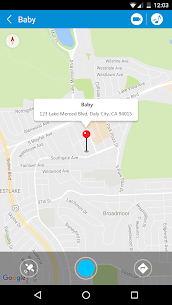
One of TrackView’s key features is its family locator and GPS finder. Once multiple devices use the same TrackView account, you can distinguish each device by assigning it a unique name. This makes it easier to identify and monitor connected smartphones, tablets, or computers.
The GPS tracking system can also record routes, allowing you to review location history instead of relying only on the device’s current position. This feature can be useful for keeping track of connected family devices and checking their movement history.
Turn Your Device into an IP Camera
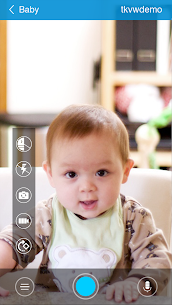
TrackView can transform a compatible smartphone or computer into an IP camera for remote monitoring. After connecting the devices, you can use the viewer application to access the available camera remotely.
The system supports both front and rear camera switching, giving you more flexibility depending on what you need to monitor. This can make a spare smartphone useful as a remote camera without requiring additional dedicated surveillance equipment or complicated wiring.
Motion, Sound, and Event Detection
TrackView includes event detection capabilities designed to notify you when activity occurs around a connected device. Motion and sound detection can help identify activity that may require your attention.
When the application detects a supported event, it can send an instant alert to your connected mobile device. This allows you to react quickly instead of continuously watching the remote camera feed.
Remote Audio and Video Recording
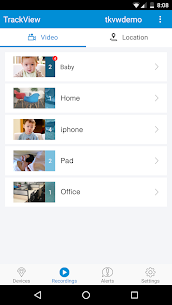
TrackView also provides remote audio and video recording capabilities. You can record clips from a connected device and later play them back through the application.
Cloud storage support allows recordings to be backed up, helping you keep important clips available for later review. This can be useful when you cannot monitor a device continuously but still want to retain recordings of detected events.
Two-Way Audio
The two-way audio feature allows communication between connected devices. Instead of simply watching a remote camera feed, you can also use the available audio functionality to communicate through the connected device.
This feature can make remote monitoring more interactive and can be useful when you need to communicate with someone near the monitored device.
Remote Buzz for Missing Devices
TrackView includes a remote buzz function that can make a connected device ring even when it is set to silent mode. This provides a simple way to locate a misplaced smartphone or another connected device.
Rather than searching through every room manually, you can trigger the remote alert and follow the sound to find the device.
Night Vision and Remote Camera Control
TrackView includes a night vision mode designed to improve visibility in dark environments. When combined with remote camera access, this feature can help you monitor areas where normal lighting is limited.
You can also remotely switch between the front and rear cameras on supported devices. This gives you additional control over how you view the surrounding environment.
Multi-Network and Automatic Network Switching
TrackView supports different network connections, including Wi-Fi, 2G, 3G, and 4G. The application can automatically switch to an available network when the current connection changes.
This automatic network switching helps maintain connectivity when a device moves between different network environments. The application also focuses on real-time access and low latency to deliver event notifications and live video with minimal delay, although actual performance depends on the available network connection.
Secure Device Access
TrackView uses account-based access to connect your devices. The same Gmail account can be used to log in to multiple devices, while assigning unique device names helps you distinguish each connection.
The service also emphasizes secured access so that connected devices remain accessible through the authorized account. Users should always protect their account credentials and avoid sharing login information with other people.
Easy Installation and Setup
Getting started with TrackView requires only a few basic steps. First, install TrackView on the devices you want to connect. The installation process is designed to take only a short amount of time.
Next, log in using your Gmail account credentials. You should use the same account across the devices that you want to connect and give each device a unique name.
Once multiple devices are connected, you can use TrackView Viewer to monitor locations, access available camera functions, trigger a remote buzz, review alerts, and manage recordings from the connected devices.
TrackView Viewer Features
TrackView Viewer combines several monitoring tools in one application. Its main capabilities include GPS location tracking, IP camera access, event alerts, remote audio and video recording, route history, two-way audio, remote device buzzing, night vision, motion detection, sound detection, cloud storage, and remote camera switching.
The application also supports multiple network types and automatic network switching, while its low-latency design aims to provide real-time access to connected devices.
Final Verdict
TrackView Viewer MOD APK offers a comprehensive remote monitoring experience for users who connect multiple devices through the TrackView platform. By combining GPS tracking, IP camera functionality, motion and sound detection, instant alerts, remote recording, two-way audio, route history, and cloud storage, it turns ordinary smartphones and computers into useful connected safety and monitoring devices.
Its simple setup and multi-network support make TrackView convenient for users who want to monitor connected devices without purchasing dedicated equipment. However, available features and performance can vary depending on the device, network connection, and platform being used. For users looking for a practical family locator and remote monitoring solution, TrackView Viewer provides a wide range of useful tools in a single application.


Latest Apps
-
 M3U IPTV3.1.0 Herber Entertainment 19.50 MB Premium Unlocked
 -
 Alarmy26.42.1 Sleep Tracker & Alarm Clock by Delightroom 144.23 MB Premium Unlocked
 -
 Calls Blacklist – Call Blocker4.17.0 Enchan Li 13.94 MB Pro Unlocked
 -
 Radarbot9.35.26 Radarbot Company 150.67 MB Premium Unlocked
 -
 Nebula Icon Pack8.5.9 Stark Designs 110.26 MB Full Version
-