
Font Size

Images


Description
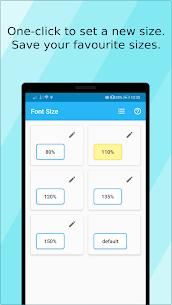
Font Size is an Android app that lets users instantly resize on-screen text between 65% and 250%, offering home-screen widgets, saved presets, and no-restart adjustments for better readability on phones and tablets.
Font Size: The Easiest Way to Fix Small Text on Android
Struggling to read tiny text on your phone or tablet is a common frustration, and it’s one that shouldn’t require a workaround. Font Size solves this problem directly by giving Android users full control over how big or small their system text appears. Instead of squinting at menus and messages, you can adjust your display in seconds and keep it comfortable for daily use.
What Font Size Does
Font Size gives you a fast, direct way to change how text appears across your device. Rather than digging through hidden system menus, you get one clean tool built specifically for text scaling.
The app lets you shrink or enlarge your font size anywhere between 65% and 250% of the default, so you can dial in exactly the size that works for your eyes and your screen. A live preview shows you how each size looks before you commit, which removes the guesswork that usually comes with adjusting display settings.
Core Features That Make It Useful
Font Size packs several practical tools into a lightweight app:
- One-Click Resizing: Adjust your font size instantly, without navigating multiple settings screens.
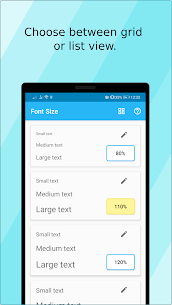
- Live Preview: See exactly how your chosen size will look before applying it.
- Saved Presets: Store your preferred font sizes so you can switch between them whenever you need to.
- Home Screen Widget: Change your font size directly from your home screen, with widget options supporting either 2 or 4 preset sizes.
- No Restart Required: Apply changes instantly — your phone never needs to reboot for the new size to take effect.
Together, these features turn a normally clunky process into something you can manage in a few taps.
Built for Both Phones and Tablets
Font Size isn’t limited to smartphones. The app performs equally well on tablets, giving you consistent control over text size no matter which device you’re using. This flexibility matters for anyone who switches between a phone and a tablet throughout the day and wants the same comfortable reading experience on both.
Whether you’re checking messages on a small screen or browsing on a larger tablet display, Font Size adapts to help you get the clearest possible view of your content.
Why Readability Upgrades Matter
Small, hard-to-read text isn’t just an inconvenience — it can slow you down, cause eye strain, and make everyday tasks like reading emails or browsing apps unnecessarily difficult. Font Size addresses this directly by putting text-size control in your hands rather than leaving you stuck with default settings that may not suit your vision or your device’s screen size.
By allowing precise adjustments rather than a handful of fixed options, the app gives you far more flexibility than most built-in accessibility settings offer.
Permissions the App Requires
Font Size needs a couple of specific permissions to function properly:
- Write System Settings: Required to actually change your device’s font size.
- Run at Startup: Needed so your home-screen widget refreshes correctly and stays in sync after your phone restarts.
Both permissions exist purely to support the app’s core functionality — resizing text and keeping your widget accurate — rather than for any unrelated data access.
Ad-Free Option Available
For users who prefer an uninterrupted experience, Font Size includes an in-app purchase to remove ads permanently. This gives you the choice between using the free version or upgrading for a cleaner, ad-free interface while keeping every core feature intact.
Get a More Comfortable Reading Experience Today
If small text has been making your Android device harder to use, Font Size offers a direct fix. With adjustable sizing from 65% to 250%, live previews, saved presets, and a home-screen widget for instant changes, the app puts full control over your display right at your fingertips — no restart, no hassle.
Download Font Size today and start reading comfortably on your terms.
Related apps


Latest Apps
-
 M3U IPTV3.1.0 Herber Entertainment 19.50 MB Premium Unlocked
 -
 Alarmy26.42.1 Sleep Tracker & Alarm Clock by Delightroom 144.23 MB Premium Unlocked
 -
 Calls Blacklist – Call Blocker4.17.0 Enchan Li 13.94 MB Pro Unlocked
 -
 Radarbot9.35.26 Radarbot Company 150.67 MB Premium Unlocked
 -
 Nebula Icon Pack8.5.9 Stark Designs 110.26 MB Full Version
-