
MemeOS Enhancer

Images


Description
MemeOS Enhancer is a sleek, fast, and fully accessible app that displays your OS version and device details in seconds, complete with security patch info, MD5 checksums, high-quality news, and customizable themes.
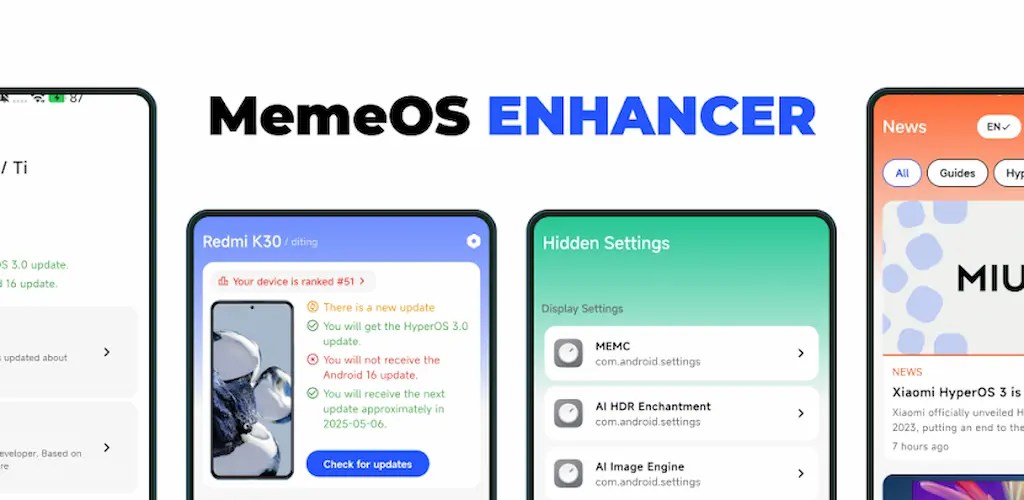
Find Your OS Version Instantly — No Guesswork Required
Tracking down your current OS version should never feel like a chore, but for many users it does. MemeOS Enhancer eliminates that frustration entirely. The app surfaces your OS version in seconds, presenting all the critical details you need in one clean, organized screen. You no longer have to dig through buried settings menus or squint at confusing system screens — MemeOS Enhancer brings everything to the surface immediately.
The app pairs speed with simplicity. Its sleek interface keeps the focus on the information that actually matters, stripping away unnecessary clutter so you can read your device’s software status at a glance. Whether you want to confirm which OS build you are running, check your security patch level, or share device details with a support team, MemeOS Enhancer puts all of that within arm’s reach.
Get Started Effortlessly With the First-Launch Setup Wizard
MemeOS Enhancer respects your time from the very first moment you open it. A built-in setup wizard greets you on launch and walks you through everything you need to get started. The wizard automatically detects the correct device type and method for your specific hardware, so you never have to manually configure anything technical or hunt down the right settings yourself.
Beyond device detection, the setup wizard also gives you full control over your privacy preferences. You can review and configure your privacy options right from the start, ensuring the app behaves exactly the way you want it to before you even reach the main screen. This thoughtful onboarding process means you spend less time setting up and more time getting the information you actually came for.
View All the Important Details You Need in One Place
Once you are inside the app, MemeOS Enhancer delivers a comprehensive snapshot of your device’s software status. You can view your current OS version, your device model information, and your security patch level — all displayed clearly without requiring you to tap through multiple screens or interpret technical jargon.
The security patch detail is especially useful. Knowing whether your device runs the latest security update helps you stay on top of potential vulnerabilities and make informed decisions about whether to update. MemeOS Enhancer surfaces this information cleanly so you can check it in seconds and move on with your day.
The app also gives you access to the full changelog, so you can read exactly what changed between versions. Whether you want to understand what a recent update improved or identify when a specific feature arrived, the changelog keeps you fully informed about your software’s history.
Stay Fully Transparent With Filename and MD5 Checksum Verification
MemeOS Enhancer takes transparency seriously, and it backs that commitment up with real tools. The app displays the filename and MD5 checksum of your current OS build, giving you a straightforward way to verify that your software is exactly what it claims to be.
MD5 checksum verification matters because it lets you confirm the integrity of your OS files. If the checksum matches the official value, you know your build is authentic and untampered. This feature is particularly valuable for users who want to be absolutely certain about the software running on their device, and MemeOS Enhancer makes it accessible to everyone — not just technical users.
Stay Informed With High-Quality News Articles About Mi
MemeOS Enhancer goes beyond device stats by giving you access to a curated feed of high-quality news articles covering a wide range of topics related to Mi. You can browse the latest updates, announcements, and insights without leaving the app. This keeps you connected to everything happening in the ecosystem you care about, all within the same clean interface you already use to check your device details.
Customize Your Experience With Flexible Theme Options
MemeOS Enhancer lets you tailor the visual experience to match your preferences and environment. You can choose from four theme options: Light, Dark, System, and Auto. Light and Dark modes let you lock in your preferred look regardless of your system settings, while System mode mirrors whatever theme your device currently uses. Auto mode goes one step further by adjusting the appearance based on the time of day, switching automatically so the app always feels comfortable to look at.
Designed for Everyone — Full Accessibility Built In
MemeOS Enhancer builds accessibility into its foundation rather than treating it as an afterthought. The app follows WCAG 2.0 accessibility guidelines through a professionally crafted design that works for users of all abilities. It also includes full support for screen readers, ensuring that visually impaired users can navigate every feature and access every piece of information the app provides.
This commitment to inclusive design means MemeOS Enhancer genuinely works for everyone — regardless of how you interact with your device.
Download MemeOS Enhancer and Take Control of Your Device Info Today
MemeOS Enhancer delivers everything you need to stay informed about your device’s software status in one fast, transparent, and beautifully designed app. From instant OS version lookup and security patch details to MD5 verification, news, and full accessibility support, it covers every angle without overcomplicating anything.
Download MemeOS Enhancer today and experience the simplest, most transparent way to know exactly what is running on your device.
Related apps


Latest Apps
-
 X-Plane Flight Simulator12.4.0 Laminar Research 1276.67 MB All Unlocked
 -
 Just Cause 21.0.5-beta Avalanche Studios 44.28 MB Full Game
 -
 Ninja Gaiden Black0.9.53 Team Ninja 16.72 MB Full Game
 -
 WWE 2K14android-v0.2.1 Yuke’s 56.35 MB Full Game
 -
 Subway Surfers3.71.0 SYBO Games 258.87 MB Unlimited Coins/Keys
-