
MiX Camera for Mi Camera

Images
Description
MiX Camera MOD APK combines professional camera controls, beauty tools, AR stickers, 200+ filters, 4K video, collage templates, and an all-in-one photo editor for Android.

MiX Camera MOD APK
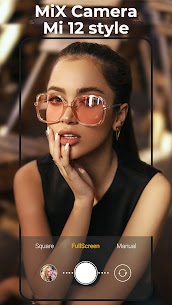
MiX Camera MOD APK turns your Android smartphone into a versatile photography and video tool packed with creative features. Inspired by the camera experience found on Mi devices, the app combines professional camera controls with beauty effects, AR stickers, filters, collage tools, and a powerful photo editor. It supports Android 5.0 and above, giving users an easy way to capture, enhance, and customize photos directly from their phones.
Whether you want to take better selfies, record short videos, create social media content, or edit your favorite photos, MiX Camera provides a wide selection of tools in one application. Its combination of automatic and manual controls also makes it suitable for casual users and creators who want more control over their camera settings.
Real-Time AR Stickers and Filters
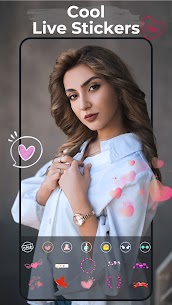
MiX Camera includes real-time AR stickers, emoji stickers, and augmented-reality filters that you can apply while taking photos or recording videos. These effects add a fun visual layer to your content without requiring separate editing software.
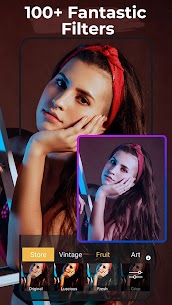
The app also provides more than 200 professional filters, including a random filter option for users who want to experiment with different visual styles. A built-in filter store provides additional filter options, giving you more ways to customize the appearance of your photos.
Beauty Camera for Better Selfies
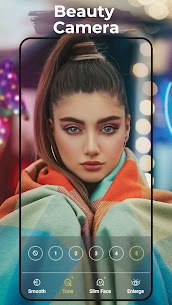
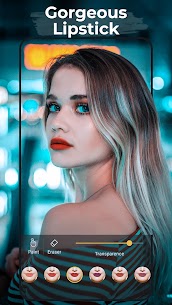
MiX Camera works as a dedicated beauty camera with several tools designed specifically for portrait and selfie photography. You can smooth the skin, adjust skin tone, enhance lips, enlarge eyes, reshape the face, and apply other beauty effects before saving your photos.
The funny camera features also include entertaining masks and stickers that make selfies more expressive. These tools work particularly well for social media photos, profile pictures, and casual content where you want to create a more polished or playful appearance.
Convenient Selfie Features
The app includes several functions designed to make selfie photography easier. You can use the volume keys as a shutter button, allowing you to capture photos without reaching for the on-screen shutter. The front camera also supports a white-screen fill light that can help brighten your face when you take selfies in darker environments.
MiX Camera also provides a floating shutter button, giving you more flexibility when positioning the camera. You can move the shutter control to a convenient location and capture photos more comfortably.
Professional Camera Mode
For users who prefer manual control, MiX Camera includes a professional camera mode with adjustable settings. You can control ISO, white balance, scene modes, and exposure compensation to achieve a specific result instead of relying entirely on automatic camera processing.
The app also supports HDR mode, touch-to-focus, pinch-to-zoom, automatic flash control, grid lines, and mirror camera functionality. These tools give you greater control over composition and exposure while shooting.
4K and Ultra HD Video Recording
MiX Camera supports 4K and Ultra HD camera capabilities on compatible devices. The app also lets you adjust the resolution used for both photos and videos, allowing you to choose settings that suit your storage capacity and image-quality requirements.
You can create short videos by holding down the shutter button, while burst shooting lets you capture multiple images quickly. Timer shooting is also available when you need to take photos without manually pressing the shutter.
Creative Camera Effects
The app includes several creative photography functions for users who want to experiment with different visual styles. Tilt-shift photography can create a miniature-style effect by selectively blurring parts of an image, while the vignette feature adds a subtle visual effect around the edges of your photos.
You can also add date stamps, seal stickers, and watermarks to your images. Silent capture mode is available as well, giving you another option when you want to take photos with minimal camera sound.
All-in-One Photo Editor
MiX Camera is not limited to taking pictures. It also includes an all-in-one photo editor with a wide range of tools for improving and transforming your images after capture.
You can apply filters, crop and rotate photos, adjust contrast, saturation, brightness, and tone, or add text and drawings. The editor also includes splash and spiral effects, allowing you to create more artistic compositions without switching to another application.
Beauty Photo Editing Tools
The built-in beauty editor provides many of the same enhancement options available while taking selfies. You can smooth facial skin, brighten the complexion, adjust skin tone, apply lipstick, enlarge the eyes, reshape the face, change hair color, whiten teeth, and make additional body adjustments.
These tools allow you to refine a portrait after taking the photo, giving you more control over the final appearance. You can make subtle corrections or apply more noticeable effects depending on the style you want to create.
Collage Maker and Creative Templates
MiX Camera includes more than 100 collage templates that let you combine multiple photos into a single composition. You can select different layouts and arrange your pictures for social media posts, personal albums, or creative projects.
The editor also provides frames, backgrounds, fonts, tags, and other decorative elements. You can combine these resources to create customized images instead of relying on standard photo layouts.
ID Photo Maker
Another useful feature is the built-in ID photo tool. MiX Camera allows you to create ID-style photos directly from your smartphone, which can be convenient when you need to prepare a properly arranged portrait without using a separate application.
The editor also supports different image ratios for platforms such as Instagram and Facebook, making it easier to prepare photos for different publishing formats.
Advanced Photo Effects
MiX Camera provides additional creative effects such as double-stacking artwork, splash effects, spiral effects, tilt-shift, and vignette. These options give you more flexibility when creating artistic images.
You can also add frames, backgrounds, fonts, and tags to personalize your photos. After editing, the application provides options for adjusting the image size and selecting an appropriate save format.
Easy Photo Management
The application includes an integrated album for managing captured and edited photos. This makes it easier to review your work without immediately switching to another gallery application.
MiX Camera also provides default camera settings and a reset option, allowing you to restore the camera configuration when you want to return to the original setup.
Why Use MiX Camera?
MiX Camera stands out because it combines a camera, selfie editor, professional camera mode, AR effects, and photo editing tools inside one application. Instead of installing separate apps for beauty editing, collages, filters, and basic photography, you can access many of these functions from a single interface.
Its combination of manual camera controls and creative editing features makes it suitable for different types of users. Beginners can rely on automatic features and filters, while more experienced users can adjust ISO, white balance, exposure, and other settings manually.
Final Verdict
MiX Camera MOD APK provides a comprehensive photography experience by combining a professional camera, beauty selfie tools, AR effects, filters, video recording, and an extensive photo editor in one application. With more than 200 filters, 100+ collage templates, 4K support on compatible devices, manual camera controls, and numerous editing effects, it offers plenty of options for both casual photography and creative content production.
For Android users who want an all-in-one camera and photo editing solution, MiX Camera is a practical choice. Its combination of professional controls, beauty features, creative effects, and easy-to-use editing tools makes it useful for selfies, social media content, everyday photography, and more creative projects.
Developer's apps


Related apps


Latest Apps
-
 LeapAhead2.8.8 LeapAhead Books Corp 50.89 MB Premium Unlocked
 -
 S27 Launcher One Ui inspired2.1.311 YatoPlayroll 24.01 MB Premium Unlocked
 -
 Clone App4.2.4 SZPY Tech 59.29 MB VIP Unlocked
 -
 Windscribe VPN4.3.2360 Windscribe 32.86 MB Premium Unlocked
 -
 Leghe Fantacalcio® Serie A13.2.3 Fantacalcio s.r.l. 40 MB Premium Unlocked
-