
My Boy! – GBA Emulator
Pixel Respawn LLC
6 MB
2.1.1
Varies with device

Full Version
Images
Description
My Boy! MOD APK is a fast Game Boy Advance emulator for Android with high game compatibility, multiplayer link support, cheat codes, save states, Google Drive sync, and customizable controls.

My Boy! GBA Emulator
My Boy! MOD APK turns your Android device into a portable Game Boy Advance gaming system with fast and reliable emulation. The emulator supports a wide range of GBA games and can run them on everything from entry-level smartphones to modern Android tablets. It recreates most aspects of the original Game Boy Advance hardware while adding useful features that make playing classic games more convenient on modern devices.
The emulator focuses on performance, compatibility, and customization. You can configure on-screen controls, create different key-mapping profiles, use cheat codes, save your progress at any point, and even connect with other devices for multiplayer games. With its combination of classic GBA compatibility and modern Android features, My Boy! provides a practical way to enjoy your favorite handheld games.
Fast and Reliable Emulation
My Boy! uses a JIT recompiler to deliver fast emulation performance. This technology helps the emulator process Game Boy Advance games efficiently, allowing many titles to run smoothly even on lower-end Android hardware.
The emulator also provides broad game compatibility and can run nearly all GBA games without major issues. Performance can still vary depending on your device, game, and Android configuration, but the application is designed to provide a smooth experience across a wide range of hardware.
Multiplayer Link Cable Support
One of My Boy!’s standout features is its ability to emulate the original Game Boy Advance link cable. You can connect games running on the same Android device or establish a connection between separate devices using Bluetooth or Wi-Fi.
This feature allows compatible multiplayer games to recreate the experience of connecting multiple Game Boy Advance consoles. It can be especially useful for classic multiplayer titles that originally required a physical link cable.
Sensor and Rumble Support
My Boy! can take advantage of several hardware features available on your Android device. The emulator supports gyroscope, tilt, solar sensor, and rumble emulation through compatible phone sensors and the device vibrator.
This allows certain GBA games that rely on special hardware or motion-related features to work with modern Android hardware. However, the exact behavior depends on the capabilities of your smartphone or tablet.
GameShark and Action Replay Cheats
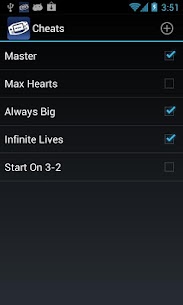
The emulator includes extensive cheat support for players who want to modify their gaming experience. You can enter multilined GameShark, Action Replay, and CodeBreaker codes directly into the application.
You can also enable or disable individual cheats while the game is running. This makes it easy to experiment with different codes without restarting the game every time you want to change your configuration.
Built-In BIOS Emulation
My Boy! uses high-level BIOS emulation, which means you do not need to provide a separate GBA BIOS file to use the emulator. This simplifies the initial setup and allows you to start configuring your games without dealing with additional BIOS files.
The emulator handles the required BIOS functionality internally, helping keep the setup process straightforward for Android users.
IPS and UPS ROM Patching
My Boy! supports IPS and UPS ROM patching, giving users another way to customize compatible game files. These patch formats are commonly used for modifications, translations, and other changes made to GBA ROMs.
With built-in patching support, you can apply compatible patches through the emulator instead of relying entirely on separate applications for this part of the workflow.
OpenGL and GLSL Shader Support
The emulator provides an OpenGL rendering backend for devices with suitable graphics hardware. It also includes normal rendering for devices that do not have a compatible GPU.
My Boy! supports GLSL shaders that can add different visual effects and video filters to your games. These options allow you to customize the appearance of classic GBA graphics and create a visual experience that better matches your personal preference.
Fast-Forward and Slow-Motion Controls
My Boy! includes speed controls that can make certain parts of games more convenient. The fast-forward function lets you quickly move through lengthy dialogue, slow animations, or sections that normally take a long time.
The emulator can also slow games down when necessary. This can help when you encounter a difficult section that requires more precise timing than the normal game speed allows.
Save Games Anytime
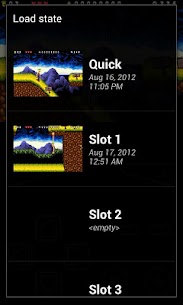
You do not have to rely exclusively on the original save system of a game. My Boy! allows you to save your progress at almost any point using its save-state functionality.
You can also capture a screenshot alongside your saved game state, making it easier to identify different points in your progress. This feature is particularly useful for difficult games where reaching a specific location again would otherwise take considerable time.
Google Drive Save Synchronization
My Boy! can synchronize your saved games with Google Drive. This feature lets you continue playing across multiple compatible devices without starting your progress from the beginning.
For example, you can play a game on your smartphone, synchronize the save data, and then continue from the same point on another Android device. This makes the emulator more flexible for users who regularly switch between devices.
Customizable On-Screen Controls
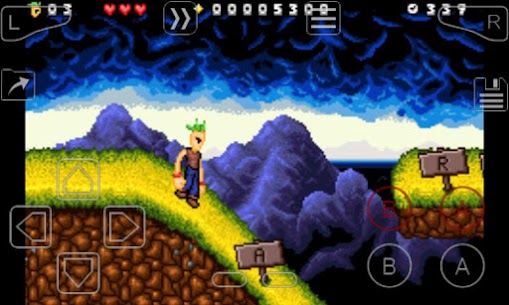
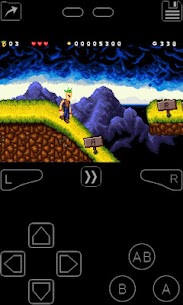
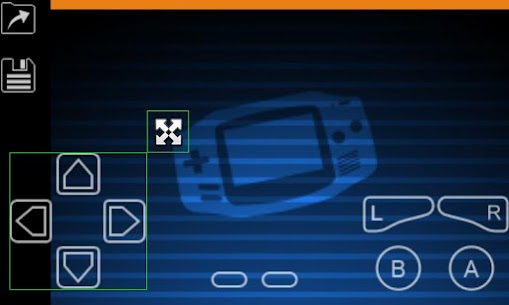
My Boy! provides an on-screen keypad designed for touchscreen gaming. The emulator supports multi-touch on compatible Android versions and also provides shortcut buttons for common actions such as loading and saving game states.
You can customize the controls to make them more comfortable for different games. The screen layout editor lets you change the position and size of individual controls as well as the game display area.
Screen Layout and Key Mapping Profiles
Different GBA games can benefit from different control configurations. My Boy! lets you create multiple screen-layout and key-mapping profiles so you can quickly switch between different configurations.
You can position buttons according to your preferred playing style and adjust the game display to fit your device. This customization makes the emulator more comfortable to use on smartphones and tablets with different screen sizes.
Launch Games from Your Android Desktop
My Boy! also lets you create shortcuts for your favorite games directly on your Android desktop. Instead of opening the emulator and searching through your game library every time, you can use a shortcut to launch a selected title more quickly.
This small feature makes accessing frequently played games more convenient and gives the emulator a more integrated feel within the Android operating system.
Clean and Simple Interface
Despite offering a large collection of advanced emulation features, My Boy! maintains a clean and straightforward user interface. The application integrates with modern Android devices while keeping important gaming and configuration options easy to access.
The combination of a simple interface and extensive customization makes the emulator suitable for both newcomers and experienced GBA players.
My Boy! MOD APK Features
My Boy! MOD APK is designed for users looking for a more flexible Game Boy Advance emulation experience on Android. Its feature set includes fast JIT-based emulation, broad game compatibility, multiplayer link support, cheat-code functionality, save states, cloud synchronization, customizable controls, screen-layout profiles, OpenGL rendering, GLSL shaders, and speed controls.
These features allow you to customize the way you play instead of being limited to the basic experience offered by the original Game Boy Advance hardware.
Game Compatibility and Legal ROMs
My Boy! does not include any games with the application. You need to obtain your Game Boy Advance games separately through legal means and place the compatible files on your Android device storage.
Once your legally obtained game files are available on the device, you can load them through the emulator and configure the controls, graphics, save states, and other available options according to your preferences.
Final Verdict
My Boy! MOD APK offers a comprehensive Game Boy Advance emulation experience for Android users who want fast performance, extensive compatibility, and plenty of customization options. Its JIT recompiler helps deliver smooth emulation, while features such as link cable emulation, cheat support, save states, Google Drive synchronization, customizable controls, and GLSL shaders provide capabilities far beyond a basic GBA emulator.
Whether you want to revisit classic Game Boy Advance titles on a smartphone or build a more convenient mobile retro-gaming setup, My Boy! provides the tools needed for a flexible experience. Feature availability and performance can vary depending on your Android device, but its combination of speed, compatibility, and customization makes it a versatile choice for GBA emulation.

Related apps


Latest Apps
-
 Headway3.181.0 Books Made Easy Corp 17.29 MB Premium Unlocked
 -
 Le Figaro6.5.0 Société du Figaro 69.03 MB Premium Unlocked
 -
 MyJio8.0.45 Jio Platforms Limited 124.44 MB Premium, No Ads
 -
 MovieBox4.0.03.1020.03 TRANSSNET (HK) LIMITED 91.05 MB Premium Unlocked
 -
 Picsart31.0.6 PicsArt Inc. 77.18 MB Gold Unlocked
-