
PDF to Image – PDF to JPG

Images


Description
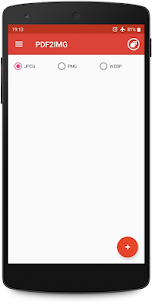
PDF to Image – PDF to JPG in various formats like JPG, PNG, and WebP. PDF to JPG Converter – Convert PDF to images in various formats like JPG, PNG and WebP

In today’s digital age, the ability to seamlessly convert Portable Document Format (PDF) files into various image formats has become increasingly valuable. Whether you need to extract specific pages or convert an entire document, having a reliable tool that can transform PDFs into high-quality JPG, PNG, or WebP images can streamline your workflow and enhance your productivity.
One such tool that stands out for its simplicity and effectiveness is the PDF to JPG Converter. This user-friendly application allows you to effortlessly convert your PDF files into a wide range of image formats, including the widely-used JPG, PNG, and WebP formats. With its intuitive interface and straightforward process, even those with limited technical expertise can navigate the conversion process with ease.
The conversion process is remarkably simple and can be broken down into six straightforward steps:
- Select the PDF file: Begin by clicking on the “+” icon within the application. This will prompt you to browse and select the PDF file you wish to convert.
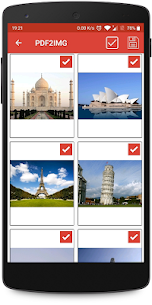
- Preview and customize: Once the PDF file is loaded, you can preview its contents. This step allows you to deselect any unwanted pages or images, ensuring that only the desired content is included in the conversion.
- Initiate the conversion: With your desired pages selected, simply click the “Convert to Image/Images” button, and the application will begin the conversion process.
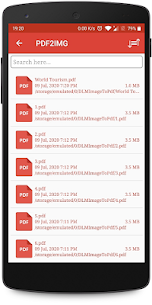
- Access the converted files: Upon completion of the conversion, a new folder containing the converted images will be added to the list within the application’s interface.
- View the converted images: By navigating to the newly created folder, you can easily view and inspect all the converted images, ensuring that the conversion process was successful and the resulting images meet your expectations.
- Share or delete the images: The PDF to JPG Converter offers additional functionality, allowing you to share the converted images with others or delete them from the application if they are no longer needed. This can be accomplished by long-pressing the desired image or images within the image list.
One of the standout features of the PDF to JPG Converter is its ability to function offline. Unlike many online conversion tools that require an active internet connection, this application can be used without any internet connectivity, ensuring that you can convert your PDF files into images anytime, anywhere, without relying on an external server or service.
The versatility of this tool extends beyond just converting PDFs to JPG format. It also supports conversion to other popular image formats, such as PNG and WebP. PNG (Portable Network Graphics) is a widely-used format that supports lossless compression, making it an excellent choice for preserving image quality, while WebP is a modern image format developed by Google that offers superior compression and faster loading times, particularly for web-based applications.
Whether you’re a professional working with graphics or documents, a student in need of extracting images from PDFs for presentations or assignments, or simply someone looking to repurpose PDF content in a more visually appealing format, the PDF to JPG Converter is a valuable tool that simplifies the conversion process and delivers high-quality results with minimal effort.
Related apps


Latest Apps
-
 Forgotten Memories: Remastered1.9.145 Psychose Interactive Inc. 3861.78 MB Full Game
 -
 Grok1.1.49-release.00 SpaceX Super Intelligence 48.31 MB Premium Unlocked
 -
 XNXX1.63.1 XNXX 17.38 MB Premium Unlocked
 -
 Spotify9.1.94.1929 Spotify AB 87.68 MB Premium Unlocked
 -
 CapCut19.10.0 Bytedance Pte. Ltd. 310.97 MB Pro Unlocked
-