
Phi Launcher MOD APK (Premium Unlocked)

Images




Mod Info
- Premium Unlocked
Description
Discover Phi Launcher, the minimalist Android launcher that combines speed, customization, and developer-friendly features like multi-spaces, app groups, and live coding stats for an efficient, bloat-free mobile experience.

Phi Launcher delivers a streamlined Android launcher experience tailored for users seeking lightning-fast performance and a clutter-free home screen, all while preserving the flexibility to customize everything to their liking. No unnecessary extras or rigid designs here—just a powerful tool that adapts seamlessly to your workflow.
Introducing Phi Launcher: Speed Meets Simplicity
Users love Phi Launcher because it strips away the excess that plagues many Android launchers. Developers crafted this tool specifically for those who demand a responsive home screen without sacrificing control. You get pure performance right out of the gate, with no bloated features forcing you into unwanted setups. Instead, Phi Launcher empowers you to shape your interface exactly as you envision it. Imagine launching apps in milliseconds, navigating effortlessly, and tweaking layouts on the fly—all without the lag or visual noise of traditional options.
This launcher shines in its commitment to minimalism. It avoids the common pitfalls of overwhelming animations, ads, or pre-set themes that lock you in. You take the reins from day one. Whether you’re a power user juggling multiple workflows or someone who just wants a clean daily driver, Phi Launcher delivers reliability and speed. Active development ensures it evolves with user needs, incorporating feedback to refine every aspect. As a result, it stands out as a top choice for Android enthusiasts tired of one-size-fits-all solutions.
Spaces: Effortless Multi-Screen Management
Phi Launcher’s Spaces feature revolutionizes how you handle home screens by letting you create entirely independent layouts within one launcher. You simply long-press the home screen to switch between them instantly—no swiping through endless pages or dealing with clunky transitions. Picture this: craft a “Work” space packed with productivity apps like email, calendars, and project managers, arranged for quick access during office hours. Then, flip to a “Personal” space with social media, streaming services, and entertainment icons tailored for downtime.
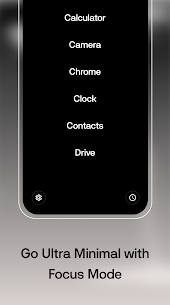
You can build as many spaces as needed—a “Focus” layout stripped bare for deep work sessions, a “Gaming” setup with controllers and emulators front and center, or even a “Travel” mode optimized for maps and booking apps. Each space operates fully separately, complete with its own icons, widgets, wallpapers, and arrangements. This setup prevents cross-contamination; your professional tools stay hidden during leisure time, and vice versa. Developers designed Spaces to mimic the fluidity of desktop virtual desktops but optimized for touch interfaces. You save time switching contexts, boosting productivity without restarting your phone or installing multiple launchers. Users report seamless transitions that feel intuitive, making it a game-changer for multitaskers.
App Groups: Flexible Collections at Your Fingertips
Say goodbye to rigid app pinning with Phi Launcher’s App Groups, which let you organize app collections directly on your home screen in versatile List, Grid, or Circle formats. You resize each group freely—make it compact for quick glances or expansive for detailed views—then restyle colors, icons, and borders to match your aesthetic. Reorder items within groups effortlessly by dragging and dropping, creating a personalized hub that evolves with your habits.
This approach outshines standard launchers’ limited pinning, offering true flexibility. For instance, group your messaging apps (WhatsApp, Telegram, Signal) in a tight Circle for one-tap access during chats. Or arrange fitness trackers, music players, and health apps in a Grid for your morning routine. You control every detail independently per group, stacking them across spaces without overlap. Phi Launcher tracks your usage patterns subtly, suggesting optimizations while you maintain full authority. This feature shines for busy users who juggle categories like work tools, family apps, or hobbies, turning your home screen into a dynamic command center rather than a static grid.
Innovative Folders: Direct Access Without Delays
Phi Launcher reimagines folders with four distinct types that prioritize speed and usability, ensuring apps remain tappable straight from the home screen—no frustrating opens required. Opt for classic 2×2 or 3×3 grid folders where icons sit ready for immediate launches. You tap any app icon directly, bypassing the extra step that slows down other launchers.
Explore additional styles like stackable lists or radial expansions for variety. Resize folders dynamically to fit your screen real estate, and customize transparency or animations for a polished look. Developers focused on tactile feedback, so gestures feel natural—swipe to expand, pinch to resize. This setup proves ideal for power users with dozens of apps; group utilities in a 2×2 corner folder for instant calculator or flashlight access. Families appreciate it too, as parents organize kids’ games without cluttering main views. By eliminating folder-diving friction, Phi Launcher keeps your workflow uninterrupted, proving that simplicity enhances efficiency.
Radial Wheel: Gesture-Driven Quick Launch
Access your favorite apps via the Radial Wheel, a circular menu that activates with one intuitive gesture—always ready at your fingertips. Choose the Classical style, which pops open on a simple tap for immediate selections, or the Modern style triggered by a long press for a subtler approach. You populate the wheel with up to a dozen high-frequency apps, arranging them radially for thumb-friendly reaches.
This feature draws inspiration from game controllers and smartwatch interfaces, adapting seamlessly to phones. During commutes, spin the wheel to launch navigation or podcasts without fumbling. In meetings, long-press for discreet note-taking tools. Customize animations, speeds, and even haptic feedback to suit your device. Users praise its reliability—no missed gestures or lag—making it a staple for one-handed operation. Phi Launcher ensures the wheel integrates across spaces, remembering your preferences per layout for ultimate convenience.
Global Search: Unified Power in One Spot
Phi Launcher’s Global Search unifies your device’s intelligence, letting you query apps, contacts, calendar events, and shortcuts from a single, lightning-fast screen. Type once, and results appear instantly—no app-hopping required. An inline calculator handles math on the fly; enter “1523” for quick computations. Dial numbers directly or jump into WhatsApp messages with a tap.
This tool excels in practicality. Search “meeting tomorrow” to surface calendar entries with one-handed navigation. Contacts integrate deeply, showing recent calls or messages alongside profiles. Shortcuts extend to system functions like Wi-Fi toggles or battery stats. Developers optimized it for privacy, processing everything locally without cloud dependencies. Voice input adds hands-free control, perfect for driving. By consolidating search, Phi Launcher slashes time wasted switching contexts, empowering you to stay in flow.
Dev Panel: Real-Time Coding Stats Hub
Developers rejoice with the Dev Panel, a dedicated screen that aggregates live data from GitHub, LeetCode, and Codeforces profiles in one glanceable view. No more browser tabs—Phi Launcher fetches commits, pull requests, problem-solving streaks, ratings, and contest histories automatically. You configure profiles once, and it updates in real-time via secure API pulls.
Visualize progress with charts tracking daily contributions or rank climbs. Toggle dark mode or metric filters for focus. This panel motivates during coding marathons, reminding you of wins without distractions. Remote workers sync across devices effortlessly. Phi Launcher’s commitment to devs extends here, blending productivity with passion projects.
App Drawer: Customizable App Organization
Dive into the App Drawer with four layout options—Grid for overviews, Minimal List for scrolling efficiency, Pager for tabbed browsing, or Tiles for visual flair. Sort apps by usage frequency so favorites rise to the top. Search yields quick-opens on single results, with findings pinned at the bottom for easy one-handed grabs. An alphabetical scrollbar speeds navigation, and custom fonts let you personalize typography.
You tweak everything: icon sizes, spacing, even dark/light themes per style. Frequent flyers like browsers or editors launch in under a second. This drawer adapts to your habits, learning without invading privacy, making app discovery intuitive.
Built-in Widgets: Personalized Dashboards
Access the Phi Widgets screen for built-in tools tracking app usage stats, habit streaks, upcoming events, and dev metrics—all in elegant, stackable cards. Pair it with the App Widgets screen, where you vertically stack standard Android widgets into a custom dashboard. Monitor weather, fitness goals, or RSS feeds in one scrollable view.
Mix and match for dashboards like “Daily Health” (steps, calories, sleep) or “Project Overview” (tasks, deadlines). Resizing and opacity controls ensure clean integration. This duo transforms your launcher into a proactive assistant.
Active Development and Community Engagement
Phi Launcher thrives on ongoing updates, with developers pushing refinements based on real user input. Join the Telegram community to share feedback, report issues, or test beta features early. This collaborative spirit keeps it ahead, incorporating requests like new gestures or integrations swiftly.
Related apps


Latest Apps
-
 Kilonotes3.35.1.1 合肥栈顶信息科技有限公司 188.58 MB Premium Unlocked
 -
 Print Master5.23.0 ZHUHAI QUIN TECHNOLOGY CO.LTD. 113.28 MB Premium Unlocked
 -
 StandBy Mode2.2.7.575 Zetabit Tecnologia 28.13 MB Premium Unlocked
 -
 AndroVid7.3.3 Fogosoft Ltd 76.66 MB Premium Unlocked
 -
 X (Twitter)12.33.1-prod.01 X Corp. 151.63 MB Premium Features
-