
PlayerPro Music Player (Pro) MOD APK (Full Version)

Images
Mod Info
- Full Version
Description
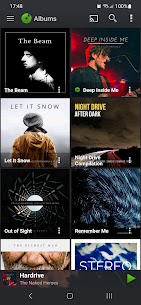
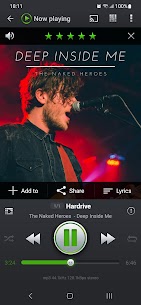
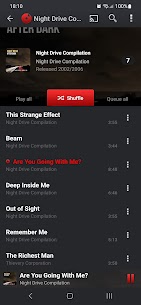
PlayerPro Music Player features a beautiful, fast and intuitive interface, alongside powerful audio configuration options. In addition, there is a choice of several free plugins to complement it: Skins, DSP Pack… This app is an advanced music and video player for Android devices. It is known as PlayerPro Music Player.

Note: This PlayerPro Music Player app is standalone. You should uninstall the PlayerPro Music Player (Free) version if you have previously installed it.
KEY FEATURES:
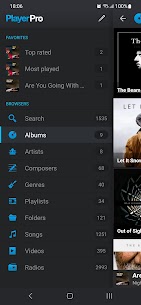
• Browse and play your music in many different ways, such as by albums, artists, or folders, using the PlayerPro Music Player.
• Browse and play your videos by folders.
• Listen to your music while driving thanks to the built-in Android Auto (integrated into your car system) or standalone (via the Android Auto app). PlayerPro Music Player especially enhances the experience.
• Stream your music to your TV or any Chromecast Audio compatible device.
• Liven up your music library with album artwork, artist/composer pictures, and genre illustrations that you can select from a variety of sources: ID3 tags (embedded artwork), SD card folders, Gallery app, and the Internet.
• Change the user interface of the Player by installing one of the many available Skins.
• Customize the layout, choosing between Grid or List views, which is a feature of PlayerPro Music Player.
• View and edit the lyrics embedded in the ID3 tags of your music files.
• ID3 Tags editing, in single or batch mode.
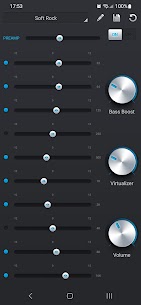
• Default mixable audio effects: 5 band graphic equalizer with 15 default presets, stereo widening effect, reverb effects (large/medium hall, small/medium/large room), bass boost effect, and volume control.
• Free additional professional DSP plugin: High-Res audio (up to 32-bit, 384kHz), 10 bands graphic equalizer with 20 default presets, Pre-Amp control, bass boost control, stereo widening control, left-right volume control, optional mono output. Gapless playback. Auto/Manual crossfade. Replay gain. Audio Limiter. Go to Settings > Audio and select the “Download DSP pack” option to install the free plugin.
• Music stats and smart playlists: Recently added, Top Rated, Most/Recently/Least played. Build additional custom playlists using the smart playlist editor and the many different criteria it offers.
• Import and export music history and ratings from your favorite desktop music player, all while facilitated by the PlayerPro Music Player app.
• Music folder selection: restrict your music library to a specific folder.
• Choice of 2 lock screen widgets with many customization options: unlock slider, sound toggle, skip tracks using volume buttons, and swipe gestures. Additionally, you can adjust the background selection, controls selection, time display, and skin selection.
• Choice of 5 different home screen widgets (4×1, 2×2, 3×3, 4×4, 4×2). All widgets are customizable and skinnable. There are 6 different skins available, and you have the option to display the artist picture instead of album artwork. You can also display ratings, shuffle/repeat controls, etc.
• Google Drive backup/restore: automatically backup your playlists, music stats, and settings to Google Drive as supported by the PlayerPro Music Player.
• Supports most popular Scribblers.
• Sleep timer with fade out.
• Share text notifications, album/artist artwork on your favorite Social Networks.
• Headset support. Customize long press and double/triple press actions.
• Library wide search. Voice search and Google Assistant support.
• Swipe gestures: swipe album art to skip songs, double-tap, or long-press to pause/resume playback.
• Shake it feature: give your phone a shake to play the next/previous song (e.g.: shake top to bottom or bottom to top to play the next/previous song).
Explore these features and more with the PlayerPro Music Player app.
Related apps


Latest Apps
-
 WG Tunnel5.8.1 Zane Schepke 17.87 MB Original
 -
 Charging Master5.37.44 LiteAPEX Tech 20.92 MB VIP Unlocked
 -
 Shazam16.63.0-261008 Apple Inc. 29.37 MB Premium Unlocked
 -
 Into the Badlands Blade Battle1.5.114 Reliance Games 248.52 MB Mod Menu
 -
 World War 2: Strategy Games1212 Joynow Studio 531.14 MB Unlimited Money
-