
RecycleMaster

Images

Description
Recycle Master MOD APK adds a recycle bin to Android, allowing you to back up deleted files, recover photos and videos, protect private content, and automatically clean old files.
Recycle Master MOD APK – Recovery File & Deep Recovery
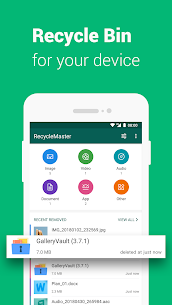
Recycle Master MOD APK brings a convenient recycle bin feature to Android devices, similar to the Trash on Mac or Recycle Bin on Windows PC. If you have ever accidentally deleted an important photo, video, audio file, document, or another type of file, Recycle Master can help provide an extra layer of protection before permanent deletion.
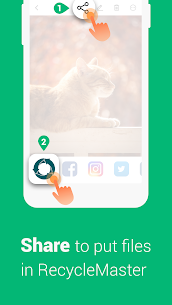
Instead of immediately removing files from your device, you can share them with Recycle Master before deleting them. The application stores the selected files inside its own recycle bin, allowing you to access and restore them whenever you need them. This makes Recycle Master a practical solution for users who frequently manage large numbers of files on their smartphones.
Easily Recover Deleted Files
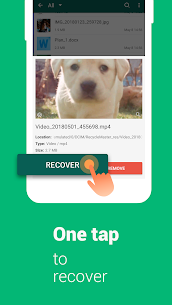
Recycle Master focuses on making file recovery simple. When you send photos, videos, documents, or other files to its recycle bin, the application keeps a backup that you can access later. If you accidentally remove something important, you can open Recycle Master, locate the file, and restore it to your device.
The recovery process works directly from the application, so you do not need to search through complicated menus. This feature can be particularly useful when managing personal photos, work documents, downloaded files, and other important content.
Deep Recovery
Recycle Master also includes a Deep Recovery feature designed to scan your device for files that have already been deleted. This provides another option when a file was removed before you had the opportunity to back it up in the recycle bin.
Deep Recovery attempts to locate deleted content and recover as many files as possible. However, recovery is not guaranteed because the availability of deleted data depends on factors such as storage activity and whether the original data has already been overwritten.
Protect Private Files with App Lock
Deleted files stored inside a recovery application can still contain sensitive or personal information. Recycle Master addresses this concern by allowing you to protect the application with a password.
Once you enable the password lock, other people who access your smartphone will need to enter the correct password before they can view the content stored inside Recycle Master. This provides an additional privacy layer for photos, videos, documents, and other files that you do not want other people to access.
Auto Clean
Keeping every deleted file indefinitely can eventually consume valuable storage space. Recycle Master’s Auto Clean feature helps manage this problem by automatically removing older files from the recycle bin after a specified period.
You can configure the cleaning schedule according to your preference, including weekly, monthly, or seasonal intervals. Once the selected period expires, unnecessary backed-up files can be removed automatically, helping you maintain available storage without having to clean the recycle bin manually.
A Recycle Bin for Android
After installing Recycle Master, your Android device gains a dedicated space for files that you may want to remove temporarily rather than delete permanently. You can place photos, videos, documents, and other private files inside the application’s dumpster and access them whenever necessary.
This approach can also work as a temporary storage area. Instead of permanently deleting files that you might need later, you can keep them inside Recycle Master and decide whether to restore or remove them permanently at a later time.
Backup Files Before Deleting
Recycle Master makes the backup process straightforward. You can share a photo or video with the application before deleting it, and Recycle Master will store the file in its recovery area. This gives you an additional safety net when cleaning up your smartphone.
The feature can be especially useful when you regularly delete screenshots, duplicate photos, downloaded videos, documents, or other files but sometimes need to retrieve something after removing it.
Instantly Retrieve Different File Types
Recycle Master supports more than just image recovery. Depending on your device and the files stored in the application, you can use it to manage pictures, videos, audio files, documents, and other types of content.
Having different file types available from the same recovery interface makes it easier to manage deleted content without relying on separate applications for each category.
Why Use Recycle Master?
Recycle Master is useful for Android users who want additional protection against accidental file deletion. The application combines a recycle bin, file backup system, deep recovery scanner, password protection, and automatic cleanup into one package.
Its recycle bin feature provides a convenient way to temporarily store files, while Deep Recovery gives you another option when you have already deleted something. At the same time, the password lock protects private content and Auto Clean helps prevent the recovery folder from consuming too much storage.
Recycle Master MOD APK Features
Recycle Master MOD APK provides a convenient file recovery experience with several useful tools for managing deleted content. Its main features include:
- Easy Backup: Share photos, videos, and other files with Recycle Master before deleting them.
- File Recovery: Restore supported pictures, videos, audio files, documents, and other content.
- Deep Recovery: Scan the device for previously deleted files and attempt to recover them.
- Password Lock: Protect private files stored inside the application.
- Auto Clean: Automatically remove older backed-up files according to your selected schedule.
- Android Recycle Bin: Keep unwanted files temporarily instead of permanently deleting them immediately.
Final Verdict
Recycle Master MOD APK offers a practical way to add recycle bin and file recovery functionality to Android. Instead of permanently losing a file immediately after deletion, you can use its backup system to keep important content available for restoration. The Deep Recovery feature provides an additional recovery option for files that have already been deleted, although successful recovery cannot be guaranteed.
With password protection, automatic cleanup, support for multiple file types, and an easy-to-use recycle bin, Recycle Master can be a useful companion for anyone who frequently manages files on an Android device. It provides an extra layer of protection against accidental deletion while keeping file recovery and storage management in one convenient application.
Developer's apps



Related apps


Latest Apps
-
 Forgotten Memories: Remastered1.9.145 Psychose Interactive Inc. 3861.78 MB Full Game
 -
 Grok1.1.49-release.00 SpaceX Super Intelligence 48.31 MB Premium Unlocked
 -
 XNXX1.63.1 XNXX 17.38 MB Premium Unlocked
 -
 Spotify9.1.94.1929 Spotify AB 87.68 MB Premium Unlocked
 -
 CapCut19.10.0 Bytedance Pte. Ltd. 310.97 MB Pro Unlocked
-