
Tenada

Images


Description
Tenada MOD APK is a powerful mobile graphic design app for creating 3D logos, animated text, posters, thumbnails, intro videos, and social media graphics directly from your phone.

Tenada MOD APK – 3D Logo Maker, Text Editor & Graphic Design
Tenada MOD APK turns your smartphone into a versatile graphic design studio for creating professional-looking visual content without relying on complicated desktop software. The app focuses on 3D graphic design, allowing you to create logos, realistic 3D text, animated typography, posters, thumbnails, intro videos, and other digital content directly from your mobile device.
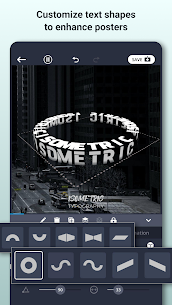
Unlike basic graphic design apps that only provide flat text and image editing, Tenada lets you work with elements in a real 3D environment. You can rotate text, photos, and videos along the X, Y, and Z axes, then enhance them with materials, lighting, shadows, textures, depth, and animations. This gives creators more flexibility when producing branding assets, social media graphics, gaming designs, and video content.
3D Logo Maker & Branding
Tenada works as a dedicated logo maker for users who want to create unique branding graphics quickly. You can start with professional logo templates or build a design from scratch using customizable 3D text and visual effects.
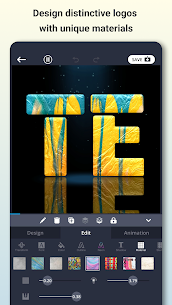
The app supports different logo styles, including wordmarks, 3D logos, gaming logos, e-sports clan logos, name logos, and profile graphics. You can customize fonts, spacing, colors, shadows, lighting, textures, materials, and 3D depth to match your preferred visual identity.
After finishing your design, you can export a logo as a transparent PNG and use it for merchandise, T-shirts, posters, banners, stickers, thumbnails, profile pictures, business materials, and other branding projects.
Create Realistic 3D Text
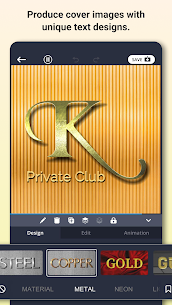
Tenada goes beyond ordinary typography by allowing you to transform standard text into detailed 3D designs. You can experiment with effects such as neon, fire, metal, glass, outlines, shadows, lighting, textures, bevels, and embossing to create more distinctive typography.
The 3D editor also lets you manipulate text from different angles. By controlling the X, Y, and Z axes, you can create depth and perspective that would be difficult to achieve with a conventional mobile text editor.
Animated Typography
Static text is only part of what Tenada can create. The app also supports animated typography, allowing you to turn 3D text and graphic elements into motion content.
You can animate text, photos, and videos while controlling the speed, direction, angle, timing, and duration of each animation. These tools are useful for creating YouTube intros, animated titles, end screens, logo animations, motion graphics, and other video elements.
Tenada also includes dynamic effects such as Shatter, which can add a more dramatic appearance to intro videos, posters, social media content, and animated branding.
Poster, Thumbnail & Social Media Design
Tenada provides tools for creating different types of graphic content directly from your phone. You can design posters, flyers, banners, stickers, event graphics, profile images, YouTube thumbnails, and social media posts without switching between multiple applications.
You can combine images and text layers, add 3D titles to photos, place animated elements over video clips, and create layouts specifically for popular social platforms.
The app provides convenient canvas sizes for different types of content, including 1:1 designs for logos, 4:5 layouts for Instagram posts, 16:9 formats for YouTube thumbnails and intro videos, and 9:16 formats for TikTok, Instagram Reels, and YouTube Shorts.
Create Intro Videos & Motion Graphics
Tenada can also help you produce video-based branding content. You can create intro videos, outro screens, title cards, animated text overlays, and motion graphics for your channel, business, or social media account.
By combining 3D text, animations, photos, and video elements, you can create branded content that looks more dynamic than simple static graphics. This makes the app useful for YouTubers, gamers, streamers, social media creators, and businesses that regularly publish video content.
Edit Photos & Videos in 3D
One of Tenada’s notable features is its ability to combine graphic design with practical photo and video editing tools. You can place photos, videos, and text inside a 3D workspace and manipulate them from different perspectives.
You can rotate elements across three axes, adjust lighting, add soft shadows, apply bevel and emboss effects, and combine multiple layers with 3D titles. This provides more creative control when building complex visual compositions.
The app also includes tools for removing backgrounds with AI, trimming video clips, adjusting colors, and making other basic edits. As a result, you can complete more of your project within a single mobile editor instead of constantly moving files between different apps.
Customizable Design Templates
If you do not want to start from a blank canvas, Tenada offers curated templates for different types of projects. These include logo designs, posters, flyers, stickers, intros, thumbnails, typography artwork, photo collages, and social media graphics.
Templates provide a starting point, but you can customize their individual elements to create your own design. You can change text, images, videos, colors, materials, animations, lighting, layouts, and 3D effects according to your project.
This makes the template system useful for beginners while still giving experienced creators enough flexibility to develop a more personalized design.
Transparent PNG & Video Export
After completing a project, Tenada allows you to export graphic designs as PNG files with transparent backgrounds. Transparent logos are especially useful when you need to place a brand mark on merchandise, posters, thumbnails, videos, websites, or other designs without a visible background.
The app can also export video content for animated titles, intros, social media posts, and motion graphics. You can even create green-screen chroma key videos, giving you additional flexibility when editing your exported content in another video editor.
Why Use Tenada?
Tenada combines several creative tools into one focused mobile application. Instead of using separate apps for logo creation, 3D typography, posters, thumbnails, animation, and basic photo and video editing, you can handle many of these tasks from the same workspace.
The app is particularly useful for creators who need 3D visual content but do not always have access to desktop design software. Gamers can create clan logos and gaming graphics, YouTubers can produce thumbnails and intros, businesses can design branding assets, and social media creators can build animated content directly from their phones.
Tenada MOD APK Features
Tenada MOD APK is designed for users who want to explore the application’s graphic design capabilities with greater flexibility. The available MOD features can depend on the specific version, so the exact unlocked functionality may vary.
The core application provides tools for 3D logo creation, realistic typography, animation, templates, photo and video editing, background removal, transparent PNG export, and video production. These features make Tenada a practical option for users who want to produce professional-looking visual content without using complex desktop applications.
Device Compatibility
The performance and availability of certain Tenada features can vary depending on your smartphone. Advanced 3D editing, high-quality animations, video processing, and AI-based tools can require more processing power and available memory.
For the best experience, use a device that can comfortably handle 3D graphics and video editing. Some features may also behave differently depending on the Android version and hardware capabilities of your device.
Final Verdict
Tenada MOD APK offers a versatile solution for mobile graphic design, especially for creators who want to work with 3D logos, realistic typography, animated text, posters, thumbnails, and video content. Its real 3D workspace provides more control than a typical mobile graphics editor by allowing users to manipulate elements across the X, Y, and Z axes while applying lighting, shadows, textures, materials, bevels, and animations.
With customizable templates, AI background removal, photo and video tools, transparent PNG export, green-screen support, and multiple social media formats, Tenada can handle a wide range of creative projects from a single smartphone. For gamers, YouTubers, businesses, and social media creators, it provides a convenient way to produce eye-catching visual content without depending entirely on desktop design software.


Latest Apps
-
 Picasso10.14.2 Streams Hub 11.65 MB Premium Unlocked
 -
 Currency Converter Plus3.4.5 Digitalchemy LLC 16.89 MB Premium Unlocked
 -
 Resource Monitor Mini Pro1.0.197 KF Software House 3.18 MB Full Version
 -
 Need for Speed: Underground 20.14.12 ELECTRONIC ARTS 61.30 MB Full Game
 -
 Muse Dash6.8.0 HONGKONG HASUHASU LIMITED 2041.31 MB Mod Menu
-