
Compress Image – MB to KB

Images
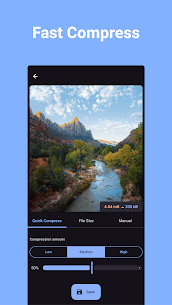


Description
You can quickly compress and resize your photos using this intuitive and easy-to-use image compressor. Just choose the image you want to optimize, set your preferred compression level, and let the app handle the rest.

The app reduces image file size while preserving visual quality. You can free up storage space on your device or prepare images for online sharing without noticeable quality loss. Try it today and experience the improvement firsthand.
Real-Time Preview Before You Save
The app provides a live preview of your compressed image before you finalize it. You can instantly see how the image will look and check the estimated file size on your device. This feature allows you to make informed adjustments and ensures the final result meets your expectations.
Three Flexible Compression Modes
Quick Compress Mode
Quick Compress offers the fastest and simplest way to reduce photo size. Select your desired compression level and tap “Compress.” The app automatically optimizes the image to minimize storage usage while maintaining a high-quality appearance close to the original.
Compress to a Specific File Size
This mode allows you to define the exact file size in kilobytes (KB). Enter your target size, press “Compress,” and the app will adjust the image accordingly. Use this option when you need precise file size control, such as for uploads with strict size limits.
Manual Mode for Full Control
Manual mode gives you complete authority over the compression process. You can set custom width and height dimensions and choose the compression level yourself. This option is ideal when you need specific resolution settings or detailed control over output quality and size.
Batch Processing Support
All three compression modes support batch processing. You can compress or resize multiple photos at the same time, which saves time and increases productivity when handling large image collections.
Key Features
The app is completely free to use. It supports batch compression and batch resizing for multiple images simultaneously. You can compress photos to a specific file size or adjust them to custom width and height dimensions. The app helps you save valuable storage space on smartphones and tablets. It also converts images between formats, including JPEG, JPG, PNG, and WEBP.
Supported Image Formats
The app works seamlessly with popular image formats such as JPEG, JPG, PNG, and WEBP, ensuring compatibility with most photos and graphics you use every day.
Related apps




Latest Apps
-
 Bridge by NeuralPlay14.20 NeuralPlay LLC 17.16 MB Premium Unlocked
 -
 Bundle Breaking News6.8.20 Bundle News 36.11 MB Premium Unlocked
 -
 Cricket Guru32.2 Cricketguru.com 57.23 MB Premium Unlocked
 -
 DaRemote5.16.0 iDeskangel 25.87 MB Premium Unlocked
 -
 Detox: Procrastination Blocker1.18.0 BlueTree Lab 30.91 MB Premium Unlocked
-