
Wave to Lock/Unlock Screen

Images


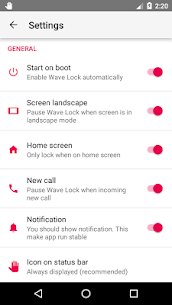
mod info
- Premium features unlocked
Description
A smart proximity-based app that lets you lock and unlock your phone screen with simple hand gestures, improving convenience and reducing button wear.

Wave to Lock and Unlock Screen App Overview
This application offers a hands-free way to control your smartphone’s screen using simple gestures. It leverages the device’s proximity sensor to detect motion and automatically lock or wake your screen without pressing physical buttons.
Key Features and Capabilities
The app allows you to unlock your device by simply waving your hand over the proximity sensor. This gesture-based control provides a quick and effortless way to access your phone, especially when your hands are not clean or you want to avoid pressing buttons. In addition, you can lock the screen by covering the sensor, making the process equally seamless and intuitive.
When your phone is locked, a simple wave over the sensor will wake the screen, allowing you to check notifications or time instantly. On the other hand, if your screen is already on, you can cover the proximity sensor to lock the device. This specific feature is optional and must be activated manually in the settings, giving users full control over how they want the app to behave.
To prevent accidental locking, the app includes a vibration alert that notifies you when the proximity sensor detects an object. This feedback ensures you stay aware of sensor activity and avoid unintended actions. Furthermore, the app supports an exclusion list, allowing you to select certain apps that will not trigger the lock function when they are active in the foreground. This is particularly useful when watching videos, playing games, or using navigation apps.
How to Use the App Effectively
Getting started with the app is straightforward. First, you need to enable the service by toggling the ON/OFF switch within the app interface. Once activated, the app begins monitoring the proximity sensor and prepares to respond to your gestures immediately.
After enabling the service, you can unlock your phone by simply waving your hand over the sensor. The app will instantly wake the screen, allowing quick access without touching the device. To lock the screen, you can cover the proximity sensor for about one second. However, since this feature is disabled by default, you need to activate it manually from the settings menu.
To fully enable the locking function, you must grant the app device administrator permissions. You can do this by selecting the lock screen option within the app, which will prompt you to authorize the required access. Once granted, the app gains the ability to control screen locking securely.
After completing the setup, daily usage becomes effortless. Whenever you want to turn off the screen, just cover the proximity sensor for at least one second. The app will instantly respond, offering a smooth and efficient alternative to traditional power button usage.
Related apps


Latest Apps
-
 IPTV DRM Stream Player2.9.6 IndoVerseID 31.83 MB Premium Unlocked
 -
 Facebook582.0.0.50.54 Meta Platforms Inc. 227.91 MB Many Features
 -
 Shadowrocket10.10.58 Cross Ltd. 39.85 MB Premium Unlocked
 -
 PodsBatteryG1.30.2 JiShufeng 16.28 MB Pro Unlocked
 -
 Injustice 26.8.0 Warner Bros. International Enterprises 830.28 MB Mod Menu
-